


|
PalmV Bridge by MidWest PCB Designs, Inc. Contact Info: peterson@ midwestpcbdesigns.com damiani@ midwestpcbdesigns.com URL: www.midwestpcbdesigns.com PalmInfoCenter.com Bottom Line: The Price: $14.99 US The Pros: Cheap and quick solution The Cons: Not quite steady on a keyboard Fit is too tight on my sample PalmInfoCenter.com Ratings*:
*Maximum Rating is FIVE (5) InfoPalms |
PalmV Bridge Review By Robert Zach 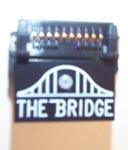 Palm has Plans for new products every 6 months according to
their S-1 filing. So looks like I have six months to save my pennies! But,
replacing all those peripherals, that's a different story. Well for $15 I can now use my
Palm III accessories with my PalmVx.
Palm has Plans for new products every 6 months according to
their S-1 filing. So looks like I have six months to save my pennies! But,
replacing all those peripherals, that's a different story. Well for $15 I can now use my
Palm III accessories with my PalmVx.
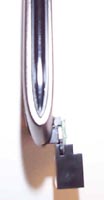
MidWest PCB designs has conceived a very simplistic approach to doing this. Use this little brick of plastic.
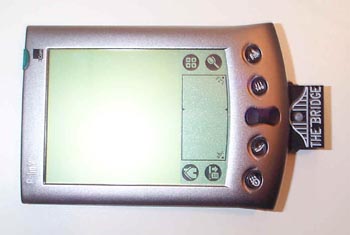
When attached to the bottom of my PalmVx the whole set-up appears non-intrusive.
The Bridge functions quiet well during HotSync operations and I was able to verify the functionality of a number of third part hardware devices. The product simply works! Just as described. What I found a little disconcerting is what happens to the sleek profile of the PalmVx once the Palm V Bridge is attached.
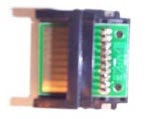
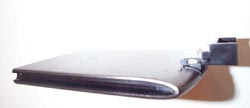
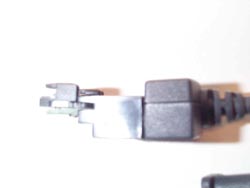
Due to the Palm Inc.'s design of the port , and the straight line PCB style construction by MidWest, the device actually protrudes significantly from the unit. This makes keeping the Bridge attached during transportation clumsy. Also, the flat PCB designed contacts could short if left attached to the device in your pocket. As the MidWest web site says, the fit with third party add-ons is tight. Very Tight! In struggling to remove the device I actually stuck myself on the solder pins sticking through the PCB. Also, due entirely to Palm's design of the PalmVs serial port, although Palm III devices fit snug onto the Brige, sticking that mass onto the Palm V doesn't make a snug fit. So with devices like keyboards (with the Palm now having a higher center of balance) the PalmV/Bridge combo tends to wiggle a little making the unit a little unstable on say the GoType Keyboard. Well all of this must be already known because MidWest PCB Designs let me know that they have a clip-on type system under development. These types of devices appear more stable as a "portable" solution. And, they tend to put more of the "attaching mechanism" in contact with the add-on peripheral. I also hope the clip-on relieves the tightness a little, snug should be good enough for attaching devices. So where do I think the BEST use of the Palm V Bridge is then? If not attached to the Palm V, the best place the Bridge can be for me is to have one permanently attached to my home Palm III HotSync, and a second one attached to my HotSync travel cable.
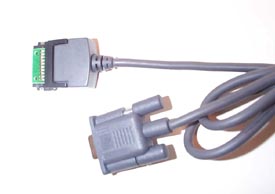
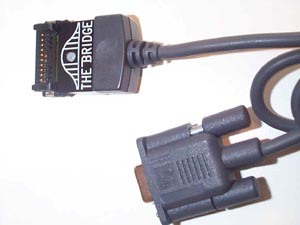
This is where the diminutive size and simplicity of a non-clip-on device excels. I plan on keeping the bridge permanently attached to the HotSync cable and stashed safely away in my travel bag for quick on-the-road syncs and occasional OS upgrades! Absolutely perfect!
I gave the Palm V bridge it's rating based on the usefulness of the product and clever idea. The coolness factor rating is based on the fact that the bridge is an elegantly simple "little chunk of plastic". It really conjures up the notion "why didn't I think of that?" I can't wait to see how tricky they can get in designing a clip-on. ;-) |


 Permalink
 Print
PrintArticle Comments
(5 comments)
The following comments are owned by whoever posted them. PalmInfocenter is not responsible for them in any way.
Please Login or register here to add your comments.
 Comments Closed
This article is no longer accepting new comments.

"Clip On" attachment
If you remove both the stylus and the Cover from the Palm V, you have a deep channel running the length of each side of the PV. It is possible to wrap an elastic band around the bottom of the little "tabs" on either side of the PV side of the Bridge, and then hook the elastic through the channels on the side of the PV, around the tope of the PV. This holds the bridge to the bottom of the PV quite securely.
He's right
Palm V Bridge and Palm Modem
Nekrataal
nekrataal666@yahoo.com


Latest Comments
- I got one -Tuckermaclain
- RE: Don't we have this already? -Tuckermaclain
- RE: Palm brand will return in 2018, with devices built by TCL -richf
- RE: Palm brand will return in 2018, with devices built by TCL -dmitrygr
- Palm phone on HDblog -palmato
- Palm PVG100 -hgoldner
- RE: Like Deja Vu -PacManFoo
- Like Deja Vu -T_W


Palm V Bridge to Palm IIIc?
Why can't Palm standardize on one set of connectors. The stuff above lists for over $500 in addition to an investment in Palm. I'd hate to throw all this away. And I don't like the idea of a tacky bridge, but will consider it if it preserves the utility of these add-ons. Resale of these peripherals will suck as they always do.
Thanks for listening.
Ina