


CallRec vs. mVoice Shootout
by: Kris KeilhackSept 12, 2006
Pricing and Availability
CallRec by Qmobilsoft is currently up to version 3.1 and is available for $19.99.
MVoice from Motion Apps is up to v5.0 and is available for $24.95.
Both programs are for Palm OS Treo's and currently only support the Treo 650 and 700p.
Testing Methodology
I spent an exclusive week with each application. In addition to spontaneously recording calls (with permission) with family and friends, I also performed side-by-side testing between both applications using the first message stored in my voice mailbox, a two-minute message from a landline phone. Since CallRec 3.1 was released during the testing period, I updated my Treo and spent an additional day with 3.1 to observe its improvements.
I used a stock Verizon Treo 700p with both a standard blue Sandisk 2gb SD card and a 2gb Sandisk Ultra II high-speed SD card.
All recordings were made at 22khz (highest quality offered).
Installation and Feature set
CallRec 3.0 was already present on my Treo upon commencement of this test. I downloaded the new version from the PIC software store with Blazer and installed it directly to RAM. My old registration info was retained with no problems whatsoever.
mVoice installed itself from a Palm OS launcher PRC-based setup routine. Much to my annoyance, the installer created a new folder on my Treo called “Motion Apps” with mVoice contained within. I quickly zapped the Motion Apps category and moved mVoice into “Main”.
CallRec 3.1 offers a few nifty features such as automatic recording of incoming and outgoing calls and a downloadable desktop sync conduit. Wireless beaming/sending/e-mailing of recordings is also possible but this is of dubious value since the WAV files can be many megabytes in size.
Probably the best “non voice” feature of mVoice is its ability to mount the Treo to a PC as a removable SD drive. The availability of compression during recording can be a huge boon to those of us with only a few megabytes remaining on an SD card. mVoice can also add a beep during recording and the user can choose whether or not to record both sides of a conversation.
In short, CallRec has a less intrusive installation routine but mVoice offers many more options.
Advantage: mVoice
Sound Quality and Performance
Never before have I encountered such a Pyrrhic victory when determing the winner of two software applications. Under the best of circumstances, Palm’s Treo 700p is a laggy, unresponsive beast. When tasked with something like recording a high-bitrate WAV file to an SD card while on a phone call, the 700p is absolutely brought to its knees.
Time after time, I called my voice mail number and listened to the same message, recording it with each app. In the course of the two-minute voice mail, each app failed to record the entire message properly. CallRec’s error choice is to skip chunks of a conversation, several seconds at a time, but resume recording properly immediately afterwards. Example: “1,2,3,4,7, 8, 9…”
While Callrec’s issues were quite aggravation, nothing prepared me for mVoice. Upon playback, every few words would repeat themselves or simply become a garbled mess. Normally staid coworkers suddenly began sounding like Max Headroom and my wife sounded like she was barking at me! Example: "1, 2, 3,3,3,4444, 6, 7,7,8,8…"
While background recording the standard test VM message with mVoice, my call timer simply stopped at 29 seconds and did not resume until 53 seconds! Trying to exit to the launcher to launch mVoice and regain control of my Treo brought only the dreaded white screen and an unflinching red LED.
Dropping down to 11khz compressed helped matters somewhat but longer recordings always managed to present problems. I do not know if this is an OS issue, a matter of CPU utilization or slow SD bus speeds but this would be unacceptable performance from a freeware app. When coming from a piece of $20+ commercial software, it’s simply unacceptable in every way. If, as I suspect, this is related to the Treo 700P’s known database lag issue, then the developer community should hold Palm’s feet to the fire to immediately release a ROM update.
When playing the stored WAV files from my SD card on my desktop PC though high-quality speakers, mVoice definitely had cleaner sounding recordings, even with comparable sampling rates. Do note that the compression algorithm used by mVoice is not compatible with Windows Media 9. I used Quicktime 7.1 to play the compressed WAVs with no problems.
Advantage: CallRec (but both apps need some performance help)
Ease of Use
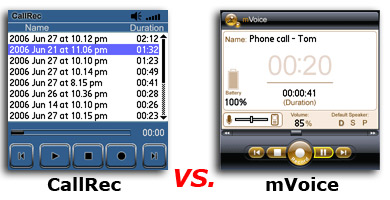
CallRec’s very straightforward UI is a huge help to its ease of use. The recent 3.1 update introduces larger “finger-sized” onscreen buttons. Mvoice has familiar VCR-style controls but I found them a bit more fiddly than the equally sized Callrec icons, especially when trying to jab them with a thick index finger while on a voice call and battling with a laggy Treo.
To mVoice’s advantage, excellent “Tips” and FAQ sections are present within the application. mVoice also allows Treo users to wirelessly connect to the server and check for program updates. These are small touches but they help it feel like a comprehensive self-contained application instead of a barebones call recorder.
Advantage: CallRec (barely)
Conclusion
Neither solution is perfect, but thanks to its recent 3.1 update, CallRec wins this comparison by a slim margin. The 3.1 update offers just enough bells and whistles to keep CallRec competitive and the improved UI is a very welcome improvement.
mVoice is certainly the more attractive and feature-laden of the two but too many issues with garbled sound hamstring the product. After taking into account the constant sound skipping the program is essentially useless at the higher recording bit rates. My Casio EX-Z850 digital camera records 640 x 480 30fps MPEG-4 videos with sound to the same “slow” Sandisk card so the media or the SD card spec is not culpable.
The main focus of both apps is recording both sides of a telephone call. To that end, CallRec 3.1 simply offers better in-call recording performance while remaining a simpler, more straightforward application to use while in the midst of a telephone call.
CallRec v3.1:  3 / 5
3 / 5
mVoice v5.0:  2.5 / 5
 Permalink
 Print
PrintArticle Comments
(14 comments)
The following comments are owned by whoever posted them. PalmInfocenter is not responsible for them in any way.
Please Login or register here to add your comments.


RE: Good stuff Kris

With the extra memory available on the 700P it's almost be nice if you could just record straight into available RAM and THEN, upon conclusion of the recording session, dump the file onto SD.
Pilot 1000-->Pilot 5000-->PalmPilot Pro-->IIIe-->Vx-->m505-->T|T-->T|T2-->T|C-->T|T3-->T|T5-->TX-->Treo 700P
RE: Good stuff Kris
Tim
I apologise for any and all emoticons that appear in my posts. You may shoot them on sight.
Treo 270 ---> Treo 650

Why can't Palm have a built-in MP3 recorder?
My 2 year old iRiver iFP-799 (best MP3 player ever made) can record incredibly clear conversations direct to MP3 format (Secret: files merely have to be re-labelled with the MP3 extension), so why can't we get a Treo that has the same capability? I would pay $25 for an app that records in MP3 format, but I refuse to pay for a betaware WAV format recorder. It's funny to see these guys asking almost as much for these two crappy apps as Pimlico does for the brilliant DateBk6 ($27.95)
TVoR
RE: Why can't Palm have a built-in MP3 recorder?
A company spokesman says that it uses to much battery life. :-o
Pat Horne
RE: Why can't Palm have a built-in MP3 recorder?
I suppose the same could be said of the PIM apps. I'm constantly using them, consuming lots and lots of battery.
I would like to see a comparison with Audacity.
Why not support the Treo 600?
most recent Treo apps are 650-only. Why cant developers go on supporting the Treo 600 or even just offer older versions for purchase...hmm!
But well, I may just get the m70 instead of the Treo Lowrider anyways
Best regards
Tam Hanna
Find out more about the Palm OS in my blog:
http://tamspalm.tamoggemon.com
Card speed difference?
I originally had the 2GB Sandisk at 60X speed and that was a nightmare and had crashes, the "stuttering" and when I bought a 2GB 150x PQI SD card that improved things immediately and also have it set at 64KB/sec as it works perfectly with Dragon Naturally Speaking Legal Addition. I have tried the MVoice 5 and actually thought it was not as good as 4 since the higher recording quality could go up to 84KB/sec and the MVoice seemed not to have it.
What about Audacity or other third party programs - really interested in getting the best for recording. Also has anyone tried a 4gb SD on the Treo 700p?
RE: Card speed difference?
E-T
e-tellurian
Completing the e-com circle with a people driven we-com solution
WiFi & BT? No strings attached
we_tellurian@canada.com
RE: Card speed difference?
FYI I do not believe 4GB cards will work on the Treo withgout a software update from Palm, as that is actually a different format from SD- it's "Secure Digital High Capacity " or "SDHD," and didn't exist when the original SD spec was created.
RE: Card speed difference?
Newbie 700p Expansion Card question


Latest Comments
- I got one -Tuckermaclain
- RE: Don't we have this already? -Tuckermaclain
- RE: Palm brand will return in 2018, with devices built by TCL -richf
- RE: Palm brand will return in 2018, with devices built by TCL -dmitrygr
- Palm phone on HDblog -palmato
- Palm PVG100 -hgoldner
- RE: Like Deja Vu -PacManFoo
- Like Deja Vu -T_W


Good stuff Kris
Thanks for taking the time to write.
Pat Horne