


Comments on: CallRec Version 5.0 Released
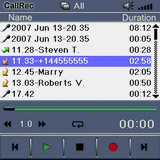 Qmobilesoft has released CallRec version 5.0. CallRec is a useful utility that can record your phone calls on your Palm OS Treo. It is able to record both sides of the conversation at the touch of a button or all call automatically. Recorded phone calls are saved as wav files on your memory card. The program can also be used to record voice memos.
The latest version features an improved interface, enhanced file compression, Treo 755p support, categories, background playback and auto repeat and a number of other updates. CallRec also comes with a desktop conduit to easily transfer files to a PC.
CallRec 5.0 is compatible with the Treo 755p/700p/680/650 smartphones. It sells for $19.99 USD and comes with a free trial period. This update is free for users of v4. You can find out review of CallRec here.


Article Comments
(18 comments)
The following comments are owned by whoever posted them. PalmInfocenter is not responsible for them in any way.
Please Login or register here to add your comments.


RE: I like!

Great and useful product.
Pat Horne

Superb!
While eating lunch, I downloaded the new version (trial) onto my 700p. I launched the installer and it overwrote my existing registered version of 4.0 and cleaned up after itself without a hitch. Wow! I'm impressed with the initial results.
I REALLY would like to have access to a patched 700p or a 755p to test this with. Hiccupping/stuttering/worse-than-usual lag was my main beef with all previous veersions of CallRec and mVoice.
P.S. Pat, go ahead and upgrade! It's a nice improvement!
Pilot 1000-->Pilot 5000-->PalmPilot Pro-->IIIe-->Vx-->m505-->T|T-->T|T2-->T|C-->T|T3-->T|T5-->TX-->Treo 700P
RE: Superb!
the real question is - why are you recording your phone calls???
I don't know what you do for a living, Gekko, but when I have phone meetings with clients where we're hammering out important stuff and making sure we understand where everyone is coming from we're frequently all recording the call. Also a great thing for phone interviews. The ground rules are: make sure you're up-front about what you're doing, why you're doing it, know that everyone is cool with it, and for God's sake don't tell the legal department.
David Beers
Pikesoft Mobile Computing
www.pikesoft.com/blog
RE: Superb!
Also, I've recorded some hysterical drunken voicemails and other entertaining events (a sobbing spouse, raging colleagues, a foul-mouthed friend who lives out of state that everyone else would otherwise not get to hear in action, confrontational wrong number callers at 3am) etc.
I use it as more of a novelty than anything else.
And as Beersie said, it's great for conducting phone interviews or whatnot provided you clarify everything up front & in full.
Regardless of one's usage patterns, it's nice to see an app like this available and frequently updated. It's sorta like radar detectors...anyday I expect The Man to put the smack down on this sort of ambiguous stuff.
Pilot 1000-->Pilot 5000-->PalmPilot Pro-->IIIe-->Vx-->m505-->T|T-->T|T2-->T|C-->T|T3-->T|T5-->TX-->Treo 700P
RE: Superb!
HKK. I've never had a stutter issue with 3.1, probably because of the overwhelming efficient of NVFS, Palm OS SD drivers, and excessive Treo processing power. Hehe! Nonetheless, I'll probably take your advice. The background playback is worth the price of admission. Great for recoding notes or numbers to PIM while listening to the convo.
Pat Horne
RE: Superb!
My wife finally gave the go ahead yesterday, so I was able to cancel and unload that massive virus-trojan-spyware- resource hog off my home PC. Felt like getting outta prison. :-D
Pat Horne
RE: Superb?? Not ready for prime time yet...
Very consistently with many of the comments over on another Treo-centric site, I had problems from the get-go with v5, and ended up uninstalling it within 15 minutes. Upon attempting to make calls, my Treo 650 was reseting spontaneously (ostensibly upon triggering the background automatic call recording action I had set to be invoked). I expect they will take care of this quickly, since I very much doubt there were only a small number of folks affected by the unseemly anomaly. In my case, I'm also running Butler, but the problem continued after deactivating that app as well...
CallRec seems to be well done-- controls are large enough to use on a treo-- a nice feature. The automatic recording is nice.
One Comment- The Preferences are too spread out among multiple menu list items and should be consolidated so you can move through them easily to set from a single menu item. Multiple screens are fine (tab them if needed) but having to back out and then reenter another menu item over and over is wasted, when there are only two settings in a screen.
__
Mike Compeau
RE: Superb!
I record all my calls as a real estate agent. Many people out there try to hang an agent out to try and avoid paying their commision. I use my recordings as proof just in case. It keeps everyone honest.
RE: Superb!
Just about the perfect recording app!
(Now, if I can just get them to use two-digit numbers instead of names for the months in recording filenames so the recordings sort correctly.... :O )
Anyone else having crashes?
Arthur
Palm Pilot 1000 > Palm Pilot Professional > Palm III > Palm M100 > Sony Clié PEG-T415 > Palm T|T3 > Samsung SCH-i730 > Palm 700p
RE: Anyone else having crashes?
RE: Anyone else having crashes?
consistently when initiating a call using the shortcuts on the phone
page; I have reverted back to version 4 and things seem stable again.
I have not sent anything to qmobilsoft about this but hope they are
aware.
RE: Anyone else having crashes?
Until then, I'm sticking with version 4.
RE: Crashes appear fixes in new version sent to me...
The voicememo at quick button access is also well done-- and LED confirmation makes it reassuring that it's working.
Nice.
__
Mike Compeau


Latest Comments
- I got one -Tuckermaclain
- RE: Don't we have this already? -Tuckermaclain
- RE: Palm brand will return in 2018, with devices built by TCL -richf
- RE: Palm brand will return in 2018, with devices built by TCL -dmitrygr
- Palm phone on HDblog -palmato
- Palm PVG100 -hgoldner
- RE: Like Deja Vu -PacManFoo
- Like Deja Vu -T_W


I like!
http://foleocentral.blogspot.com
FoleoCentral is the news, opinions & review blog about the Palm Foleo Mobile Companion