


|
Contact Info: Cutting Edge Software CESinc.com Palm Infocenter.com Bottom Line: The Price:
The Cons:
Palm Infocenter.com Ratings*:
*Maximum Rating is FIVE (5) InfoPalms |
Quickword 5.0 Ed Hardy (ed@palminfocenter.com) Quickword is based on SmartDoc, a Palm DOC reader that Cutting Edge has been selling for a long time. In fact, Quickword essentially is SmartDoc with a conduit added to sync with Microsoft Word documents. Unfortunately, Quickword has the same limitations as all other DOC readers when it come to formatting; there is no way to make words bold, italics, underlined, or anything else. Cutting Edge is working on this but they are running into one simple problem: the DOC format itself has no way to do text formatting. In order to add this, future versions of Quickword will have to come up with a new document format, though I am sure they will continue to be backwards compatible. They'd be fools to cut their users off from the thousands and thousands of books already available in Palm DOC format.
This is where Quickword's big limitation becomes blindingly clear. If you have formatting in the Word document and sync it with your Palm, that formatting will be removed. When you for set a document to be synchronized, Quickword asks if you want to create a copy just for its use. If the document has formatting you don't want to lose, you need to hit "yes". Quickword only synchronizes the actual text of the document and up to 25 bookmarks. Objects, pictures, tables, database links, inter-document links, and ActiveX links are not transferred. But there is a light at the end of the tunnel. As I said, the developers are already hard at work on the next version and they are promising "basic" formatting capabilities. They also promised that the next version will be a free upgrade to all registered users of the current one. There is no Macintosh version of the conduit.
The main window you see when you start the app is a listing of all the DOCs on your Palm. To the right is the size of the file and to the left is a small icon called an "Action Icon". Clicking on this will let you perform quite a few actions on the file without having to open it, like beam it, or compress it, or even print it if you have PalmPrint. It also shows which file was the last one to be opened. Like just about all Palm apps that deal with multiple files, Quickword lets you organize your files into categories. In the upper right corner is a drop-down box showing what category of DOC files is being listed. To open a file, you can either tap on its name or tap the New button at the bottom of the page.
In the middle of the screen is the contents of the file. This is where you read or add text. Along the bottom of this screen you will see four buttons. The Done button saves and closes the file. The Details button opens a pop-up screen where you can name the file, see how many characters and words it has, mark it as private, mark whether to backup the file when HotSyncing, mark whether to include this file when doing Global Finds, and delete it. The third button is for doing find and replace. The final button has a small arrow on it that will auto scroll through the document for hands-free reading. In the lower right corner is a small triangle that, when tapped on, lets you add and edit bookmarks that let you save your place in a long document.
The Palm app is well designed and easy to use. I've used some DOC editors that put about a dozen small icons on the text viewing screen that really clutter up the interface. I'm sure there are some people who love this but I'm not one of them. Give me a simple interface every time. Quickword is a decent DOC editor and probably worth the $20 it costs, if just for the conduit. As a comparison, PalmDocs is a piece of shareware that converts Word documents to Palm DOC format and puts them on your Palm, but it also costs $20 and doesn't come with an editor. But I'm really looking forward to the next version of Quickword and its text formatting capabilities. I haven't a clue whether Cutting Edge will raise the price for the next version, but if you go ahead and buy Quickword now, you'll be guaranteed to get that next version for a mere $20. |

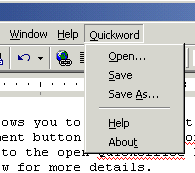 The Conduit
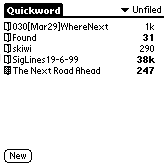 The Palm App
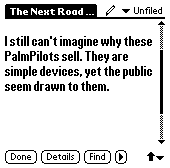 Once you have a file open, you will see a small pencil next to the document name at the top of the screen.
Tap to toggle whether the document is editable. If the pencil has a line through it, the document currently is non-editable. You may want to keep the document non-editable if it is just for reading.
Once you have a file open, you will see a small pencil next to the document name at the top of the screen.
Tap to toggle whether the document is editable. If the pencil has a line through it, the document currently is non-editable. You may want to keep the document non-editable if it is just for reading.
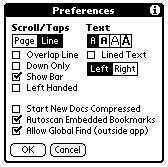 You can also set preferences for the entire application. When a file is marked non-editable, tapping on the top or bottom of the screen will move you forward or backward in the file. The Preferences screen lets you control exactly how this works. You can change whether a tap moves you only one line or a whole page and much more. You can also set how big to make the font for all your documents here. You can't set this for each document; all of them have to be the same. You can set all your text to left or right aligned and whether to under line your text like Memo Pad does. At the bottom of this page you can see where you set whether new documents that you create are compressed, whether to scan for bookmarks whenever you open a document, and whether to allow Global Finds to all your documents.
 Permalink
 Print
PrintArticle Comments
(18 comments)
The following comments are owned by whoever posted them. PalmInfocenter is not responsible for them in any way.
Please Login or register here to add your comments.
 Comments Closed
This article is no longer accepting new comments.

RE: AvantGo Formatting
------
Ryan
PalmInfocenter webmaster
webmaster@palminfocenter.com
Quickword
After trying out several handheld editing programs, I recommend Smartdoc, now Quickword, to all of my friends as a straight forward, sleek editing program.
MiniCalc vs. Quicksheet
RE: MiniCalc vs. Quicksheet
RE: MiniCalc vs. Quicksheet
Megadoc vs. Quickword
MegaDoc may be a little bulky compared to QuickWord, but its features seam to blow it away! Oh yeah, one more thing that MegaDoc has over QuickWord and many other word processors - you can have TWO DOCS OPEN AT THE SANE TIME!!! How cool is that?!
RE: Megadoc vs. Quickword
I have also tried Documents to Go and I was really impressed. Esp. with it's ability to maintain formating features like bold and Underline. It however, is really pricy!
I am about to purchase Quickword, but I have heard good things about Megadoc. I have however, had no luck in finding it online. Where might I get more info. on this app. Thanks
RE: Megadoc vs. Quickword
Good idea.
Capability to print docs with the PALM using Quickword????
Has anybody tried to print docs with Quickword?
Does it work? Is there any software out there that does?
I would like to print factsheets/bulletins on demand when mobile.
Thanks
RE: Capability to print docs with the PALM using Quickword????
Ah well. Maybe PrintBoy does a better job, but I didn't have much luck getting it to work, way back when I tried it.
RE: Capability to print docs with the PALM using Quickword??
---
Plenipotentiary
Palm Infocenter
RE: Capability to print docs with the PALM using Quickword????
Mike Compeau
Cutting Edge Software, Inc.
QuickWord vs SmartDoc
1) In SmartDoc you could leave the program and return and the last document would appear with the cursor right where you left it. With QuickWord once you re-open the file it does have the cursor where you left off reading but the program comes up in List mode only with your last read file closed.
2) But worst of all is that the font size icons used to appear at the bottom of the opoen document page but have now disappeared in QuickWord. It now takes two commands to reach the change font size commands (and with no shortcut key available either). I believe that there is room for them to return and if enough people request it they may reconsider.
That's it.
Steve
RE: Quickword vs SmartDoc
As for your comment on "burying" the font choice for viewing. We hear you. We have a few "features" we're working on that may become clearer in time....
Mike Compeau
Cutting Edge Software
Not short cut key support
copy/paste short cuts from a keyboard (even notepad supports these with my Targus). Over
all it meets most of my needs and I really look forward to further development, but short cut key
support for copy/paste off of a keyboard is a MUST. It's great not to have to lug the laptop
around and wait 5 mins for it to start up, instead I just whip out the keyboard and start typing
on the Visor and let the document sync up later.
Quickword to PocketMail
my laptop, hotsync it directly to my PocketMail app on my Palm IIIe and /or IIIxe.
I can presently hotsync from my laptop to my MemoPad on my Palm IIIe then cut and paste
to Pocketmail app for transmission. The problem with this is that the clipboard on the IIIe is too
small and requires several cut and pastes to do the job. I am presently in the process of
replacing the IIIe with an IIIxe and may be able to do better if the IIIxe has a larger clipboard,
but I would like to be able to go directly to PocketMail from my laptop. Will Quickword allow this?
Help?


Latest Comments
- I got one -Tuckermaclain
- RE: Don't we have this already? -Tuckermaclain
- RE: Palm brand will return in 2018, with devices built by TCL -richf
- RE: Palm brand will return in 2018, with devices built by TCL -dmitrygr
- Palm phone on HDblog -palmato
- Palm PVG100 -hgoldner
- RE: Like Deja Vu -PacManFoo
- Like Deja Vu -T_W


AvantGo Formatting