


|
Contact Info: Vianix LC PalmInfoCenter.com Bottom Line: The Price:
The Cons:
PalmInfoCenter.com Ratings*:
*Maximum Rating is FIVE (5) InfoPalms |
Vianix SASO Review By Rob Zach 10/16/2001
I will reserve most of the technical details as an exercise for the reader, there is just too much here to cover - but I'll tell you what you need to know to make a buying decision.. Vianix has a very informative website that can provide all the details, I will concentrate on the Palm integration aspects of this product. Basically this device is a digital voice recorder that happens to also play MP3 audio and integrate with a Palm. This integration is accomplished through the use of a serial port. On the bottom of the SASO is a wide slot for a serial cable. The serial cable has rows of very exposed pins on one end that plug into the slot on the SASO, and a 9-pin serial plug on the other end . I think a much better design could have been conceived; one that doesn't leave the cable's pins so exposed - they can be easily bent or crushed. By the way, there is also an optional USB cable as well (it's announced but not yet available) and I think that this cable should have been standard. The serial cable can be used to load and download MP3s and MCF recordings to the device through an included Windows desktop "sync" application . Also included is a Windows application to play (Vplayer) the .MCF files (no Mac software that I know of). Below are two of the "options" windows for this sync application; the application, once run, lives in the Windows system tray. Basically the sync app allows audio (or other files) to be moved on/off the SASO either manually or initiated at the time of a Palm HotSync. Fortunately, the serial cable can also be used to update the firmware of the SASO, which I did update to the latest revision. I say fortunately, because below is a list of the bugs I encountered using the product.
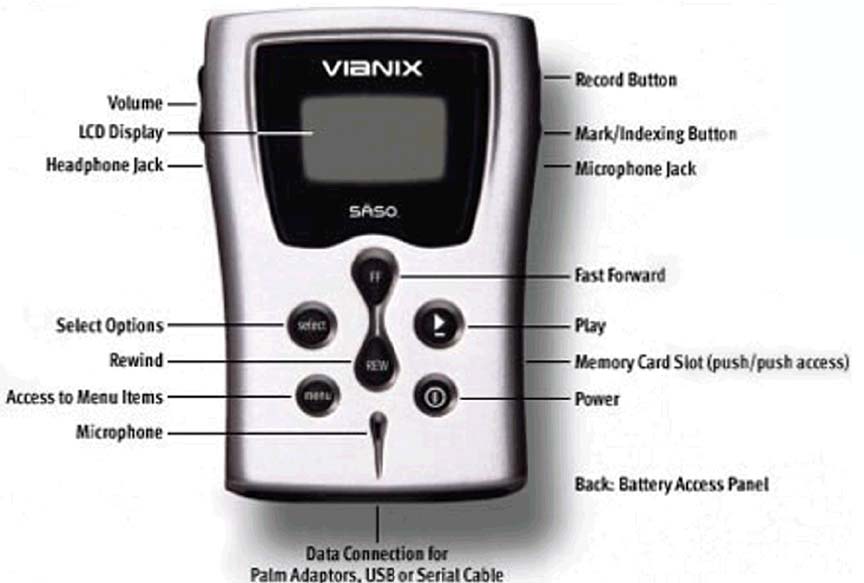
The recorder itself has some basic control functions and and a
backlit LCD display. The recorder also includes some very nice additions that are above and beyond the basic digital voice recorder fare. The unit has both mic and headphone accessory jacks. The unit even includes a slot for SD/MMC card expansion; now a Palm device standard. The unit it very light and compact; it's only as wide as the two AAA batteries it runs on. As a voice recorder this device excels. The MASC technology produces some exceptional quality recordings, but I did find that the playback was soft/muted. The compression routines make for small sized recordings of good quality. However, as an MP3 device the unit is not adequate. The device simply does not have the power for high-fidelity playback. I found that pushing up the volume often resulted in the device shutting down. Apparently the firmware is programmed to shutdown when the circuitry is pushed or over amplified. For all but a few MP3 recordings this resulted in the device shutting down on playback; it was then difficult to get the unit to come back on and stay on long enough for me to turn the volume down. Even fiddling with the equalizer and bass boost I couldn't get reliable MP3 playback. I said we'd concentrate on the Palm integration and haven't typed a word yet; so here it goes. The SASO has many optional accessories from cases to faceplates (yes you can change the color of this little baby) to cables and these Palm adapters. The adapters allow you to hook the Palm serial port to the SASO serial port allowing the Palm software to control all the SASO functions. There is an adapter for the PalmVx, the Palm III series, and the Handspring Visor.
Once connected to the Palm device the SASO is controlled through a single application (the SASO Windows applications and the Palm application are installed through a single Windows .EXE install file). Here is the main application S_screen and the about screen:
The control are very simple; files can be selected from the internal memory or the SD card memory for playback. File information can also be viewed.
Audio playback control preferences can be set as seen here as well as equalizer settings - including bass boost - for audio playback quality.
Some more advanced features allow for the marking of an "index" point for advanced editing and playback feature. Audio can even be selected for playback at a certain time/date whether the SASO is attached to the Palm or not - nice way to set a traveling alarm clock!
Conclusion: I think it's terrific that more and more companies are looking to integrate into the Palm platform, and I think that Vianix has done a fine job at that with a few minor exceptions. However, it seems that the SASO doesn't really excel in any one area as it is. As a $399 voice recorder with expansion and MP3; the top of the line Olympus is $100 cheaper. As a MP3 player there are better playback quality devices, with more memory, for less money. That said, there isn't a smaller voice recorder out there that better integrates with the Palm platform; if that's what you want. If it's the MP3/Palm integration you want there are better options - look for my upcoming review. I'll part with some specs from the Vianix website: Features
|


 Horizontal scroll doesn't work in OS under 3.5 (this I think is a Palm
OS problem - but I have seen other vendors come up with workarounds)
Horizontal scroll doesn't work in OS under 3.5 (this I think is a Palm
OS problem - but I have seen other vendors come up with workarounds)
 It can be fully operated independent of the Palm. The on
board menu system in the SASO itself is very well organized and feature rich.
The controls and menu system allow access to all the features of the device and
they are laid out in a hierarchical menu format (much like a cell phone menu
system).
It can be fully operated independent of the Palm. The on
board menu system in the SASO itself is very well organized and feature rich.
The controls and menu system allow access to all the features of the device and
they are laid out in a hierarchical menu format (much like a cell phone menu
system).


 Permalink
 Print
PrintArticle Comments
(8 comments)
The following comments are owned by whoever posted them. PalmInfocenter is not responsible for them in any way.
Please Login or register here to add your comments.
 Comments Closed
This article is no longer accepting new comments.

RE: Why?
smaller mp3 player
RE: smaller mp3 player
RE: smaller mp3 player
RE: smaller mp3 player
Missing the point ...
This device is not going head to head with the likes of the MiniJam, or a Rio, or a Sony ... it is up against devices like the Olympus DS-320, DS-3000, or DW-90 (or equivalent models from Sony, Philips, Hitachi, etc). These recorders get used in boardrooms across the world on a daily basis - and that is the market and pricetag this device is targetted, not the college student with the Visor Deluxe that wants to play back the latest bootleg.
can find a better one
Check out:
http://www.the-gadgeteer.com/pyropro-review.html


Latest Comments
- I got one -Tuckermaclain
- RE: Don't we have this already? -Tuckermaclain
- RE: Palm brand will return in 2018, with devices built by TCL -richf
- RE: Palm brand will return in 2018, with devices built by TCL -dmitrygr
- Palm phone on HDblog -palmato
- Palm PVG100 -hgoldner
- RE: Like Deja Vu -PacManFoo
- Like Deja Vu -T_W


Why?
Ok, now down to it. Why are all of these companies releasing products for the Vx. While I have three Vxs, I have moved along witht he times and my primary device is my 505. Why have developers been so slow to develop add-ons for the 500 family, it does have the new universal connector after all so you wouldn't think it would be wasted development cycles.
Also anyone that would pay that much for this device is going to be the consumer that already has the top of the line Palm device.