


Developer:
The Price:
The Cons:
PalmInfoCenter.com Ratings*:
*Maximum Rating is FIVE (5) InfoPalms |
BackDrop GC Review By Davy Fields 4/7/2002 Overview BackDrop GC is a classic example of "It’s not my fault". The program itself isn’t causing the problems that are so prevalent, it’s the other ones. Unfortunately, they can’t blame other companies for the garbled text, system crashes, massive slowdown, lack of high-res support, and memory card access flaws. BackDrop GC is a great idea on paper that translates into a poor Palm product.
Setup Then, I went to the default Palm Launcher. Many icons break the "Code of Palm" about having transparent icons, and this is the case here. Many icons had blank white space around them, immediately killing the coolness of the launcher.
Third-Party App Problems Next, I tried out SilverScreen 2.5, which was a huge disaster. The Ticker crawled across the screen, with odd colors in place of former blank spots. Everything ran slow, and the icons were still as messed up as before. So, I disabled the background on that application. Next, I tried out McFile, which resulted in two miniature screens fragmented on the top of the display, in bizarre colors. I disabled this, and many other applications, until I was down to Palm’s default applications. At this point, I would have been happy with it running in those, because it was bearable to have it off in Silverscreen and Wordsmith.
Memory Card Problems You’ll notice the dearth of screenshots in this review, because BackDrop GC generates errors in Palm OS Emulator, and the Screenshot hack that I installed didn’t take the pictures properly, but you probably wouldn’t want to witness them anyway.
Conclusion |


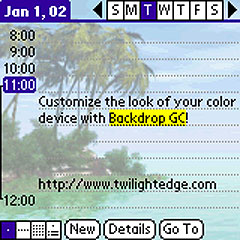 Next, I tried Palm’s default apps, which all worked great, and looked very cool with the image in the background. I was quite pleased at this point, but unfortunately I decided to continue testing.
 Permalink
 Print
PrintArticle Comments
(43 comments)
The following comments are owned by whoever posted them. PalmInfocenter is not responsible for them in any way.
Please Login or register here to add your comments.
 Comments Closed
This article is no longer accepting new comments.


RE: LOL
So, if you use the built in apps, it's good, but it has problems with 3rd party apps...
------------------------
Mario
CLIE Moderator
http://www.geocities.com/msmasitti
RE: LOL
I can't agree with ''Not my fault!''
Interesting idea and nice try, but full-depth, full-screen color takes a lot of working memory by itself. This concept is going to be really difficult to do without smashing other things in the process.
Evaluating performance using the built-in apps is not an accurate assessment, anyway. The built-in apps are still based (mostly) on their Palm OS 1.0 origins, which were very, very, VERY stingy with dynamic heap. By far most 3rd-party apps are going to assume Palm OS 2.0 (or even 3.0) or better, which assumes a lot more elbow room.
So I have to agree - great idea on paper, but it doesn't work in the real world.
RE: I can't agree with
get PocketPC!, some of the wallpaper are in 'Flash'
RE: I can't agree with ''Not my fault!''
RE: I can't agree with ''Not my fault!''
RE: I can't agree with ''Not my fault!''
---------------------------------
I am lost. But I am going to find myself. So if I return before I get back, please ask me to wait.
RE: The Cons (Cont.)
The Pros:
- They said they will support Hi-Res in the future
The Cons:
- But this is a promise they make a year ago
LOL
RE: The Cons (Cont.)
The Cons:
Doesn't work most of the time
Many application problems
Expensive for it’s features
The Pro:
It won't work with Hi-Res, so I don't need to experience all these...
Alan
----
Read your manuals before you ask!!
Strange, it's been working for me...
I've been using BackDrop GCV2.0 for about two months and have lots of non-trivial software on my M505: Quickoffice (QuickWord QuickSheet & Quick Chart), Avant Go, Fireview, JPG View, Pocket Quicken, Worldmate, Fast CPU, Button Manager, FindHack, Sidelight Hack, RootM, Blocks, Tide Tool, Star Pilot, pSatellite, Pocket Sat, etc. etc.
It is all working fine!
In fact, the only thing that seemed to have a problem was one of the new SEGA demo games that were mentioned is a recent Palm Info Center Post. To make that run, I had to turn the backdrop program off.
RE: Strange, it's been working for me...
RE: Strange, it's been working for me...
I wasn't trying to be contrary, just wanted to offer a point of view that helps people understand it can be made to be congenial with other applications in an M505
RE: Strange, it's been working for me...
Changing the background...
I'd love to be able to just have a dark background with white lettering in my apps.
---
If you sing in french while hopping on one foot, the evil birds won't come out of your bathroom mirror.
RE: Changing the background...
Its free and it does what you wanted big_raji. Email me if you need help.
----------
God Bless,
EnocH
RE: Changing the background...
---
If you sing in french while hopping on one foot, the evil birds won't come out of your bathroom mirror.
RE: Changing the background...
RE: Changing the background...
Feel free to point out if I'm talking out of my ass. :)
---
If you sing in french while hopping on one foot, the evil birds won't come out of your bathroom mirror.
RE: Changing the background...
RE: Changing the background...
It's a heck of alot easier on the eyes, but I had no idea that I also suffered from the notorious Clie screen dust problem. Gah!
Here I thought I was dust free. (sigh) ignorance is (was) bliss.
---
If you sing in french while hopping on one foot, the evil birds won't come out of your bathroom mirror.
i don't understand the fascination
RE: i don't understand the fascination
"Why do you want your hair to look like that? Get it cut."
RE: i don't understand the fascination
Anyone heard YiShow?
sorry that the homepage is in Japanese, no English homepage available.... It's a very good launcher + file manager like software, and you can choose a 256 color BMP image in MS/SD/MMC as wallpaper...
it has versions for CLIE (Hi-Res.) and Palm...
Response From The Developer
In the section of the documentation titled, 'Choosing Applications', (http://www.twilightedge.com/bdgc_docs.html#Apps), the text describes Backdrop's default setting for app modes. (The app mode setting determines whether or not to display the background while that application runs).
Perhaps this should have been stated explicitly in the documentation, but the default app mode setting is exactly what its name implies - it is a default setting which is used for applications for which the user has not manually specified an app mode. The default setting will apply to all applications which Backdrop does not see in its application list, such as those which have been installed since the last time Backdrop was run, or, implicitly, those not on the device, such as on a memory card.
I believe that if Mr. Fields had experimented with the default mode setting, he would've found that setting the default mode to 'OFF' would remove the background for all of the apps on his memory card (as they don't appear in Backdrop GC's app list). This setting will also hide the background for all on-device apps using the default mode, but further down in the same section of the documentation, it describes how to use the 'Set All To:' button, which can be used to set all listed, on-device apps back to 'ON' (256 Colors).
"Doesn't work most of the time".
While this statement may simply reflect his frustration at not being able to remove the background for memory card apps, I must strongly take issue with it. Where is the evidence to back up this statement? Mr. Fields himself writes that he only tested Backdrop GC on one device, for a short, limited time, with a small number of apps. A broad, sweeping dismissal from just the small amount of exposure that he has shown reflects poorly not just on the reviewer, but also on Palm Infocenter for allowing this baseless statement to be posted in a review on their site. Since before its initial release over a year ago, Backdrop GC has been tested on a huge number of applications, in many different device configurations. Undeniably, there are incompatibilities. Do these incompatibilities represent "most" applications? No.
Again, I feel that the reviewer has done a disservice to the reader by reaching a conclusion without enough information. While there may be other users like Mr. Fields that find a number of incompatibilities between Backdrop GC and the apps they have on their device, some users may not find any at all. I would argue that on average, Backdrop GC will work with the majority of programs for which a background is appropriate, that is, programs that don't preclude the need for the image by filling their own screen real-estate with graphics, as with games, movie players, and image viewers.
For the reasons stated above, I do not feel that this review was accurate or fair. My argument is not with the fact that the reviewer formed a negative opinion. (Of course, that doesn't make me happy, but I realize that this software will appeal to some people and not to others). My problem with this review is that there are serious gaps in the reviewer's information, gaps which he apparently did not make the effort to overcome in order to develop a reasonably informed opinion.
Josh Freeman
Twilight Edge Software
http://www.twilightedge.com
RE: Response From The Developer
ok, so how about if i want to enable some of the apps on my memory card to use backdrop gc? there's apparently no way to do so.
i would also suggests to other readers that...in that case..turning off backdrop gc at ALL would also disable backdrop gc for all of the applications on the memory card...right? this make no sense man.....
Alan
----
Read your manuals before you ask!!
RE: Response From The Developer
Quite frankly, until the "known" bugs and incompatiblities are worked out, the software should be free.
RE: Response From The Developer
One thing I did was that I READ the instructions when I installed the application.
IMHO, this is a great app to show off color m505 or m515. I agree with the developer that there seems to be some issues with some handful of programs but majority of apps work fine with BackDrop... :)
I'm very satisfied customer...
What I use commonly: m505, bible reader, bugMe, chess, HanDBase, Kidometer, Mathpad, Palmpix, PalmReader, HandheldMed reader, Splash photo, Supermemo, Tarascon pharmacopia, x-Master, Filez, Hi-Note, McFile, Only Me... I've never had problems with above apps...
Sam
RE: Response From The Developer
>Quite frankly, until the "known" bugs and >incompatiblities are worked out, the software should >be free.
That would mean that all software should be free because just about all software has "known" bugs and incompatiblities.
RE: Response From The Developer
RE: Response From The Developer
RE: Response From The Developer
RE: Response From The Developer
RE: Response From The Developer
yesyes.......
so you call "BackDrop GC" a LARGE software package...?
oh well....
Alan
----
Read your manuals before you ask!!
RE: Response From The Developer
A low-res disaster. Download at your own risk on Clies.


Latest Comments
- I got one -Tuckermaclain
- RE: Don't we have this already? -Tuckermaclain
- RE: Palm brand will return in 2018, with devices built by TCL -richf
- RE: Palm brand will return in 2018, with devices built by TCL -dmitrygr
- Palm phone on HDblog -palmato
- Palm PVG100 -hgoldner
- RE: Like Deja Vu -PacManFoo
- Like Deja Vu -T_W


LOL
Looks Nice when it works
The Cons:
Doesn't work most of the time
I like this one....What da fun!
Alan
----
Read your manuals before you ask!!