


Developer:
The Price:
The Cons:
PalmInfoCenter.com Ratings*:
*Maximum Rating is FIVE (5) InfoPalms |
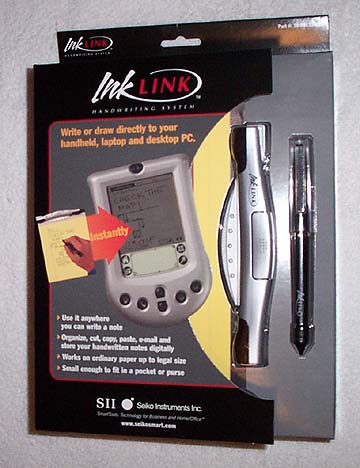
InkLink Review By Ed Hardy 4/29/2002 Overview The InkLink from Seiko Instruments transfers handwritten notes or drawings from paper to a handheld. It is the next generation of the SmartPad but doesn't require that the notes be made on a special notepad. The InkLink works with any piece paper up to legal size.
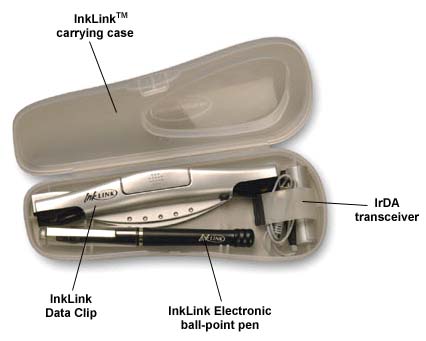
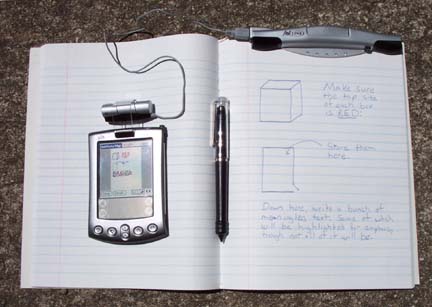
The Data Clip looks like what George Jetson would use to hold closed a bag of Space Potato Chips. It is about six inches long and gets clipped to the top of the pad of paper you want to write on. Built into it are sensors that monitor the location of the Electronic Pen. Of course, you don't have to use a pad of paper; you can use with almost anything. The InkLink could be a godsend to all those people who do their best work on napkins in cocktail bars. This flexibility makes it much more useful than the SmartPad. The Electronic Pen constantly broadcasts to the Data Clip its position and whether it is writing or not. On one end is a ball point pen. On the other is a stylus point that can be used with a handheld. The Data Clip can only detect the location of the Pen if the ball point pen end is being used. It is powered by three watch batteries. IrDA Transceiver is on a wire about 12 inches long that plugs into the Data Clip. There is a AAA battery inside that also powers the Data Clip. The Data Clip doesn't have a power switch. It is activated when the Transceiver is plugged in and will turn itself off if it isn't used for a few minutes. The Transceiver is a couple of inches long. It has a plastic clip that lets it be attached over the infrared port on any handheld. This is how the InkLink communicates with the handheld. The InkLink comes with a plastic case that keeps all its parts together in one package.
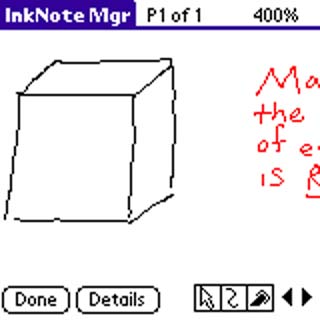
Software Really, using the InkLink for its basic use isn't complicated. You just write or draw and it gets transferred into a file on your handheld. It's just that simple. When you are writing or drawing, InkNote Manager shows the full page on the handheld's screen. That doesn't give you any detail but is enough to let you know basically what you are doing. Later you can enlarge your drawing to full size on the screen to pick out the details.
I'd suggest you make a few small marks at the top of the page where the Data Clip is attached. This will help you get it lined up if you need to attach it to the same page again. This is important if you want the drawing on your handheld to look exactly like the one on your paper. Of course, there are a lot of options you can make use of that add a lot of functionality. The pen itself has only one color ink but you can change the color that is saved in your handheld. You can also use different line thicknesses. You can even automatically straighten your lines. The first time you use it, you have to set your paper size. InkNote Manager has the standard ones built-in, like Letter, Legal, etc. But if you can still use a non-standard pad. You can quickly show it how big the paper is and save that size. If you always use the same size paper, you only have to do this once. You can make changes to drawings directly on your handheld, too. You can add or remove lines or text and highlight things, too. Of course, InkNote Manager has a screen that lets you choose which file to edit. It will display you files as a list or as tiny versions of your drawings. InkNote Manager tries hard to help you find your drawings later. You can categorize them, of course, but you can also assign them keywords. Of course, this means you have to be a bit organized yourself and enter some keywords, especially if you are going to save a lot of files.
Drawbacks If you are left handed and wrap your fingers around the top of your pen, you won't be able to use the InkLink. It depends on there being an unobstructed line-of-sight between the pen and the Data Clip at the top of the paper. This won't work if your fingers are in the way.
Desktop Once the drawing are on your PC, you can work with them there, print them, and export them. Files can be exported as BMP, JPG, or PNG. The user can also specify the number of dots per inch, with 72 being the default, though you can have higher than that. If you want to, you don't even have to use this with your handheld at all. It comes with a USB cable that also powers the Data Clip and you can make your drawings directly into your desktop or laptop.
Conclusion You can't complain about the price, either. It's more flexible than the SmartPad 2 and, at $100, costs half as much. |


 Permalink
 Print
PrintArticle Comments
(57 comments)
The following comments are owned by whoever posted them. PalmInfocenter is not responsible for them in any way.
Please Login or register here to add your comments.
 Comments Closed
This article is no longer accepting new comments.


RE: Resolution
Nate, if I made three marks on a page and the InkLink combined them into one, it would, to put it frankly, suck and I'd have ripped it a new one in the review. Images are saved at 100% of the size of your piece of paper. As long as marks are separate on the page, they are separate on the handheld.
---
News Editor
RE: Resolution
Can you, or someone else, post some samples of a typical output... perhaps a page of drawings and one of written text... in several exported DPI settings?
I'd like to see the actual output.
Tx!
RE: Resolution
RE: Resolution
(and that's why i stop here 2-4 times a day!)
nategall says "blah!"
RE: Resolution
fire pretty tree bad
Lefty Questions
Thanks
CTSLICK
RE: Lefty Questions
The Ink Link clip has 2 Ultrasound receivers (the 2 black things on the end of the clip and as a result and of course line of sight is required for proper operation. The inklink will beep if it cannot triangulate the position of the pen (i.e. your finger is blocking it.) This way you can simply re-adjust your finger/hand and keep writing.
If you have any further questions, give us a call at 1-800-757-1011 or email us at us-support@seikosmart.com
Sounds great! Hope to be available in Germany soon!
that's the biggest wish :) In Germany we only get cool things like this far after US and Japan... very bad! We love this Gadgets, too!
Thank you for the good review and I think this tool does work very fine when you're at university or in meetings 'cause you can comfortalbe make your notes etc. and then beam it to your Palm!
Seiko: GREAT SOLUTION!!!!!
greetings
Thomas
VFS Support?
RE: VFS Support?
Seiko Support
1-800-757-1011 (Support)
1-800-688-0817 (Sales)
us-support@seikosmart.com (Email support)
RE: VFS Support?
Seiko Support
1-800-757-1011 (Support)
1-800-688-0817 (Sales)
us-support@seikosmart.com (Email support)
Bluetooth?
Maybe Seiko will release one for the notebook/desktop too. It will be like having an IBM TransNote notebook without the bulk.
RE: Bluetooth?
RE: Bluetooth?
Seiko Support
1-800-757-1011 (Support)
1-800-688-0817 (Sales)
us-support@seikosmart.com (Email support)
cool...but
-Mathrocks314
RE: cool...but
Seiko Support
1-800-757-1011 (Support)
1-800-688-0817 (Sales)
us-support@seikosmart.com (Email support)
Document Archival
My main interest in this product would be for archiving my tons of notes on my desktop computer. Besides the conduit, does the inklink come with any desktop applications for organizing files and searching by keyword?
Thanks,
--Charlie
RE: Document Archival
---
News Editor
RE: Document Archival
- David
RE: Document Archival
---
News Editor
RE: Document Archival
(and thanks for the prompt reply)
-- David
RE: Document Archival
Any options?
Regards,
Paul
Hmm
I'll consider it when they produce a developers kit
RE: I'll consider it when they produce a developers kit
Seiko Support
1-800-757-1011 (Support)
1-800-688-0817 (Sales)
us-support@seikosmart.com (Email support)
flash storage
RE: flash storage
Seiko Support
1-800-757-1011 (Support)
1-800-688-0817 (Sales)
us-support@seikosmart.com (Email support)
Seiko Instruments
After several email communications, Customer Service said they didn't intend to support the development of the SmartPad software anymore to show same-size display on the Palm as the "Palm OS resources were not sufficient" but Pocket PC's OS were.
And that they would only be too happy to refund the money. Difficult if, as I am, based in Asia and the product purchased through a Palm accessory shop in yet another Asian country. Seiko Instrument's web site clearly tries to hide the fact that both the SmartPad and SmartPad 2 can't display same size resolution on any colour Palm powered device. What's the point of buying a writing device that does not enable you to read your own handwriting?! Basic function of a "SmartPad" wouldn't you say?!
So, please check that this SmartPen InkLink can display in colour Palms at same size resolution before you purchase it and don't expect the software to be developed too much in the future if Seiko Instruments' historical actions holds true.
Disgrunted ex-SmartPad2/m505 user.
F.L.Kin
fe@spm.com
RE: Seiko Instruments
Seiko Support
1-800-757-1011 (Support)
1-800-688-0817 (Sales)
us-support@seikosmart.com (Email support)
RE: Seiko Instruments
"Due to incompatibilities with the imaging software and Palms (including other PDAs using the Palm OS) that have color displays, 4x Zoom (read lifesize) will not be available for these models. We were recently told by our developers that due of the system resource limitations of color Palms there will not be a 4x patch forthcoming for the SmartPAD software. We apologize for any confusion regarding this matter.
If you have further questions please feel free to call us at 1-800-757-1011 between the hours of 6 am to 8 pm PST Monday through Friday, excluding holidays.
Thank you,
Seiko Technical Support Team"
Try and find this information on the Seiko web site.
F.L.Kin
Kudos to Seiko
Ed, given that corporate people do seem to read these boards when their products are mentioned, have you ever encouraged them to do what this Seiko guy is doing and directly participate in addressing people's concerns, etc? It'd be even better if they used "official" support logins to do it, so the info isn't provided by "anonymous." I remember someone from (maybe?) ababall doing that here a while back.
CLIE support?
Gary
Battery life?
Thanks.
InkLink with Netmeeting whiteboard
M. Church
Output file organization

 Only the first 50 comments are displayed within the article.
Click here for the full story discussion page...


Latest Comments
- I got one -Tuckermaclain
- RE: Don't we have this already? -Tuckermaclain
- RE: Palm brand will return in 2018, with devices built by TCL -richf
- RE: Palm brand will return in 2018, with devices built by TCL -dmitrygr
- Palm phone on HDblog -palmato
- Palm PVG100 -hgoldner
- RE: Like Deja Vu -PacManFoo
- Like Deja Vu -T_W


Resolution
What type of resolution is available in the drawing? For instance, if you make 3 hash marks on college ruled paper, do they come across as three separate marks? How is the definition of the capturing?
I haven't used the other pad, so maybe these questions are obvious, but how smoothly the system works is important in mechanical drawings.
Thanks again!
nategall says "blah!"