


By Ed Hardy
Overview
I'm not going to do a review of all the features. I did a full review of TinySheet 4 when it was introduced last year and, if you aren't familiar with the app, I suggest you take a look at it.
Memory Card Support
Since VFS went into wide use about this time last year with the introduction of the Palm m500 series and the Sony N series, its inclusion in applications has been sadly slow. The fact that a great app like TinySheet is just now supporting it is a good indication of how slow its been. This is unfortunate because the ability to open and save files from a memory card is an extremely useful feature.
However, at least in this case, that deficiency has been corrected. TinySheet now lets users decide where to store their files, either in RAM or on a card.
This isn't a really big hassle but I think a major function like this should be a one- or two-tap operation. I shouldn't have to go digging around for it in dialog boxes. Still, it helps that you can access the Options screen from both the file list and when the spreadsheet is open.
Nit-picking aside, once a spreadsheet is saved on a memory card, working with it isn't any different from files in RAM. It appears on the same list with the other spreadsheets. You can only tell the difference because there is an icon of a memory card next to the file name.
You can open, edit, and save files on the card just like you could if they were in RAM. Really, I can't see any difference, besides the fact that your spreadsheets no longer need to take up valuable space in RAM.
In the desktop app, you can set a file to be converted to TinySheet format and be saved directly to a memory card.
I'm not going into a long list of all the handhelds that have VFS support. Hopefully it will be enough to say that if your handheld has an SD/MMC or Memory Stick slot, it supports VFS.
TinySheet 4.12 has the ability to display spreadsheets with either the Graffiti area hidden or showing. It can also display them at hi-res and "normal" size, that is 160 pixels across.
This gives you a four options, which is plenty for me. I tend to enter data at normal resolution with the Graffiti area showing, then switch to hi-res+ to get a complete look at the whole spreadsheet. This is because at high resolution the boxes are really small and you have to be very careful to tap inside the box you want, not the one next to it.
Here comes another nit-pick. I wish it were easier to switch between hi-res and normal resolution. You have to dig around in the Preferences screen in order to switch between the two. I guess iambic thinks you'll always want to be normal-res or high-res, but that's not the way I use the app.
I have to tell you, hi-res+ support is great. I no longer feel like I'm looking at my spreadsheets through a keyhole. I can see an entire month's checkbook entries at once. All that extra screen real estate is wonderful.
I ought to mention TinyChart does not take advantage of the hi-res+. It does show charts and graphs in hi-res but it can't take up the full screen. When you have TinySheet open with the Graffiti area hidden and you open a chart, you can still see the bottom portion of the spreadsheet below the chart.
Conclusion
TinySheet costs $30. If you are already a registered user of TinySheet, this upgrade is free.
TinySheet 4.12 is a new version of iambic's spreadsheet application. It supports the 480 by 320 color screens on Sony's just released NR series. The company has also added VFS memory card support. Workbooks can be saved to removable memory cards in the TinySheet Manager.
The change that is going to be most significant to the majority of TinySheet users is the ability to save and open spreadsheets directly from memory cards.
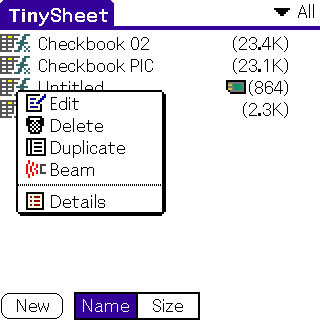 Moving a spreadsheet to your card isn't as simple as I would like. You need to go into the Details on the file and check the "Saved on memory card" option. You move it back by unchecking this.
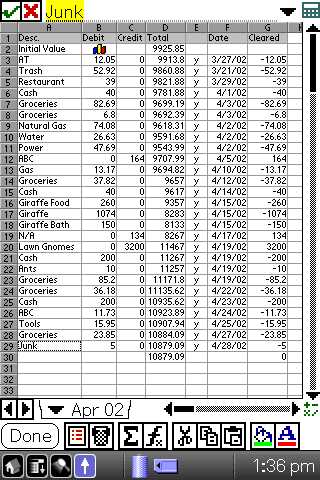 Hi-Res+ Support
With its NR series, Sony introduced a new screen size, 320 by 480, which has gotten a surprisingly large amount of support from third-party developers, especially considering the NR series has only been available in the U.S. for about a week. iambic has been at the forefront of this, adding hi-res+ support to TinySheet several weeks ago.
The inclusion of memory card support in TinySheet is good for everyone. In addition, everyone who owns a NR70 or NR70V should at least consider this app.
 Permalink
 Print
PrintArticle Comments
(22 comments)
The following comments are owned by whoever posted them. PalmInfocenter is not responsible for them in any way.
Please Login or register here to add your comments.
 Comments Closed
This article is no longer accepting new comments.

RE: NR series and Macs
Is it the case that the CLIE PEG-NR70 can connect to an Apple Computer? How?
RE: Landscape... and Mac
This is very impressive on the Handera 330 with QuickSheet (from QuickOffice) and was available when Handera launched the 330.
Thanks, Robrecht
RE: Landscape... and Mac
You can exchange your TinySheet data with Palm and Mac easily, using Palm Memo pad and CSV files. I have done this kind of exchanging operation several times already. Should work well.
PLS refer to www.iambic.com and find operation manual of TinySheet. (On the program download site, you can find it)
http://www.iambic.com/
Also, for HotSync with NR70 and Mac, you can use Missing Sync from http://www.markspace.com/missingsync.html
This works well with Mac ,CLIE USB cradle and Palm Desktop 263.
Hope this helps.
Cheers.
RE: Landscape... and Mac
With Missing Sync app, you can mount Memory stick on your Macintosh finder with CLIE's app called "MS import". Then you can copy your MP3 files directly from Mac to Memory Stick.
The next version of MissingSync (maybe 3) will be more compatible with MacOS X. You can use iTunes and iPhoto apps to convert some data for Mac, I heard. Can't wait :-)
http://www.markspace.com/missingsync_preview.html
Thanks.
RE: Landscape... and Mac
Lawn gnomes?
;)
--------------------------------------
"Well, if it isn't the leader of the wiener patrol, boning up on his nerd lessons"
http://stirwise.com
RE: Lawn gnomes?
Software upgrades
One little gripe. I wish that developers would change the way they produce software for different models to cope with the different screen requirements. I have a plain old (boring, to some) Palm with a monochrome 160x160 screen. Whenever a new screen resolution comes out, some developers upgrade their code to deal with this by issuing an new version - that is, as a single version for all users. This means if I upgrade to get the benefit of new features and bug fixes, I end up with programs that include a lot of code to deal with color & strange screen resolutions, which are useless to me. I still have to carry that extra code, using up memory and, in some cases, causing a detectable slow down in the execution of the program. The upgraded software is inherently more complex, which just increases the scope for bugs, which is infuriating.
Please don't take this as a criticism of iambic in particular - I think they produce some excellent software. It's just that I wish that Palm developers generally would get into the habit of producing different modes of a particular version. For example:
TinySheet4.12b&w - for 160x160 mononchrome screens
TinySheet4.12colour - for 160x160 color screens
TinySheer4.12extra - for the more exotic screen resolutions
This way users can get the benefit of an upgrade in a way which is more taylored to their particular unit.
Is this too much to ask?
RE: Software upgrades
You will end up with a buggier product, because developers with limited resources will have three versions of a product to test, instead of one. The product development cycle will be the same length, but the amount of software to test will triple, and therefore there will be a decline in the quality of the product.
RE: Software upgrades
I really don't see why it would be such a massive problem to develop 2 or 3 versions of a popular, relatively expensive application. this might make more grayscale 160x160 resolution users likely to buy iambic's software, simply because it takes up less space and moves a little quicker on their handheld.
--------------------------------------
"Well, if it isn't the leader of the wiener patrol, boning up on his nerd lessons"
http://stirwise.com
RE: Software upgrades
RE: Software upgrades - Multiple Versions a BAD idea
For a start the Windows CE had endless problems with different hardware platforms (SH3/ARM/MIPS), frequently users could not get a version for there hardware platform.
Also there is the issue of having multiple development trees - that would mean some versions get released ahead of others (and some Palms might never get a version, as happened with Windows CE platform) then there is the issue of bugs that could creep in.
And WHY would you want to do this?
And the saving in complied code is going to be around 1K! (Heck the UNCOMPILED CODE is only going to be around 2-3K!)
Having multiple versions of games (one in B&W, one in Color) makes sense because most users still do not have color Palms and color graphics (used extensively in most games) take up much more space than greyscale graphics - so in effect having color bitmaps would easily waste 1 MB or more in a game with a large amount of graphics (like an RPG say).
This is a non issue with software that doesnt use large amounts of bitmaps. The savings would be non existant.
In fact, if a develoeprs creates more generic code in your software, meaning they could do a single build and complie multiple versions of the app at once, the additional generic code require could easily push the overall size of each application up, not down.
So, saving a couple of K per app is a non issue. It makes more sense for a developer to optimise other parts of the app and it's libraries to bring overall size down (as that's where the bloat tends to be). Having a slightly larger application or adding support for higher res on some devices, does not make the application slower in any way.
-- Iain
RE: Software upgrades
I think that support for color/weird screen resolutions does slow down programs in some cases. Take, as an example, CryptoPad v3.64 and v4.09 (freeware, available at www.palmgear.com). Both are really good replacements for the standard MemoPad, but the latter is much slower than the former (at least on OS4.1 juiced up with Quickbits).
Also I've seen posts by developers at this and other sites complaining about the difficulty of coding for CLIE's funny screen resolution. This has got to add to the complexity of the code.
No software is bug free, I accept that. But I think you would agree that software which has, say, a million lines is likely to have more bugs than software with 100 thousand lines, all other things being equal. On the same principle, adding extra code to deal with non-standard screen resolutions (and color, etc) is, I think, likely to increase the probability of bugs in the program.
Put yourself in the shoes of a user with say a Palm IIIx or a m105 - you don't have the (dubious) benefit of the color and non-standard resolutions, yet you inherit bugs from code added to deal with these things.
This does not make sense to me.
Surprising
What is so surprising? It is a Sony, it has the highest resolution, and it is hte best Palm OS device on the market. How is it surprising?
RE: Surprising
RE: Surprising
It's funny - until a few weeks ago - the CLIE boosters were crowing that 360x360 was the "industry standard". Evidently, the manufacturers didn't think so, because they kept making the 160x160 units the whole time (because they were, and remain, their best selling units). Now of course we have 320x480 too. What will it be next week?
This must be driving developers nuts.
Tinysheets on Memory Cards get hotsynced?
Thanks for the update. Quick question: If you store your TinySheet on the memory card, using the new VFS functionality, will the TinySheet Conduit be able to hotsync the document?
For example: Store Tinysheet on Memory Stick make changes to it on the PDA. When you hotsync, are the changes transfered to the PC (and Excel)?
Thanks,
Jeff
----
Jeff Meyer
RE: Tinysheets on Memory Cards get hotsynced?
---
News Editor
Tinysheet support for the HandEra is still lacking
TinySheet is too buggy!
Perhaps if they spend some time fixing the bugs instead of adding wizbang features, I would buy the program. For now, I am stuck with Quick Sheet.


Latest Comments
- I got one -Tuckermaclain
- RE: Don't we have this already? -Tuckermaclain
- RE: Palm brand will return in 2018, with devices built by TCL -richf
- RE: Palm brand will return in 2018, with devices built by TCL -dmitrygr
- Palm phone on HDblog -palmato
- Palm PVG100 -hgoldner
- RE: Like Deja Vu -PacManFoo
- Like Deja Vu -T_W


Landscape... and Mac