


Developer:
The Price:
The Cons:
PalmInfoCenter.com Ratings*:
*Maximum Rating is FIVE (5) InfoPalms |
Handspring Treo 90 Review By Ed Hardy 7/1/2002  Overview
The Treo 90 is priced for the mid-range but is still loaded with features. It has a color screen, an SD/MMC slot, and a built-in keyboard. It has 16 MB of memory and runs Palm OS 4.1. Don't be confused by the Treo name; this isn't a smartphone like the rest of the Treo line.
Screen The screen is 12-bit, instead of the 16-bit screens we've become accustomed to. This means it can display fewer colors, 4,000 instead of 65,000. Does this matter? Depends on what you want to use your handheld for. I loaded a couple of 16-bit color images onto a Treo 90 and an m505 for comparison and while there was a difference, it wasn't huge. However, if you frequently use your handheld to show people pictures of your latest vacation or houses for sale or something like that, you might want to consider a 16-bit, high resolution screen. If you just want a color screen to play a few games or make eBooks look better, you'll probably be happy with the Treo 90. I ought to point out that the colors it does show, it shows very well. All the colors are strong; none are washed out or weak. Its whites are nice and white, making a good background for reading text. At least, that's true indoors. Outdoors is a whole new kettle of fish. The Treo 90's screen depends on being backlit. If the ambient light is brighter than the backlight, the screen becomes unreadable. Now the Treo has a good backlight but it isn't brighter than the Sun. Therefore, it is difficult to use the Treo 90 outdoors. With a lot of playing around you can usually find an angle that will let you see the screen but I don't think you'll be using it outdoors a lot. Like the rest of the Treo line, Handspring was able to reduce the size of the entire handheld by slightly reducing the size of the screen. However, there aren't any fewer pixels; it is still the standard 160 by 160. The pixels are just smaller and closer together. I know there are some people who find this unacceptable but I'm not one of them. Heck, I had the Treo 90 for almost a day before I even remembered the screen was a bit smaller. Actually, the smaller screen helps compensate for the lack of a hi-res screen. The smaller pixels make images and fonts look smoother. Lots of people have asked what the exact screen size is so they can compare it with a Palm m130, which also has a slightly smaller than normal screen. Turns out the two are almost exactly the same size, roughly 1 7/8 inches.
Keyboard
Of course, with a keyboard only 2.5 inches across, there can be no question of touch typing. Instead, the Treo is held between the two hands and you type with your thumbs. That's why people call it a thumboard. After about a week of practice, including writing most of this review with it, I've become pretty good at it. In fact, I can already write 15% to 20% faster with the keyboard than with Graffiti, partially because I made fewer mistakes. Based on that, I think it's a good replacement for Graffiti, though not for everyone. It is at least as good as Graffiti for short notes and better than it for mid-length notes. My hand gets tired after writing a paragraph or two in Graffiti but not with the Treo 90's keyboard. However, I don't think either are best if you are planning to write thousands of words. In that case, you should get a full-sized keyboard. One thing I've been thinking about is, why is there so much resistance from long time Palm users to this model's built-in keyboard? I finally decided it was the learning curve. For these people, it is going to take some time working with this keyboard to get as fast as they are now with Graffiti. If you never put in more than a few words into your handheld at a time, then learning to use a new input method is a waste of time. But if you write a lot on your handheld, it pays off. However, first time users will get started much faster without having to learn Graffiti, which is harder than getting used to a smaller keyboard. Cramming a keyboard into a tiny handheld isn't easy and Handspring definitely had to make some compromises. The keys are small and close together, which can make typing tough if you have really big hands. Of course, they have to limit the number of keys so the ones they have need to do double duty or more. Of course, each key handles both upper and lower case. Punctuation and other special characters are typed by pressing an Option key then the appropriate letter key. Don't worry, the period has its own key. There still aren't enough keys for all the special characters but the Treo can handle that. I think I can explain this best by example. Pressing Option S types a (. If you then hit yet a third key, which is marked ... for some reason, a pop up window appears on the screen which will allow you to pick from (, <, [, {, or ‹. It's a little cumbersome but it let's you use 34 keys to type about 200 characters. One of the things I miss is a set of directional keys. If I want to go back just a few letters, I have to pull out the stylus and tap on the screen. The keyboard takes the place of the Graffiti area so there are no silkscreen buttons. There are keyboard equivalents but they aren't as easy to use as I'd like. My main complaint with this is you have to press two buttons to open the application launcher. There was a reason why all other Palms have a silkscreen button that does this in a prominent place; because you do it all the time. The Treo 90 makes this too hard. The new Treo 270's backlight shines behind the keyboard, making it easier to use in the dark. The Treo 90 doesn't have this feature. I have no problem with this. While it is occasionally useful to be able to work in the dark, the rest of the time this is an unnecessary drain on the battery.
SD/MMC Slot I don't want this to turn into an editorial but I agree with this decision. I think Handspring has accepted that the Springboard wasn't a big success. Modules were never as small as Handspring hoped they would be and most were too expensive. It was a great idea that didn't pan out. If this makes you angry, think about it from Handspring's perspective. No one wanted more for the Springboard to be successful than the people at Handspring did. If they can accept that their handhelds are better off without it, so should you. For me, it came down to one thing: Including the Springboard slot limits how small a handheld can be and the Treo 90's small size is one of its best features. The SD slot allows the Treo to store huge amounts of applications and files. Storage is limited only by your budget in buying SD or MMC cards. The Treo doesn't come with a file manager. It depends on the Palm OS's ability to run applications off memory cards and individual applications' ability to store and access files from them. However, several third-party file managers are available. I thought using an SD card was a little sluggish so I tested it with VFSMark, which benchmarks the speed of common tasks VFS memory cards perform, like reading, writing, creating files, etc. My hunch wasn't wrong, the Treo 90 uses its SD slot about 20% slower than an m500, which is VFSMark's default device. Not a big deal but I thought I'd point it out. One thing I think is a bit disappointing about this model is it doesn't support SDIO. This means it won't be able to use the new Palm Bluetooth SD Card or any other non-memory card. This is too bad as I think a Treo 90 and a mobile phone connected with Bluetooth would be an excellent mobile way to access the Internet and get email. Update: Handspring has released an update for the Treo 90 that adds support for SDIO. This means it can use the Palm Bluetooth card.
Casing
Sound
Buttons An additional use for the buttons is for games. On the Treo 90, the buttons are right at the bottom, which isn't the best place for gaming. However, there wasn't a lot of space left over after the screen and the keyboard went in. Like I said, it’s not optimal but still usable. The flip cover doesn't cover the buttons, which means the Treo might get activated in your pocket accidentally. Fortunately, Handspring thought of this. Holding down the Power button for two seconds locks all the buttons, including the keyboard. Only holding down the Power button again will reactivate them. I was very sad when I discovered that the Treo 90 doesn't have a jog dial like the rest of the Treo line. I really thought Handspring understood how much easier a jog dial makes using a handheld. Like my mother used to tell me, I'm not angry, just very disappointed. Still, they added some nice software tricks to try and compensate for not having a jog wheel. When you are in the application launcher, you can scroll through the list of applications with the Up/Down buttons. When the app you want is highlighted, pressing the Space Bar or Return key will open it.
Motherboard The Treo 90 has 16 MB of memory, which I think is great. I was afraid Handspring would be chintzy like Palm did with the m130 and only give it 8 MB. All this memory plus the SD slot allows it to be competitive with even high-end devices. It doesn't have Flash ROM, which means the operating system can't be upgraded. This is no big deal because there isn't going to be anything to upgrade it to. OS 5 requires an ARM-based processor and the Treo 90's 33 MHz Dragonball VZ isn't one. I wouldn't be too concerned about the fact that this device won't run OS 5. I strongly suspect that OS 5 handhelds will be high-end devices for a good while after the first ones come out. If you are interested in the Treo, you are probably pretty price conscious and this model is a good deal. Update: Turns out that the Treo 90 actually does have flash ROM and, to prove it, Handspring released an update that reflashes the ROM. As I said earlier, this adds SDIO support but also does some bug fixes. If you get a Treo 90, I'd suggest you add this patch.
Battery Life With the backlight on full, the Treo got 3 hours and 55 minutes before the first battery warning. With it on half power, it lasted 10 hours and 5 minutes. I was going to see how long it would last with the backlight on low but the screen is too dim to be usable that way unless you are in very dim light. I tested battery life by installing an application called UpTime. This tracks the amount of time a handheld is on. Then I used the Treo normally, reading AvantGo pages, playing games, looking up address, and that sort of thing. I think this is a very realistic test as it takes into account that handheld batteries are designed to be used intermittently.
Software When listing your contacts, the names and phone numbers are on separate lines and all the phone numbers are displayed, not just a default one. Also, if you begin typing a name, it will only display all the contacts that don't match what you've put in. For example, if you are looking at the full list of all your contacts and you type in "B" and then "I", Contacts will only display people whose first or last name begin with "BI", like someone name Bill Smith or Karen Billingsly. It can directly dial numbers on some mobile phones via infrared. It has Date Book+, an enhanced version of Date Book that includes some extra features, like floating events, an improved weekly view, a yearly view, and a list view. The Treo 90 is bundled with a copy of Blue Nomad's WordSmith word processor, which I reviewed a while back. This is a good app but don't try to use the High Resolution font feature. This takes advantage of the fact that on color screens each pixel is actually made up of three sub-pixels. This is supposed to improve the perceived resolution of the fonts but on the Treo 90 they just look fuzzy.
Stylus This isn't just mine, either. I've heard from numerous people who complained of the same thing. Eventually, I took some advice from one of them and put some tape inside the slot until the stylus was less loose. This isn't perfect but it is much better. The stylus is about a half inch shorter than the standard one. Not a big deal but it might be a problem if you have big hands.
Flip Cover Handspring will probably sell replacements, though. It is supposed to be removable but it isn't easy. I gave up trying to remove mine when it seemed like it was about to break.
Cables I don't like the lack of a cradle but I can accept it as a cost-cutting feature. You can buy one separately but I think handhelds should be in the hands, or at least the pockets, not hanging around in cradles. The best feature about the power cable is it can also plug directly into the Treo. This means you can use it as a travel charger. The prongs on the wall plug even fold down to save space.
Conclusion |


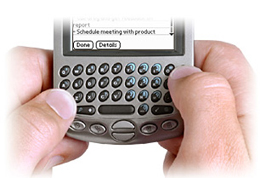 If you are a long time Palm user, this will be a bit of an adjustment. It took me a while to stop pulling out the stylus whenever I wanted to enter some text or open a menu. However, I think first time buyers will be able to get quickly up to speed with the Treo 90 without having to go through learning Graffiti.
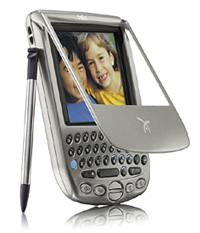 To get down to the details, the Treo 90 is 4.2 by 2.8 by .65 inches (10.8 x 7.1 x 1.6 cm). It weighs only 4 ounces, making it the lightest Palm OS handheld available.
 Permalink
 Print
PrintArticle Comments
(117 comments)
The following comments are owned by whoever posted them. PalmInfocenter is not responsible for them in any way.
Please Login or register here to add your comments.
 Comments Closed
This article is no longer accepting new comments.


RE: Typo
"Also, if you begin typing a name, it will only display all the contacts that don't match what you've put in."
I think you mean "it will only display all the contacts that match what you've put in."
RE: Typo. oh my god
RE: Typo
This one should read: "People who read these articles have brains, you know?"
> you dont
Besides forgetting to capitalize the new sentence, you also forgot the contraction of "do not" - don't.
RE: Typo
Visit us at www.tdscomputer.com
RE: Typo
RE: Typo
"Problem is, the stylus slot let's it fall out if you turn the Treo upside down."
... should be "lets" (no apostrophe) ...
Almost Perfect
RE: BackLight Settings
How do you change the backlight settings? Since holding the power button locks the keyboard, is there another key sequence to bring this up? Thanks for a great review.
Kirk
RE: Almost Perfect
RE: Almost Perfect
RE: Almost Perfect
RE: Almost Perfect
Maybe you mean third-party apps can't take advantage of it? That's also not quite true. developers can already start building their applications with required portions running native ARM code (ARMlets).
Re-Mapping of Buttons
Actually Treo Button has been around a while to allow Treo users ( all keyboard models) to customise the botton mapping as well as how the flip behaves for Tro 180 / 270.
It works well and it is free.
Here is the link :-
http://homepage2.nifty.com/hackerdudesan/index-e.html
Just to clarify.
I NEED A COLORED PDA ASAP
1.reading
2.rarely with games
3.addbook and datebook entry which i
type long notes (maybe treos thumboard or sony t665s addon thumboard will solve it?
4. i need the screen to be clear and easy on the eyes (i dont know if hi-res solves that, i know m505 didnt).
5. DURABLE since i wont be using a case for it since i need a slim pocketable pda.
6. last but not the least, long battery life. m505s life was ok for me.
PLEASE HELP ME OUT!!!
RE: Re-Mapping of Buttons
RE: Re-Mapping of Buttons
RE: I NEED A COLORED PDA ASAP
RE: Re-Mapping of Buttons
RE: Re-Mapping of Buttons
All PDA's are compromises, and the 665 screen is gorgeous, but it's bigger, and covers make it and the 515 as bulky as the old III series, or even my Audiovox Maestro that I've ditched for the Treo 90.
directional keys
"One of the things I miss is a set of directional keys. If I want to go back just a few letters, I have to pull out the stylus and tap on the screen. "
You can move throughout text with the option+scroll keys. It gets easy once you get used to it.
no stylus!
miradu
RE: directional keys
It's a small world....at Handspring.
RE: It's a small world....at Handspring.
RE: It's a small world....at Handspring.
RE: It's a small world....at Handspring.
RE: Treo stylus
Why I dislike the keyboard
1) I can use it without looking. I like to keep my eyes on people I'm talking with (and people talking in meetings).
2) I use shortcuts and DA-apps all the time.
RE: Why I dislike the keyboard
Handspring really should have included a little physical dot on two of the key buttons. Kind of how they have them on real keyboards. Would help immensely in giving you an idea where the keys are when you're not looking.
RE: Two raised dots
RE: Why I dislike the keyboard
RE: Why I dislike the keyboard
Peace Out
Alan
RE: Why I dislike the keyboard
David in Pflugerville, TX
RE: raised dots on keyboard
You Are Sooooo Wrong About Thumboards
As a long-time Graffiti user I have found that when I COMPOSE, usually ANY keyboard can be better than Graffiti, but when I take notes - when a client is speaking - in a classroom - during a speech, etc. Graffiti wins EVERY TIME.
Don't you remember in school that if you kept eye contact with the teacher while you took notes, your info was better? Graffiti is the only way to accomplish this without a full-size, touch-type keyboard attached. - Thumboards and the 'virtual keyboard' FORCE you to stare at the unit while typing and keeping eye contact with your client is no longer an option.
One more MAJOR gripe is that a thumboard (just ask Seiko) can be attached after the fact, and which adds very little to the footprint of the unit. Unfortunately Graffitt CAN'T BE ADDED to a unit where the thumboard is permanent. With very little engineering prowess, Handspring could rework the add-on thumboard concept Seiko started and make it an even more elegant option. Especially if they keep Graffiti and only make thumboards for Graffiti haters.
There is another possibility...
Maybe Graffiti DOES infringe on the Xerox patent after all, and Handspring (where the Graffiti inventor lives) sees the writing on the wall. They may want to avoid as much of a lawsuit payout as possible and this is just a way to hedge their bets.
Why else would they take away something that adds to productivity for so many users and inflict these dumb little thumboards?
ALL my future Palm purchases will have Graffiti !
RE: You Are Sooooo Wrong About Thumboards

 Only the first 50 comments are displayed within the article.
Click here for the full story discussion page...


Latest Comments
- I got one -Tuckermaclain
- RE: Don't we have this already? -Tuckermaclain
- RE: Palm brand will return in 2018, with devices built by TCL -richf
- RE: Palm brand will return in 2018, with devices built by TCL -dmitrygr
- Palm phone on HDblog -palmato
- Palm PVG100 -hgoldner
- RE: Like Deja Vu -PacManFoo
- Like Deja Vu -T_W


Typo
should be backlight
Thanks