


By: Jon Zaring
December 3, 2002
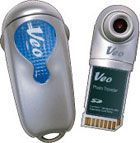 The
VEO SD Photo Traveler is a camera for PalmOS handhelds that interfaces through
the SDIO port. It supports Palm OS versions 4.x and 5.0. Pictures are either
320x240 or 640x480 in resolution and stored in 24 bit color JPGs. The pictures
can be stored in low, medium, and high quality which adjusts the amount of space
each picture occupies on the handheld. The camera lens has an adjustable focus
that allows macro (close-up) photography to regular landscape shots. In full
macro, the focusing distance is about 1 inch! The lens also rotates 180
degrees, so you can take pictures pointing forward, or at yourself. Though this
is considered a feature, it was probably due to the reversal of the SD slots
between the Tungsten-T and the M5xx. Finally, the camera boasts a countdown
timer and, for the photography buffs out there, a manual mode where the exposure
time can be adjusted.
The
VEO SD Photo Traveler is a camera for PalmOS handhelds that interfaces through
the SDIO port. It supports Palm OS versions 4.x and 5.0. Pictures are either
320x240 or 640x480 in resolution and stored in 24 bit color JPGs. The pictures
can be stored in low, medium, and high quality which adjusts the amount of space
each picture occupies on the handheld. The camera lens has an adjustable focus
that allows macro (close-up) photography to regular landscape shots. In full
macro, the focusing distance is about 1 inch! The lens also rotates 180
degrees, so you can take pictures pointing forward, or at yourself. Though this
is considered a feature, it was probably due to the reversal of the SD slots
between the Tungsten-T and the M5xx. Finally, the camera boasts a countdown
timer and, for the photography buffs out there, a manual mode where the exposure
time can be adjusted.
Installation
Installing the software was simple, just put in the accompanying CD and answer the prompts. Sync the handheld and you’re done. The associated camera program takes up approximately 150K of space on the handheld.
Hooking up the camera, however, is where my first complaint arises. The card part of the camera seems thicker than it should be, and it gives an unpleasant scraping sensation when inserting it into the SD slot. This added friction and the weight of the camera also makes it difficult to determine if the camera is seated properly. Unlike an SD card that pops up when you press on it, the camera doesn’t really move. To tell if it is inserted properly, you have to slightly tug on the camera to make sure it is latched. The VEO program will also show an alert if the camera is not seated properly.
Operation
|
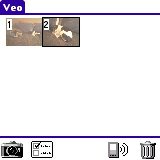
Step 1: Once the camera is installed, tap on the VEO icon and the screen on the right will appear. Using the icons on the bottom, you can take a picture, change the VEO settings, beam a picture, or discard a picture. |
|
|
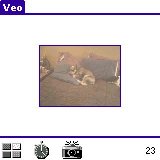
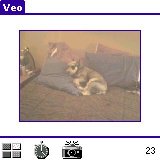
Step 2: If you tap on the camera of the preceding screen, the camera view window appears as shown on the right. To take a picture, tap the camera icon again, or press either the datebook or the notepad button. The other two icons allow you to go back to the thumbnail screen (shown previously) or set a timer for a delayed picture. The number on the far right shows an estimate of how many more pictures you can take at the current quality settings. |
|
|
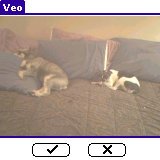
Step 3: Once you take a picture, by tapping on the camera shown on the preceding frame, or by pressing the datebook or notepad buttons, the following screen will appear allowing you to save or delete the picture. |
|
| At first, I was dismayed that the view screen for the camera was about the size of a postage stamp (see Step 2, above). Pretty difficult to see what you’re pointing at let alone trying to focus the camera. Luckily, the VEO guys had already thought of this so, by tapping on the view screen, the viewing area doubles in size. The unfortunate side effect of the increase in size is that it takes longer to update. The larger view screens lags behind what is actually seen by the camera much like the original PalmPix. In the small mode, the screen update is almost real-time. The speed of updates where fairly consistent between the M505 and the Tungsten-T, so I expect the delays are due to speed of the SDIO port. |
|
Focusing the camera is a little tricky as you have to twist the lens through two complete revolutions to go from macro focus to infinity. At each end, the lens doesn’t just stop, but kind of “snugs” up. It feels like twisting just a little too hard will strip the threads. In the middle of the two rotations, the lens is quite loose and it is very easy to accidentally knock it out of focus.
Performance
Notice that the viewing window on the above screens seem to be muddy or washed out. This is usually not the case, but it does show one of my complaints about the camera. Though not specified, the VEO seems to be set at an ASA of 100. This means that it takes adequate pictures in office lighting, does great outdoors and in the shade, but doesn’t perform very well under household lighting. The pictures I took in my home, unless right by a window, turned out as shown above. The following pictures were taken under office lighting and outside.
 |
 |
 |
| Bright Sunlight | Shade | Office Lighting |
Overall, I can’t say this was much of a disappointment since the PalmPix was set up the same way. It amazes me that the handheld camera makers did not offer an ASA of 400 as it would be much more versatile in terms of lighting conditions. Maybe someone here at PIC can tell me why.
I have mixed feelings about the pictures being stored in JPG format. For storage on the handheld, JPGs take considerably less space than bitmaps. At the same time, JPGs use a “lossy” type compression which reduces picture fidelity. I think VEO did a fairly good job at compromise by allowing the user to select the quality of the pictures. At low quality, the camera uses the highest compression algorithm allowing the pictures to be stored in the smallest space possible. At high quality, there is not as much compression so the files are much larger, but less fidelity is sacrificed. On my test pictures, a 640 x 480 picture of low quality occupied 96K of space, while a high quality picture occupied 280K.
|
Click on picture to see full size image. |
||
 |
 |
 |
| Low Quality - 96K | Medium Quality - 146K | High Quality - 280K |
Hotsync:
Hotsyncing the the pictures is fairly easy. If the default is selected during installation, the pictures from the handheld are stored in "c:\Palm\Veo Photos". The pictures are indexed by the first 4 characters of the hotsync name followed by month, day, year, then a sequence number for the day. For instance the first picture for December 02, 2002 would be jzar_120202_001.jpg. The second picture would end with _002.jpg, etc.
Along with the hotsync conduit, Veo supplies a multimedia toolkit to edit the pictures as well as create movies ¯ no, you cannot record movies with the Veo camera, ¯ homepage design, and e-Cards. Overall, the tool has quite a bit of capability and is very professionally done ¯ to cover it all, there needs to be a separate review.
I will say, however, that the picture editing has much to be desired. The brightness and contrast controls work well, and it does allow normal features such as rotate, resize and crop. Unfortunately, the hue control is way too granular, so a single step in the control radically alters the colors. The editor, itself, only shows a reduced size of the picture and will not allow viewing at a full 640x480. No other controls are available aside from saving the image and re-editing the original.
Summary:
All in all, Veo did a fairly good job with this camera. Personally, I would have increased the light sensitivity for better low light capabilities and I would have gone with a switched or fixed focus capability, as focusing is slightly difficult. Aside from those two items, I am pleased with the camera. If you are trying to decide on whether or not to buy, here are my suggestions:
- If you liked the PalmPix, you will love this camera. It is small, easy to use, and fairly capable.
- If you like gadgets, the Veo is really cool!
- If you are looking for a “good” digital camera, do not look here.

|
PROS
|
CONS
|
|
|
|
RATING:
7 / 10
|
|
| Usability: |  |
| Utility: |  |
| Value: | |
 Permalink
 Print
PrintArticle Comments
(41 comments)
The following comments are owned by whoever posted them. PalmInfocenter is not responsible for them in any way.
Please Login or register here to add your comments.
 Comments Closed
This article is no longer accepting new comments.


RE: Jpeg Format
Excellent Review
RE: Excellent Review
What separates a great review from an ordinary review is that in a great reveiw, the reviewer presents the item of interest in such a way that the reader feels as if they were actually using the device. This was accomplished very well in this review and for that I commend the reviewer.
What's the ultimate PDA??? -- Your Brain -- Don't Abuse It!!!
RE: Excellent Review
crd
RE: Excellent Review
RE: Excellent Review
Jon C. Zaring
jzaring@attbi.com
RE: Excellent Review
"The only real problem here is that if you use the camera, you can't store your photos on a SD card. They should have built in at least 16MB of memory into the camera (which would've added what, like $20 to the price?)."
I absolutely agree here. It makes no sense to have a camera if you have no ability to save the image.
RE: Excellent Review
RE: Excellent Review
FBN
Mac compatability?
RE: Mac compatability?
_________________
Sean
It is not very comfortable to have the gift of being amused at one's own absurdity.
-Somerset Maugham-
RE: Mac compatability?
_________________
Sean
It is not very comfortable to have the gift of being amused at one's own absurdity.
-Somerset Maugham-
Where to buy
So does anyone know where you can buy this online as an international sale?
I an in New Zealand and getting stuff here can be a problem…
Not JPG on Palm
1) Very difficult to focus.
2) Although hotsync creates a JPG on desktop, it appears that on the Palm itself, the format is not anything standard. I have been unable to mail pics from the Palm directly w/o a hotsync. To me, that would be the advantage of the camera, i.e., take pics on the field and email them out immediately w/o need to go back home and hotsync.
RE: Not JPG on Palm
RE: Not JPG on Palm
RE: Not JPG on Palm
Jon C. Zaring
jzaring@attbi.com
RE: Not JPG on Palm
Incidentally, the voice recorder on the Tungsten works this way. If it is saving to the Palm's RAM, it saves in .pdb format. If you tell it to save automatically to the memory card, then it will save it as a .wav file. I don't remember for sure, but I think the Handera 300's voice recorder was the same way. Now that my curiosity is up I'll have to get mine out again and check.
_________________
Sean
It is not very comfortable to have the gift of being amused at one's own absurdity.
-Somerset Maugham-
For Quick and Dirty Photos
Critical differences
I can understand Veo's rationale---develop a camera using SDIO and you can potentially stick it in Pocket PC's and Palms, not to mention upcoming devices. But this is the purpose of the UC---add on devices. The SD slot is for memory cards.
This is why I prefer the Pitch (http://www.igo.com/mapfiles/pitch.asp) over the Presenter-to-Go (http://www.margi.com/products/prod_ptg.htm), and why I'll continue to use my Xircom/Intel Wi-Fi sled (http://www.shop-intel.com/shop/product.asp?pid=SINT1043) even after someone releases a SD Wi-Fi card.
If you want a camera, buy the JamCam for about $25.00 (almost identical specs, but you can store as many pictures as you're willing to put on an MMC card.) Or buy any one of various SD-based cameras available today.
The biggest concern I have is that repeated use of this camera will destroy your SD slot, as described in the article. This seems like the final nail in the design coffin for this camera.
Palm Researcher at the University of Texas at Austin
http://www.edb.utexas.edu/petrosino/pda
RE: Critical differences
FBN
RE: Critical differences
john
RE: Wireless remote?
;)
You download the presentation to Pitch, and 'pitch away'...
---
Mike Compeau
sony t68i
The Comedy and Magic of Wanlu
Enhance your Palms usefulness
The Comedy and Magic of Wanlu Surfing the net via Palm Tungsten, Sony Ericsson T68i and Globe GPRS
Lens quality
The one issue I do have with it though and other small add on cameras is the quality of the lens. I know these are cheap cameras and you're not going to get Carl Zeiss standard optics but the lens on the Palmpix is optically appalling. Although the images are reasonably sharp in the middle they are soft are the edge of the frame, okay for portraits but not landscape style shots. I'm sure most people would pay a small amount more for better slightly better optics.
My 2c
RE: Lens quality
Jon C. Zaring
jzaring@attbi.com
Returning new Veo
As David Pogue noted in the New York Times this week, "As a general rule, trying to create a new hit product by combining two older ones is a recipe for failure. This year saw the debut of phone cameras, music-player palmtops and even Internet camcorders - but you can probably count the number of friends who own them on the fingers of one closed fist." I already have a nice digital camera, a 4-megapixel Sony CyberShot. I don't want to take it everywhere but I'd like to have the option of taking a photograph on the spur of the moment -- even if it's not of the quality Ansel Adams or my late father (a professional photographer) would like -- and this was the appeal of the Veo. If I were at the office or on a trip and had only the Veo with me, I couldn't do anything with the pictures until I HotSync'd. This makes the camera worthless to me if I can't simply stick the SD card in my office computer, in my laptop computer (with which I do not HotSync), in my Palm, or even in Grandma's computer at her 100th-birthday party at the nursing home. I could get a teeny Aiptek digital camera and get actual JPGs on an SD card and then use a program like JPEG View to look at them on my Palm, but then I'm carrying another device, albeit a tiny one.
The only way the Veo would work for me would be if someone devised a standalone program capable of converting the .pdb files into JPGs on the fly (preferably on the Palm not on the PC, without having to HotSync.
Also, the thing is pretty cheesy. It feels like a toy. The pictures are decent, though, especially in macro mode. Fortunately for me, I bought it from the Palm Store, which means I can return it within 30 days.
Why no jpeg file on palm
Many people like to get jpeg file immediately but forget that it takes a lot of computing power to do so. Most of the palms are too slow.
By the way, the palm in the picture with keyboard like pattern in the VG area looks strange to me. Anyone kowns what model is that?
Ray
Palmpix
http://www.wheelchairmodifications.org
Conversion of pictures
Photo Storage on SD Card
then store the pictures on a SD Card later to free up space on the handheld? The storage issue only would come up if your handheld ran out of space while taking photos way from your PC.
Sending photos from palm and Mac compatibility
RE: Sending photos from palm and Mac compatibility


Latest Comments
- I got one -Tuckermaclain
- RE: Don't we have this already? -Tuckermaclain
- RE: Palm brand will return in 2018, with devices built by TCL -richf
- RE: Palm brand will return in 2018, with devices built by TCL -dmitrygr
- Palm phone on HDblog -palmato
- Palm PVG100 -hgoldner
- RE: Like Deja Vu -PacManFoo
- Like Deja Vu -T_W


Jpeg Format
Happy Sony Clie User