


By: Kezza
January 17, 2003
Currently there are 6 PalmOS PDAs with hideable Graffiti areas, and 4 with no Graffiti at all. Of the 6 with Graffiti that hides, 3 are running PalmOS 5, and all use some form of a high-resolution display, be it 320x320, 240x320, or 320x480. Thanks to these new hardware innovations, the demand for on-screen text input alternatives has increased significantly. As of now, there are at least 3 pieces of software for those that prefer to keep their Graffiti area hidden (or don't have one to begin with): Jot, Graffiti Anywhere, and Newpen. Of these options, 2 are freeware, and all are OS5 and hi-res compatible.
Of course, not having access to a Graffiti area isn't the only reason for wanting on-screen text input. There's more space on the screen than on the silkscreen, and the "digital ink" echo these applications use provides instant feedback, allowing users to improve their Graffiti strokes, and therefore the recognition of those strokes. Writing on-screen can be easier, faster, and more accurate than writing in the Graffiti area.
Jot v. 2.0 (CIC software, $40)
Jot has been around for several years and, in my mind at least, is the pioneering application in this particular niche. Jot is not simply a utility to write on the whole screen, it's also an alternative handwriting recognition (HWR) system. In fact (after this review was written) PalmSource announced the licensing and enhancement of Jot for Grafitti 2, which will ship with new devices and upgrades in the near future. For those who prefer good ol' Graffiti, CIC also offers RechoEcho, a stripped-down, Graffiti-only version of Jot for $10. Since Jot's unique text input is its selling point, let's jump right into that.
The basic gist of Jot is this: each character can be recognized through a few different strokes, very similar to standard handwritten characters, instead of just one like the Graffiti alphabet. Some characters (K, T, I, Y, P and $) can be fine-tuned to suit the user's desires, albeit restricted. Punctuation is entered in one of two ways: either it is translated automatically or it is drawn between two upstrokes and then translated. Typically these characters are two strokes or more, hence the need for a specific shift mode with a closing line. All punctuation can be entered in this manner, but some characters don't need the shifting to be recognized: . , ! ? ' " @ and &.
 To help users acquaint themselves with the Jot HWR, there is a tutorial where each character can be learned. A character stroke can be displayed within the tutorial by tapping the character on the upper panel. Different character sets can be viewed and practiced using the drop-down menu in the upper right-hand corner.
Jot has a stroke for most characters available with Graffiti, as well as strokes for common gestures like cut, paste, etc. Some characters, however, are not available. Curly quotes and apostrophes (normally created using the extended shift with Graffiti) aren't an option.
Now, if you were paying attention before, you probably noticed that the stroke to induce caps and caps lock (bottom-up) is used for punctuation in Jot. So, how does one write capital letters? Jot moves caps to the middle of the input area. To enter a capital letter, write it across the border of the letter and number entry areas.
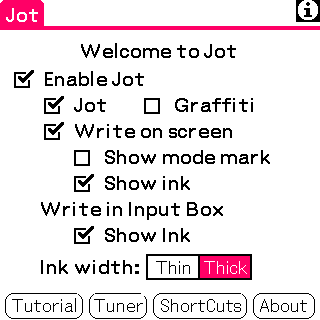
On to functional usage. Configuring Jot is fairly simple, and nearly everything is adjusted on the main screen. Jot is either on or off, there is no option to activate or deactivate it from within another application. In use, the ink for both Jot and Graffiti HWR is smooth and accurate. Translation of each stroke into a character is a little slower with Jot than with Graffiti. Commonly-used punctuation entry with Jot is so simple it's almost counter-intuitive for me. With Jot, a single tap yields a period. I can't count the number of times I entered double periods accidentally, being so accustomed to the rapid double-tap of a Graffiti period. As for other aspects of usage, one of my favorite things with Jot is the tap-hold-drag text selection. Tapping and holding on the cursor pauses it (think of it as grabbing the cursor), and dragging selects, just like with normal text input. I haven't found this to work effectively in other on-screen text input utilities.
Overall I found Jot to be a solid piece of software, and faster than entering Graffiti with the silkscreen alone (more on that later) but I'm so comfortable with Graffiti that I had trouble remembering to use the custom Jot strokes, and I was often left tap-tap-tapping to get to the Jot tutorial to learn (again) how to make an asterisk. Overall, I prefer Graffiti, but for those who have a hard time getting used to the Graffiti characters, Jot should be a blessing. Every character is recognized from essentially standard writing (be it cursive or print), and many will prefer this over having to learn new ways of writing the same alphabet. My primary gripe with Jot, however, is the hefty $40 price tag. For a piece of software that has remained essentially unchanged for several years, aside from an OS5 and hi-res compatibility upgrade, I think it is overpriced. While it was an extremely innovative application when it was released for Windows CE in 1996, $40 isn't much of a fair price for software that hasn't seen much development since it's initial release.
|
Overall: 7/10 Usability: 4/5 Appearance: 5/5 Value: 2/5 |
Graffiti Anywhere v. 1.2 (Thierry Escande & Gilles Fabre, freeware)
As far as luxury features are concerned, Graffiti Anywhere (GA, for short) is the Cadillac of on-screen text input utilities, minus the hefty price tag. The software is available as a standalone application only, no hack option, and while enabled it is typically in a standby mode, waiting for a signal to activate it. The premise is simple (write Graffiti on the whole screen) but it is executed with flair.
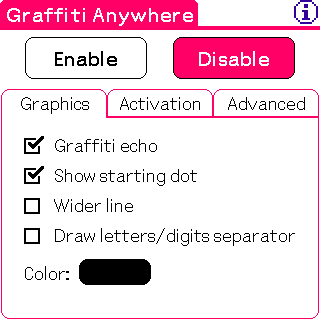 Let's begin with setup. The application itself is a single screen with three tabs: Graphics, Activation, and Advanced. The top of the screen is always composed of enable and disable buttons. The Graphics tab contains options for cosmetic changes for the Graffiti echo, including an option to choose the ink color. The Activation tab sets preferences for which hard button activates GA, and how. The 4 hardware buttons, the jog dial, back button and Tungsten T voice recorder button are supported, and GA is either toggled with a long press or a short press, or it's only active during a long press. There are also toggles for single tap recognition (on = tap for cursor placement or button press, off = ability to shift for punctuation on-screen) and autodeactivation options. Lastly, the Advanced tab brings up reactivation options and application specific activate/deactivate.
Functional use of GA is quite simple. The only major issue for me is whether or not to turn off single-tap recognition. On one hand, it's really convenient to enter punctuation on-screen (something that can't be done with Jot set to Graffiti mode), but it's also really inconvenient not to be able to press buttons or move the cursor to another line immediately when needed. From my usage patterns, it seems that turning off single-tap is great for extended writing where minor edits won't be necessary; there's no need to move to the Graffiti area to punctuate, and this may be the form people with hidden Graffiti prefer. With it turned on, however, it's great for minor edits and jumping around after writing to fix misspellings, etc. For those using Graffiti to make changes to large documents (in Documents to Go or WordSmith, for example), this would be faster and more convenient that constantly moving back and forth between the screen and the Graffiti area to make small changes. One problem still lingers, though: with GA activated, blocks of text can't be selected.
Overall, GA is robust yet simple software to operate. Configuration is easy, but tips and help are still available from within the program. I'm extremely fond of the long button press to activate, and the activate/deactivate indicator is a quick screen flash that's unobtrusive yet hard to miss. As silly as it sounds, my favorite aspect is the customizable ink color. In case it wasn't already apparent from the screenshots, I like to have my interface colors personalized, and this complements that preference nicely. In use, GA is speedy, there's never a delay in showing my strokes or translating them into characters; I can consistently write faster and more accurately than I ever could using the silkscreen area alone.
|
Overall: 9/10 Usability: 4/5 Appearance: 5/5 Value: 5/5 |
Newpen v. 1.4 (Tatsuo Nagamatsu, freeware)
Newpen is a simple and versatile choice in on-screen input. The main screen is made up of enable and disable buttons, and checkboxes for various behavior patterns (draw stroke, command bar support, sound, single tap recognition). From the menu, users can choose their preferred method of activation for the software. Similar to GA, Newpen is activated from within other applications, after being enabled in the main program. Activation consists of either a tap-and hold for 2, 3, or 4 seconds, or a shortcut stroke. Users can also choose to have a Graffiti shift indicator turned on. This is a small box that appears in the lower right hand corner of the screen. When Newpen is inactive its borders are dotted and when it is active they are solid. Shift indicators appear within this box. The box can also be tapped to turn Newpen on and off on-the-fly.
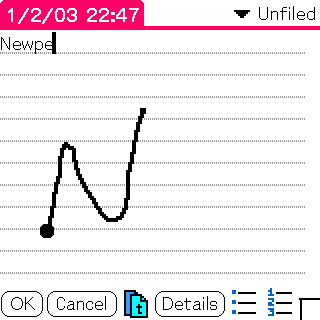 When the shortcut stroke is invoked in a text area, Newpen goes into action. Like GA, either single taps can be registered as selections on the screen or as punctuation. Newpen appears to have some kind of text selection function, but for the life of me I couldn't actually get it to work. Once text was selected, if I tried to erase or overwrite it, the highlight disappeared and my writing continued at the end. If the command bar support is turned off (which I prefer), an accidental stroke normally invoking the command bar is not registered as such. This prevents a lot of accidental commands, and is indeed a blessing for those of us not so perfectly horizontal with our space strokes.
One functional problem I had with Newpen that I didn't encounter with GA or Jot is when the single tap is selected, occasionally the cursor skips around the text area, ending up on lines where it wasn't wanted. My best guess for why this happens is because of another functional problem with Newpen: it's slow. There's a significant lag time when drawing the stroke on the screen, and I think occasionally this lag causes the software to misinterpret a stroke as a tap and moves the cursor accordingly. Slow, deliberate strokes eliminate this problem. For those who don't write that fast with Graffiti in the first place, I doubt this would ever be an issue.
My favorite thing about Newpen is the tappable activation box. While I did occasionally find it to be a distraction, mostly it was very useful. It's easier to switch between active and inactive this way than by the button pressing of GA. However, I did prefer the button pressing for initial activation over the shortcut stroke and tap-and-hold methods. The text box doesn't always automatically show up when Newpen is enabled, and sometimes only appears after activation. It'd be great if I could hold down the jog dial to activate Newpen, then use the box from there on out.
This brings me to another possible improvement for Newpen: auto deactivation when exiting. This is another favorite aspect of GA, and I think it should be included with every on-screen input utility.
|
Overall: 7/10 Usability: 3/5 Appearance: 4/5 Value: 5/5 |
Speed Tests
Yeah, ease of use and attractive design are important factors in choosing input software, but speed is probably most important of all. Using WPM (DDH Software), I tested just how fast each of the input options discussed here performed compared to writing on the Graffiti area, on a Clie SJ30. After a 10-run warm-up, I did 4 official trials of each. Because my speeds were quite consistent, I didn't see any need to do more. I'll borrow from Dan Royea's Great Input Showdown in formatting the results:
| Silkscreen | GA | Newpen | Jot (HWR) | Jot (Graffiti) | |
| Avg | 27.5 | 30.25 | 16.75 | 15.75 | 27.75 |
| SD | 1.5 | 1.125 | 1.875 | 0.875 | 1.25 |
| Max | 29 | 32 | 20 | 17 | 29 |
| Min | 26 | 27 | 13 | 14 | 26 |
It's worth mentioning that these are just my results. Everybody writes differently, so individual results may vary. ;)
Overall, as I think is probably apparent from the results above, I found GA to be by far the speediest and most responsive of the methods tested. Jot's Graffiti mode was second, and still quite speedy, but had some delay issues in translating the strokes into characters. Using the silkscreen is a little slower than the two just mentioned because my quick writing tends to result in confusion in the translation. Primarily, two of my strokes are often close enough together that they're registered as one, slowing the whole process down because I go back to delete the mistake and have to enter both characters again. I didn't encounter this problem with Jot or GA. Newpen, however, had some speed issues. The draw speed of the Graffiti echo was noticeably lagged, resulting in garbled strokes which were (of course) misinterpreted. To compound this problem, there's more of a recognition delay than with the other methods. So, in short, I had to write slower using Newpen or it didn't work right. Some of you may be furrowing your brows over the large gap in my Newpen speed trials. The Newpen results were actually much slower during the warm-up sessions, and that 20 wpm score was an anomaly. The other two results not listed above were 17. Therefore, I feel the average I listed is accurate. The Jot HWR was pretty miserable. I found the translation time to be quite slow, and frequently entering a space too quickly after a character resulted in a misinterpretation. This is just one of Jot's strengths acting as a weakness - two strokes can often yield one character. Therefore, to avoid this problem, a moderate amount of time after entering the last character in a word before entering the space is required to eliminate bad translation.
Conclusions
After all the testing and evaluating was finished and my thoughts and opinions written down, I liked one of these applications so much I continue to use it. I think it's fairly obvious from the results above as well as my individual reactions that my preferred method is Graffiti Anywhere. I find it to be the most versatile and easy to use, as well as the most customizable option. Not to mention, the fastest and most accurate. I say this with one disclaimer: results on an OS5 machine will probably be significantly different. The draw and translate lag times in Jot and Newpen are probably not an issue on a handheld using a fast processor, and I'm sure there are loyal users of each of these utilities on OS5 machines who can attest to this.
 Permalink
 Print
PrintArticle Comments
(19 comments)
The following comments are owned by whoever posted them. PalmInfocenter is not responsible for them in any way.
Please Login or register here to add your comments.
 Comments Closed
This article is no longer accepting new comments.

Suggestion
"Never offend people with style when you can offend them with substance." - Sam Brown
Heh heh
1.A real scientist doing a real statistic.
2.improvement in content rate in the past 3 days.
Newpen Crashed my palm
I have a T|T (as many may know) and tried Newpen. Initially I thought it was the bomb but I started having some problems and just quit using it.
First it jumped around the screen sometimes as previously mentioned.
Second, sometimes I got no echo and no registered input. Usually when that happened I just had to go to a different part of the screen to begin text entry (a little to the right or up).
I couldn't always tell if it was on because the box didn't show up. Sometimes it started out on, sometimes not.
Hastle to turn it off to move between fields and start writing again.
And mostly, it caused my T|T to lock up in certain games. Especially in Bejeweled. Mid-way through a game the whole palm would lock and I would have to do a soft reset. I also noticed this with a couple of card games that require screen taps. If I disabled Newpen the games worked fine.
So.... all in all it was much easier to just open the darned slider and forget it.
Maybe I will try GA.
Claire
Jot can do punctuation in graffiti mode
RE: Jot can do punctuation in graffiti mode
I'll see about correcting the review.
--------------------------------------
"Well, if it isn't the leader of the wiener patrol, boning up on his nerd lessons"
http://stirwise.com
Test results skewed - not objective
I have tried many times recently writting in both Graffiti and Jot HWR and am MUCH faster with Jot. I can't believe how much slower you were with Jot HWR - you must be very good with graffiti or more appropriately more used to graffiti. Nevertheless - real testing would have used people who were either familiar with both of not familiar with either.
After reading your article I tried Graffiti Anywhere and it is a nice program, but it is really nothing more than Graffiti with on screen capabilities. Jot really lets you write (print) more naturally. Also being able to write caps without drawing an up-stroke, rather writing between the alpha and numeric area is a real time saver.
I personally think Jot is the quickest of the bunch once you have used it for any amount of time.
Regards, Tom S.
Newpen Shortcuts
NEWPEN AND OKEY COMMANDS
NEWPEN
1. Keyboard = Bottom Left to Top Right Stroke + k.
2. Punctuation Shift = Bottom Right to Top Left Stroke Once.
3. Dot = Bottom Right to Top Left Stroke Twice.
4. Find = Single Tap Bottom Left Black Corner.
5. New Entry = Bottom Right to Top Left Stroke + n.
6. Select/Highlight Word = Double Tap on Word.
7. Select/Highlight Row = Triple Tap on Row.
8. Select/Highlight All = Bottom Left to Top Right Stroke + s.
9. Note in Date = Bottom Left to Top Right Stroke + a.
10. Beam = Bottom Left to Top Right Stroke + b.
11. Copy = Bottom Left to Top Right Stroke + c.
12. Delete = Bottom Left to Top Right Stroke + d.
13. Font = Bottom Left to Top Right Stroke + f.
14. Graffiti = Bottom Left to Top Right Stroke + g.
15. Lookup = Bottom Left to Top Right Stroke + l.
16. Paste = Bottom Left to Top Right Stroke + p.
17. Undo = Bottom Left to Top Right Stroke + u.
18. Cut = Bottom Left to Top Right Stroke + x.
OKEY
1. Selecting a Control of a Form/Menu = Hold Times and Double-Taps of the Central D-Pad button, Right and Left Taps of the D-Pad.
2. Hold down the middle button long enough to see the first pulldown menu flash, then let go. Now you just press up or down on your navigator to select which pulldown menu you want to select. Press the middle button to select that pulldown.
3. Pressing right on the D-pad opens the menu.
Requested Feature for new Input technologies
I've had a Tungsten T since it was released...and I had never used any of these software packages. I downloaded the 'assumed' favourite: Grafitti Anywhere. This should ring true to most Tungsten T users: You hold your device so that your left thumb is on the Voice Memo button. You would like to map that button to be the switch for your graffiti recognition software. In Grafitti Anywhere, there are three types of choices to toggle the software: 'Quick Tap', 'Long Tap' or 'Tap & Hold'. One of the new functions on my Tungsten T that I love is the voice recording feature...so when I'm driving and I remember I need to add something to my palm, I can take it out and record my message without looking anywhere on the device, simply by holding and talking. Next, if you have saved messages, to get into them just simply tap and you are in the application. All three of the toggling mechanisms in the Grafitti Anywhere software take away from the functionality of that application. I have thought of a way for the software to be able to work hand-in-hand with the Tungsten T voice recorder feature. If the developers came up with a way to detect a 'double-click' of the button, then we could go on using the Voice recorder feature along with the Grafitti Anywhere software, without any conflicts. This way, we could do anything Palm intended us to do with the Voice Recorder software as well as use Grafitti Anywhere to save us from uncovering the hard grafitti section on our T|T's! What does anyone else think? It should be pretty easy to implement through the Software?!?!
notepad screenshot in NewPen review
Thanks for the review - slightly OT qn - what's the notepad program you're using the screenshot of the NewPen review? I like the looks of the bullets & numbering!
Alan
PS If it's just a new version of the standard Palm app in OS5 then feel free to ignore/laugh at me - I won't have my Tungsten for another week! (m505 just now)
RE: notepad screenshot in NewPen review
--------------------------------------
"Well, if it isn't the leader of the wiener patrol, boning up on his nerd lessons"
http://stirwise.com
RE: notepad screenshot in NewPen review
Alan
I DON'T LIKE SHOUTING
But: Did anyone else have trouble with lowercase letters in Graffiti Anywhere? I had real trouble getting it to do lowercase consistently. What's the trick? I could always draw a lowercase F, but never, ever, a lowercase A. Very strange. Any pointers appreciated. Lowercase didn't seem to be mentioned in the help anywhere, or I missed it.
Thanks!
Graffiti Anywhere 1.3
Available at PalmGear: http://makeashorterlink.com/?D23852623
Thanks
Thierry
Fitaly?
I bring this up because I've seen people get 60+ wpm (one guy did like 85) with Fitaly
Peace,
-Bartman007
RE: Fitaly?
And how about a keyboard / thumboard like the Tungsten W and Sony TG50? That is where I might invest next. Seems like the thumboard would be much easier and faster.
someone tell me how to add a picture, then I will really scare you all!
Alternatives
RE: Alternatives
Hi, for me, the by far best input method is MessagEase (and I have tried quite a lot!). After a short accommodation phase to get used to the completely new style of the keyboard, I now hardly ever use my external storeaway keyboard, not even if I have long text to write. I can take notices in conferences without any problems. Simply said, since I have MessagEase installed I use my Handera 330 much more.
So MessageEase gets full marks from me, and I think it should have been included in this review due to it's completely new keyboard style.
Former Psion-User


Latest Comments
- I got one -Tuckermaclain
- RE: Don't we have this already? -Tuckermaclain
- RE: Palm brand will return in 2018, with devices built by TCL -richf
- RE: Palm brand will return in 2018, with devices built by TCL -dmitrygr
- Palm phone on HDblog -palmato
- Palm PVG100 -hgoldner
- RE: Like Deja Vu -PacManFoo
- Like Deja Vu -T_W


Newpen is fast enough on TungstenT
I recently installed NewPen and find it fast enough for my use on a Tungsten T. I'm a Palm user since 1996, and can do 25 wpm with native graffiti.
I did find that once in a while the cursor jumps to somewhere unexpected, in a page with multiple fields, but I attribute this to me inadvertently doing a double tap or something.
Also I use the new CaseToggle for OS 5 and find the combination works well.
NewPen does allow text block selection with a tap-hold stroke. That works well enough for me.
Still, after reading your review I will also try Graffiti Anywhere.
Stewart Midwinter
PDA user since 1992
Handera HE330 and Compaq Aero 2110