


Palm OS Easter Eggs
Just in time for the Easter holiday, we have a small tutorial on Palm OS Easter eggs. An Easter egg is a hidden secret or function embedded in a program deigned to amuse the end users. Impress and amaze your friends and coworkers with two "secret tricks" found in the Palm operating system. The Easter egg and the Taxi have been in the Palm source code for years and now on the IIIc they are in color!
|
The Easter Egg
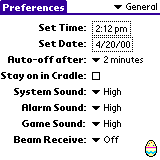
There is an easter egg that is actually an easter egg! It enables a other Easter eggs and displays a small-decorated egg in the general Prefs screen. Procedure: Open up the preferences general category. In the Bottom right hand corner of the screen (above the calculator) draw a tiny clockwise circle. |
|
|
The Taxi cab
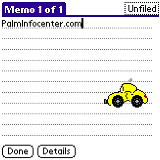
With the taxicab easter egg a small taxi drives across the screen. Why a taxicab? The prototype code name for the original Pilot was the Taxi. To see the taxicab first you must have the Easter egg enabled. Switch to the standard Memo pad. Then hold down the PageDown button while drawing a line from the middle of the graffiti area to the left edge of the case. What's interesting about this egg is that if you leave the easter egg active sometimes the Taxi will drive across the screen at random intervals for no apparent reason. |
|
This is by no means a complete list of Palm OS Easter eggs! For a comprehensive list check out PDALife's Easter Egg page.
 Permalink
 Print
PrintArticle Comments
(6 comments)
The following comments are owned by whoever posted them. PalmInfocenter is not responsible for them in any way.
Please Login or register here to add your comments.
 Comments Closed
This article is no longer accepting new comments.

Also works in other apps...
That's funny, on my Prism it's a Porche!
Hinda like Handspring's stock price compared to Palm's right now. Ha ha!


Latest Comments
- I got one -Tuckermaclain
- RE: Don't we have this already? -Tuckermaclain
- RE: Palm brand will return in 2018, with devices built by TCL -richf
- RE: Palm brand will return in 2018, with devices built by TCL -dmitrygr
- Palm phone on HDblog -palmato
- Palm PVG100 -hgoldner
- RE: Like Deja Vu -PacManFoo
- Like Deja Vu -T_W


The Inchworm