


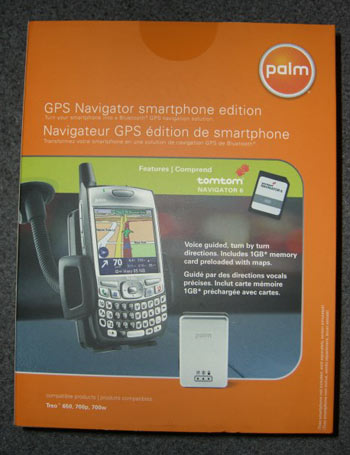
Palm GPS Navigator Smartphone Edition Review
by: Kris KeilhackAugust 16, 2006
See our full section of Treo GPS Accessories.
History of Palm GPS Navigation + Earlier Devices
My first introduction to the world of portable GPS receivers was a first-generation Garmin Street Pilot in 2000. With its dim LCD screen, flaky PC-based map loading software and pricey proprietary memory cards and peripherals I gave up on personal GPS systems for several years. I decided to revisit the concept again in 2005 after getting lost one too many times while traveling. I had read some positive reviews of products by a Dutch company called TomTom, so when I saw they had partnered with PalmOne to come up with a complete kit I had to give it a shot.
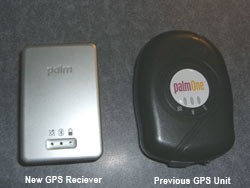
My earlier purchase, the older PalmOne (3207NA) GPS Navigator Kit, features a Holux Bluetooth GPS receiver (the rebranded GR-230) that sometimes takes an eternity to lock onto satellites. This older Holux receiver, while featuring outstanding battery life, also has a tendency to suffer coverage dropouts and occasional Bluetooth pairing glitches. TomTom Navigator 5 software, even with its most recent update (5.201), has its fair share of quirks and officially does not support the Treo 700P. All of these factors set the stage perfectly for the introduction of a new generation of TomTom software and Palm's GPS hardware.
The new GPS Navigator Smartphone Edition is available now from Palm.com and the PIC store for $229.99 USD. I am uncertain what Palm's retail plans are for this product but I have seen earlier Palm GPS kits for sale at Office Depot and CompUSA. I'd also expect this bundle to be sold at Palm's retail stores and kiosks.
Packaging
For a change, someone has introduced a product where EVERYTHING is included in the box and that "someone" is Palm! Yes, Palm somehow has managed to outdo their previous bundle this time around. Upon opening the oversized box clad in Palm's new corporate color scheme, one cannot help but notice several printed pieces of documentation and a foldout starter guide. What a welcome touch in today's PDF documentation-centric world! Another nice touch was the consolidation of the nine (!) CDs of TomTom 5's map set onto a single DVD. The DVD also contains additional installable voices in any of twenty languages.
However, the most significant addition to this bundle is a 1gb MultiMedia card (MMC) that is pre-loaded with maps of the entire United States and Canada. Even better, both Windows Mobile and Palm OS executables of the TomTom Navigator app reside on this MMC, befitting Palm's new OS-agnostic outlook on life. This bundled MMC is a writable card so the user can add a few extra megabytes of extra files (be warned that this card auto-starts upon insertion) or update the maps down the road. To aid the user in transferring new maps to the SD/MMC cards, Palm thoughtfully bundles a mini card reader in the box. It's small, USB 2.0, and supports SD, MMC, RSMMC, and Mini-SD.
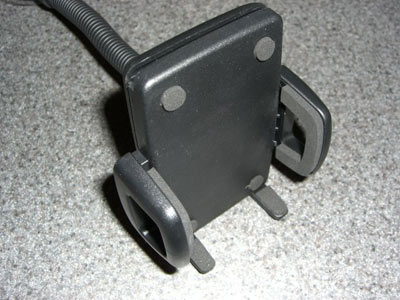
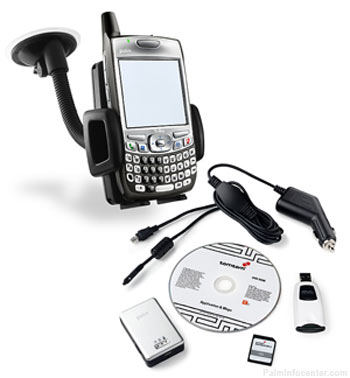 The rest of the box contents are fairly rudimentary: Windshield mount & cradle, adhesive dash mount, 12V DC combo charge cord for both the GPS receiver and Palm devices utilizing the Athena connector.
Now with the accessories out of the way I'll focus on the meat and potatoes of this kit, the GPS receiver and the TomTom software, below.
Hardware Design, Construction, and Performance
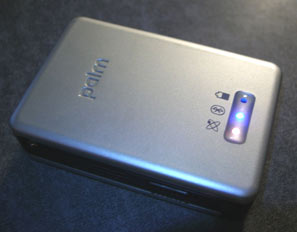
The new GPS unit, also produced by Holux for Palm and TomTom, is a bit smaller in all dimensions than its predecessor. It's also lighter and much more stylish; its sleek silver and black trim looks more modern than the humble CDMA Treo it's paired with!
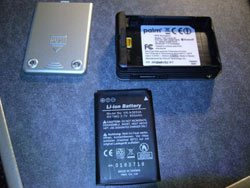
Two nice touches reside on the underside of the unit: small rubber feet keep the unit from sliding around on a dashboard and there's a removable door concealing a user-replaceable 3,7V, 850mAh li-ion rechargeable battery. The unit is charged via the same mini-USB port that graces the older GR-230. I was actually hoping Palm would have modified Holux's original design enough to incorporate an Athena connector to make for a tidier plug arrangement or additional charging options for current Palm owners.
Build quality is good on this receiver--its light weight belies its solid construction. A nice "Palm" logo is embossed on the top panel. A row of colored LEDs provides satellite lock, Bluetooth pairing status, and battery life. The annoying rubber flap over the USB port of the GR-230 has thankfully been eliminated.
I haven't had the kit long enough to compare battery life but as long as the new GPS receiver lasts at least as long like its predecessor I'll be pleased. I managed to make it through an entire weeklong trip on a single charge with the old PalmOne receiver so I have high hopes for this new unit. The replaceable battery is a good touch, especially if new batteries can be purchased inexpensively online.
Satellite acquisition was fast and rock-solid. This can be attributed to the latest SiRFstar III chipset contained within. Even when indoor and relatively close to a window I had no problems locking onto at least four satellites. Acquiring satellites while driving at 60+ mph gave no troubles! As this moment my Treo is sitting in its cradle with the GPS receiver under my desk and I am showing full strength reception on seven satellites-superb! I never had a single instance of BT disconnections or pairing loss like I experienced with the older Holux model. I am not sure if this is attributable to the new Bluetooth 1.2 stack on the 700P, the newer technology in this GPS receiver, or both.
As stated earlier, Palm has carried several components of the earlier kit to their new Smartphone Edition. The windshield bracket & cradle, dash mount, and DC combo charge cord are all carryover items and are of excellent quality (the windshield mounting bracket is made in Germany!) These work precisely as expected but I really do not care to use any of the mounting hardware. I personally am not a big fan of windshield mounts as they scream, "steal me" to thieves and prying eyes. I actually keep my GPS receiver plugged on but sitting securely on a $10 Super Sticky Pad by HandStands. Then the Treo safely resides in my car's cupholder between the front seats while it charges.
I have an existing 2gb SD card and an internal card reader in my PC so the bundled memory card and reader are nice extras but rather useless for me personally. Most power users will already have similar equipment but it's still a wonderful touch by Palm for novice users to include them in the package. One can never have enough external storage and a spare SD/MMC reader is a great addition to one's travel bag!
Software Part 1-Installation and Configuration
Herein exists the most compelling reason for owners of earlier Palm GPS solution to upgrade. For the time being, this Palm kit is the only way to acquire TomTom Navigator 6 software. While the pre-loaded MMC is the easiest way to begin using TT6, experienced users who prefer to use their own storage can still install the application into device memory and load as few or as many maps as they desire onto their own SD cards alongside other software programs and media files. With the rapidly plummeting price of 2gb and 4gb SD cards, this is a very realistic scenario for many users.
Palm and TomTom have drastically simplified the startup process with the inclusion of the pre-loaded 1gb MMC. I opened the package, installed the card into my Treo, activated the software wirelessly over my Treo's EVDO connection and began plotting a trip immediately. This PC-free install and setup makes the product non-threatening for inexperienced users but also perfect for impatient veterans like yours truly!
For the purposes of this review and the time constraints involved, I stuck with the pre-loaded MMC in my Treo. I did briefly test the TomTom software on the DVD and I had none of the issues trying to install maps or the application to my SD card like I did with the older TT5.
 The only crash I experienced was during the initial setup menu. TomTom 6 handles incoming phone calls as well as frequent exiting and restarting of the program with aplomb.
I am intrigued to see if the software makes any Treo-specific system calls that would preclude it from functioning on a recent Palm PDA device such as the LifeDrive, TX or T5. I find it unfathomable that Palm would intentionally limit the potential audience for this device, as there are still many Palm OS diehards out there who do not yet own a Treo. Additionally the larger screens and expanded resolution of Palm's non-Treo devices would make for a perfect navigation platform. Had time not been such a factor I would have definitely tested this kit on my Palm TX. I don't see any technical reason that this needs to be solely a "smartphone edition".
Software Part 2-Features and Operation
A very pleasant surprise was the elimination of all of the bugs plaguing the version 5 release of TomTom Navigator, especially when running it on Treo 700P. The aggravation crash upon startup when toggling Bluetooth on is gone. Overall performance seems snappier than version 5.201 was on my 700P but it does lag in certain instances.
The entire TomTom Navigator application has received a mild but noticeable graphical facelift. The 3D map view features faster screen redraws and a nice sky gradient. There's an overall richer use of colors and aesthetic details throughout the onscreen menus.
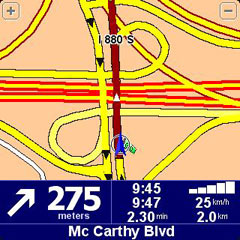 A number of improvements exist between TT5 and TT6. In the interest of saving space, I will comment on four improvements that were of the most interest to me:
1. It's now possible to plot a trip from point A to point B anywhere in the USA or Canada. Previously, TT5 would not let the user drive from NY to Florida since they were on separate "maps".
2. It is now possible to enter not only a point of interest or a point on the map as a destination but the actual latitude and longitude can be input as a destination. This feature was bizarrely absent on earlier TomTom versions and can be helpful for finding one's way to a rural location. This also improves the software's usefulness for non-automobile based travel such as hiking or biking.
3. Another huge improvement is that contact navigation is integrated into the TomTom application itself. Prior to version 6, a separate icon on the main launcher had to be selected in order to navigate to a contact's address. This was a kludge and felt very tacked-on to the Navigator application.
4. The base map of TT6 is vastly improved, expanded and updated over the previous version. With TT5 my subdivision's street didn't even exist (it was built after 2000) and several local businesses that opened in the past half-decade were absent. I'm glad to report that the map data in TT6 appears to be approximately two years old, give or take a year. TT6's Points of Interest (POIs) are also quite detailed and can be searched by proximity to one's current location, one's home address or the destination. POIs along the predefined route can also be displayed.
 TomTom has seen fit to integrate a number of safety-related features (speed limit alert, grayed out menu options while in motion) to keep the lawyers happy and the litigation to a minimum. Being a daring individual with a blatant disregard for safety nets of all types, I just skipped over these parts of the program as I sought out the "fun" parts.
Another feature that I think I will grow to appreciate was the program asking if arrival time is a factor when calculating the route. Additionally, custom routes can be plotted by "fastest", "shortest", "Avoid freeways", "walking route", "bicycle route" or "limited speed".
The program also incorporates a dizzying amount of extra features available to subscribers of the mostly fee-based TomTom Plus services. I was unable to connect to the TT server to test these features even though most of them [weather, traffic reports, Safety Camera alerts, TomTom Buddies (geocaching with your friends, basically)] seem to be of dubious benefit. I suppose TomTom's servers are not yet ready to handle requests from Navigator 6 since it's such a new product.
Pros:
-Fantastic & comprehensive hardware bundle-everything's included
-A decent value considering the sum of the parts
-New GPS receiver is a huge improvement over earlier units
-Stylish receiver with excellent fit & finish in all components
-TomTom 6 is a huge step forward in polish and features from TT5
-Strong assortment of printed documentation
-Reasonably priced considering the quality of the components and the valuable extras
-Windows Mobile and Palm OS functionality in the same box
-Amazingly easy to get going-no PC required! Can install new maps quickly via SD card reader without having to Hotsync
Cons:
-GPS receiver should utilize Palm Athena/multi-connector for charging
-Experienced users may already own a memory card + reader and desire a lower MSRP
-A way to charge the GPS receiver outside of the car (PC USB cable or AC adapter) would be nice
-Palm is mum on compatibility with their non-Treo products (at the time of testing)
-TomTom Plus services were inoperative (at the time of testing)
-No support documentation or product info on tomtom.com (at the time of testing)
Conclusion
One of the best PDA accessories I've ever used and certainly Palm's best accessory release ever. Quite simply put, Palm may have found THE new killer app for its Treo line (Windows Mobile and Palm OS) with this stunning assemblage of goodies. It's a rare event when hardware and software mesh so seamlessly to perfectly to suit the needs of mobile travelers of all experience levels. Palm would be well served to aggressively market this package and the Treo's adaptability to navigational duties. I would also encourage Palm to offer a version of this bundle for their TX/LD/Tungsten models, especially for mobile users who might prefer a larger 320x480 screen.
My overall rating:  4.5 / 5
(5/5 if TomTom's web site and support are quickly brought up to date for TT6 and/or if Palm OKs the software to run on non-Treo devices)
The new GPS Navigator Smartphone Edition is available now from Palm.com and the PIC store for $229.99 USD.
View PalmInfocenter's full selection of Treo GPS Accessories.
 Permalink
 Print
PrintArticle Comments
(49 comments)
The following comments are owned by whoever posted them. PalmInfocenter is not responsible for them in any way.
Please Login or register here to add your comments.



RE: switch map set?

No, you do not have to switch to a specific map set AFAIK. Of course, I was only able to get 30 miles across the nearest state border but still...from what I've gathered from Palm & TomTom you can have contiguous state to state mapping.
Again, I just used the preloaded MMC for the purposes of the review and it had the entire USA contained on it so I never experimented with the loading of maps for anything more than for curiosity purposes (having a single DVD is sooo much nicer than a pile of 9 CDs of various regions).
If/when I end up buying a 4gb SD card I figure I'll load the whole country on the card and still have ~3gb left over for other stuff. Then I'll keep the preloaded TomTom card in my travel bag as a spare or as a backup.
Pilot 1000-->Pilot 5000-->PalmPilot Pro-->IIIe-->Vx-->m505-->T|T-->T|T2-->T|C-->T|T3-->T|T5-->TX-->Treo 700P
RE: switch map set?
http://www.newegg.com/Product/Product.asp?Item=N82E16820141037
Good luck.

Good job Hkklife
Nice review.
Surur
They said I only argued for the sake of arguing, but after an hour I convinced them they were wrong...
Hey!! I made associate writer at PDA247. Come see my nattering over there!!
www.clieuk.co.uk/wm.shtml
RE: Good job Hkklife
Tim
I apologise for any and all emoticons that appear in my posts. You may shoot them on sight.
Treo 270 ---> Treo 650
RE: Good job Hkklife
;-)
If time & circumstances permit, I'd actually like to try the new TT6 card and see if it works on non-Treo Palms (TX, LD, T5 especially) as well as (highly unlikely I'll be able to test this) non-Palm WinMob devices.
i'd imagine that aside from the 240*240 screen resolution of the 700W vs. the 650/700P's 320*320 there are very few differences. TomTom's UI & code runs nearly seamlessly between both OSes.
Pilot 1000-->Pilot 5000-->PalmPilot Pro-->IIIe-->Vx-->m505-->T|T-->T|T2-->T|C-->T|T3-->T|T5-->TX-->Treo 700P
RE: Good job Hkklife
I WILL try the kit out on my TX this weekend.
Pilot 1000-->Pilot 5000-->PalmPilot Pro-->IIIe-->Vx-->m505-->T|T-->T|T2-->T|C-->T|T3-->T|T5-->TX-->Treo 700P
RE: Good job Hkklife
Computers don't make mistakes, people do.
Multiple T650 setup
"activated the software wirelessly over my Treo's EVDO connection"
I was hoping that I could buy one and leave the unit and MMC card in the car and whoever needed it would just pop in the card and go.
TomTom piracy
On another note, when are TomTom going to stop forcing me to pirate their Australian map and actually offer it for sale? My only current option besides buying one of the stand-alone GO units is to download a hacked map from the net. And while it's proven reliable so far it's starting to get a little out of date and appears to be based on the 2004 UBD.
Pull your finger out, TomTom.
Tim
I apologise for any and all emoticons that appear in my posts. You may shoot them on sight.
Treo 270 ---> Treo 650
How's the edit function coming, Ryan?
Ugh. MEAN. You'll see what I MEAN.
How's the edit function coming, Ryan? ;)
Tim
I apologise for any and all emoticons that appear in my posts. You may shoot them on sight.
Treo 270 ---> Treo 650
RE: Multiple T650 setup
I seriously doubt that anything TomTom does will have any effect on piracy. If there's one truism in the software world, it's that copy protection is easily bypassed by people who want to. The only ones that it actually inconveniences are the legitimate users.
RE: Multiple T650 setup
Tim
I apologise for any and all emoticons that appear in my posts. You may shoot them on sight.
Treo 270 ---> Treo 650
RE: Multiple T650 setup
I was severely tempted to pirate the maps myself a few days ago. I have a full CD set to use with my Universal, but TomTom forced me to buy another set to use with my HP 6915, which comes with TomTom and one city map free, at the low low price of only £100. In the end I decided to save myself the hassle of not having any support in the future, and just ponied up the money. I do however resent having the cost of my device increased from £400 to pound £500. At the very least they should have included the map of the whole UK in the price of the unit.
Surur
They said I only argued for the sake of arguing, but after an hour I convinced them they were wrong...
Hey!! I made associate writer at PDA247. Come see my nattering over there!!
www.clieuk.co.uk/wm.shtml
RE: KLUDGE Solution Compared to this...
Other Palms? Macs?
Have you tried it with other Palm models yet?
Also, would the Bluetooth GPS portion work standalone with a Mac running Mac GPS Pro or Route 66, does anyone know?
My current GPS unit is an old Garmin III, so this is tempting, but I don't want to be locked into using the Treo I currently have, as I'll probably upgrade pretty soon. Does the license or activation prevent you from doing that?
RE: Other Palms? Macs?
The receiver is so small & lighweight with such good battery life that it wouldn't be a problem to take it from car to car or to your pocket for hiking.
I have no experience whatsoever with Mac GPS software, btw.
Pilot 1000-->Pilot 5000-->PalmPilot Pro-->IIIe-->Vx-->m505-->T|T-->T|T2-->T|C-->T|T3-->T|T5-->TX-->Treo 700P
RE: Other Palms? Macs?
RE: Other Palms? Macs?
Model #?
Computers don't make mistakes, people do.
Which Features 'Greyed Out' when moving??
One big red flag for me is the comment you made about certain options being greyed out or otherwise unavailable when moving. I am usually traveling with my wife, so one of us is free to deal with the software without jeopardizing safety. One enormous frustration I have with the built-in Sat-Nav on my 2004 Nissan Maxima is how much is unavailable when moving, even when a passenger is in the car, and can operate it independent of the driver.
So, which functions are unavailable when moving, and is there a way to over-ride these limitations when a passenger is available? I'm really hoping they haven't crippled the software to satisfy the lawyers!!
Thanks for a great review.
Don Cohen
[url=http://www.dlcphoto.com]DLC Photography[/url]
RE: Which Features 'Greyed Out' when moving??
I think the primary things greyed out are the more elaborate POI searches and where you can input a destination by its latitude & lontitude coordinates. TT6 doesn't appear to be as crippled as I was initially worried it would be. The startup "lawyer" screen actually irritates me more than anything and it's the same as TT5.
Pilot 1000-->Pilot 5000-->PalmPilot Pro-->IIIe-->Vx-->m505-->T|T-->T|T2-->T|C-->T|T3-->T|T5-->TX-->Treo 700P
Moving Between Applications
1. I primarily use my current GPS (Magellan eXplorist 20c) for geocaching. Along with that device, I use my Treo 700p to carry and review the cache details I upload to my Treo via Cachemate. Question: if I use my Treo for both the GPS and cache detail review, am I able to repeatedly switch between applications without having to restart the GPS functionality? If I am on a hunt and switch to the Cachemate application to review clues, does the GPS application have to start from scratch when going back to that application?
2. You may not have played around with the gray area and movement issue enough to answer this question but perhaps... If I am walking and showing movement, though minor, does the gray area safety function activate?
Again, thanks for the great review!
RE: Moving Between Applications
Good news for Palm TX users! TomTom 6 + Palm TX = WORKS (kinda)!
I finally had a chance to install and test TomTom Navigator 6 on my TX last week. I am glad to say that it DOES work on the program, albeit with a couple of caveats.
320*480 MODE:
First off, 320*480 mode is fully supported and works just as wel as TT5 did on my TX. The new graphically facelifted interface and map view looks fantastic on the bigger screen. The Treo's extra brightness compensates for its lack of screen real estate but I still like the TX, especially for in-car use or mounted on the dash mount.
PERFORMANCE:
Secondly, TT6 is a MUCH more sluggish on the TX than it is on my 700P. And we already know that TT6 is more sluggish than TT5 was on all devices...This doesn't matter if you are using the pre-loaded bundled 1gb MMC or load your own maps onto an SD card. I attribute this to either a lack of optimization for the TX, the extra pixels that have to be drawn on the TX's display, and the TX's lack of DBCache/DBheap memory vs. the 700P. Do note that I did not test TT6 on ANY handhelds other than the two that I have (700P & TX) so I cannot vouch for performance on Treo 650s or WinMob 700s etc.
STABILITY:
Perhaps most depressingly, I noticed considerably more crashes on the TX. In all of the time I had TT6 on my Treo 700P it crashed maybe three times. One of those was a standard 700P issue where it crashes randomly when receiving certain incoming calls (i've not figured out why this happens). The other two were due to a small bug I found in the initial menu screens that I notified Palm about. Again, the TX's crippling lack of heap & cache memory may be the culprit. I also got an "out of DBCache memory" error message when trying to launch the Navigator 6 app and had to reset my TX in order to launch the app. Oh, TomTom didn't give me hassles registering the same product code on a 2nd device so I guess the rumor is true that they'll let you keep the Navigator software on two different Hotsync ID devices...a great boon for multi-Palm families/geeks!
ADDITIONAL PROS & CONS:
So while the maps LOOK fantastic on the TX's screen, screen redraws are stuttery and the random crashes are aggravating. I was able to drive to several spots around town with no issues so it's certainly a servicable setup. Just be prepared for one or two crashes daily. Do note that during some of the crashes (not all) I was "pushing" the program to its limits by opening and closing the Graffiti DIA and toggling wi-fi on and off while TomTom was running. Other crashes just occured when trying to search for a POI or when checking the GPS receiver status. On the bright side, the copilot voices were louder & clearer from my TX's speaker than from my Treo!
HINT:
Also, here's a tip that may save some frustrations for TX users. I was trying to install and register the program automatically on TomTom's server. I had to pair the GPS receiver via BT, then turn OFF BT and toggle Wi-Fi on, connect to my AP, launch Navigator 6 and go through the registration process, then exit TT, turn off wi-fi and turn on BT. Then I was finally able to relaunch the app and start navigating. Aggravating, yes, but since Palm doesn't officially support the TX with this product you have to expect this type of stuff. TomTom also might not be looking for a wi-fi radio to be present in the POS devices it's supposed to run with.
CONCLUSION:
I'd probably revise my rating to a 2.5/5 if I had only been able to us the product on a TX for the purposes of this review. It works but it needs some help in regards to stability. IF it was 100% stable and performance was maybe 10% improved, TomTom 6 on the TX would be an absolute 5/5 product for sure!
Pilot 1000-->Pilot 5000-->PalmPilot Pro-->IIIe-->Vx-->m505-->T|T-->T|T2-->T|C-->T|T3-->T|T5-->TX-->Treo 700P
RE: Good news for Palm TX users! TomTom 6 + Palm TX = WORKS (kinda)!
RE: Good news for Palm TX users! TomTom 6 + Palm TX = WORKS (kinda)!
Cheers
Alan
RE: Good news for Palm TX users! TomTom 6 + Palm TX = WORKS (kinda)!
So with the TX it's 2 yea, one nea. Is there anything the user can do to make it more reliable? Probably not with help from Palm: on the US page only the inferior older model is listed as TX compatible.
Palm really dug themselves a hole by hanging on to an antique, tweaked and patched OS which is different for every hardware release.
I'd love to use my TX as a GPS nav device but don't want to deal with frequent crashes. Has your experience with it gotten better/worse?
- tx
RE: Good news for Palm TX users! TomTom 6 + Palm TX = WORKS (kin
What about T5? Will TTN 6 run on it?
tomekM
RE: Good news for Palm TX users! TomTom 6 + Palm TX = WORKS (kinda)!
Remember, in the T5's favor are a 104mhz faster CPU and slightly larger DBheap/DBcache sizes (though TT6 still runs out of it on occasion) vs. the TX. The TX does have a newer OS and some NVFS optimizations that the T5 doesn't have so I'd imagine that TT6 would ultimately run about the same on both units...or it might be slightly faster on the T5 but a tad more stable on the TX.
Pilot 1000-->Pilot 5000-->PalmPilot Pro-->IIIe-->Vx-->m505-->T|T-->T|T2-->T|C-->T|T3-->T|T5-->TX-->Treo 700P
RE: Good news for Palm TX users! TomTom 6 + Palm TX = WORKS (kinda)!
Since it appears you have access to the new Navigator bundle package for the 700P and tried it on the TX, can you take it a step further and advise if the Palm® GPS Navigator Smartphone Edition 2 Navigator from Palm would be a good route to go for the TX. ie: (1) will the pre-loaded SD card for the 700P work directly with the TX and (2) will the GPS/Device charging cable work with the TX and (3) will the TX fit in the provided mount? Love the TX for the screen real estate and looking for the best Navigator solution. Would you go this route or is there a better package? If this will work, it would also provide folks an option to move to the TREO later.
Again, appreciate you sharing your knowledge and experience!!
RE: Good news for Palm TX users! TomTom 6 + Palm TX = WORKS (kinda)!
2. Yes, the combo charging cable works fine on the TX and the 700p. I've used both with the supplied cord. It's just a standard Palm Athena/MultiConnector cable so it'll work on nearly all recent Palm products, even the Windows Mobile ones.
3. Yes the TX will fit in the provided mount. It's adjustable and appears to be the same style used on the older Palm Navigator GPS kit (that was compatible with the TX, T5, LD etc). No problems there! It's also made in Germany so it's got excellent build quality and strong plastics.
Thanks for the kind words. Glad to be able to be of assistance. I wouldn't even rule out improved TX compatibility in a future software update to TomTom Navigator 6 (that is, assuming TomTom ever releases an update!)
Pilot 1000-->Pilot 5000-->PalmPilot Pro-->IIIe-->Vx-->m505-->T|T-->T|T2-->T|C-->T|T3-->T|T5-->TX-->Treo 700P
RE: Good news for Palm TX users! TomTom 6 + Palm TX = WORKS (kin
All looked fine until I started entering my favourites. This is now apparently limited to 10. Yes 10! In place of the old 48. A real limitation when you spend a lot of time travelling round the country on business and returning to customers after delays of months in some cases.
Tom Tom have been helpful to a point but cannot, or refuse to, give any assistance with this problem. Their answer is that the Tx is not on the list for Nav 6!
Does anyone out there have an answer or has suffered from a similar limitation?
RE: Good news for Palm TX users! TomTom 6 + Palm TX = WORKS (kin
Are there workarounds for the issues with a TX? Perhaps there's a utility that manages dbCache and dynamic heap or whatever resource is short. Mabye a soft reset before launching the program would help? It's nice to have a single source solution for everything rather than piecing it together, but if it's going to be buggy then one might as well hit eBay and get, say, a BT receiver + Mapopolis or DeLorme.
Overclocking (TX uses a 512mhz processor factory underclocked to 312) might help some.
tomtom Navigator for Palm on TX
I know you are all talking about TT6 so this may be nostalgic
nearly 3 years ago i bought a t3 and tomtom Navigator Bluetooth for Palm. The software has worked excellently over the 3 years even though im on my 3rd GPS reciever (common problem i understand).
My wife (bless her cotton socks) has just bought me a tx as my t3 is starting to get a little glitchy. i hoped that the tx would run the navigator as effectively as the t3 but it has not been able to.
It seems the tx can not cope with smoothly processing data from the gps unit and running the programme at the same time. however the tx can run the software before the bluetooth unit is turned on. any similar experiences?
Im interested in the tt5 as an upgrade but i wanted to check that it will run on the tx smoother than the software that i currently have. Does anyone have any experinece on this before i part with my pennies?
Thanks Jonathan
RE: tomtom Navigator for Palm on TX
Yes, I can confirm that Navigator 5 ran just fine on my Tx with the TomTom Bluetooth GPS receiver. The only reason that I changed to Nav 6 was that I was tempted into upgrading from the GB to the Western Europe Map. With only the GB map it ran error free for well over 6 months and some 15,000 miles of driving around UK.
Incidently as a follow up to my previous note: I did try copying Nav 6 plus Map onto a 2GB SD card and re-entering the favourites but it still baulked at 10. So it isn't just a card capacity issue. It is just so frustrating having to keep a note of all those locations that I used to have stored as favourites.
If anyone has any clues I'm always willing to try potential fixes.
Colin
Tips on how to work TT5 TT6 on T5 TX
- 3rd party GPS-mouse (bluetooth, standard NMEA), 4 years old from Holux
- T5 and, since I flushed it down the toilet (yes, I did): TX
- TT5 and, recently, TT6
1) If you've used TCPMP and other apps with memory leaks: soft reset before anything else. Reason: Device is more stable for long routes.
2) (In the meantime:) Turn on the GPS and let it get a fix before starting TT. Reason: TT sometimes freezes / times out otherwise (Bluetooth stack overflow?).
3) If on a very long route (>1000 km or very many turns): Avoid doing anything else while navigating, e.g. no background-PocketTunes. Reason: obvious.
4) Always exit TT correctly via the "End"-screenbutton. Reason: clears cache correctly.
5) As a precaution: Use the smallest possible map (I noticed no difference between on-card or in-memory).
Result: never once (!) had a problem for years - since then. I can conveniently switch off the T5 / TX when on a long stretch of straight highway (leave the GPS on) and simply switch the device on again after an hour - it picks everything up again after 5..10 sec.
Correction: have to use bigger maps (> 200MB) sometimes, got frozen out once when a long way (? 500 km) from "home" (as defined in TT) as well as from my destination (as defined in current TT route). And could not recover with steps 1 to 3. Finally did a new route "from here" to a destination on my way, but much nearer. Worked. After some time did a recalculation to my true destination. Worked.
Advice: Always keep a phone number and/or a cheap map with you. In the years I've used TT I recognize that it has a 99.9(9?)% accuracy but will lead you completely astray the rest of the time. Don't completely rely on it.
Palm Pilot -> ... -> TX -> Palm TX-Phone, I hope


Latest Comments
- I got one -Tuckermaclain
- RE: Don't we have this already? -Tuckermaclain
- RE: Palm brand will return in 2018, with devices built by TCL -richf
- RE: Palm brand will return in 2018, with devices built by TCL -dmitrygr
- Palm phone on HDblog -palmato
- Palm PVG100 -hgoldner
- RE: Like Deja Vu -PacManFoo
- Like Deja Vu -T_W


switch map set?
Good job. One question: Do you still have to switch to the specific map set if you travel out of your home state? Also do you have to keep all maps in the SD card in order to travel from east coast to west coast?
Thanks