


MobiTV for Palm OS Review
by: Kris KeilhackOctober 13, 2006
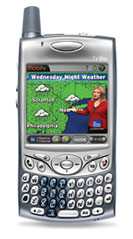
 IP-based mobile Television has long been cited as one of THE killer apps for high-speed wireless data services. The Palm Treo’s rather strong multimedia features and high-resolution would seem a natural fit for high-quality streaming audio and video Until now, most of the solutions available across various platforms were either lacking technically or sadly lacking in content. Fortunately for the Palm OS faithful, all of this has changed with the arrival of MobiTV.
Background and Overview
Originally launched in 2003 for select Sprint Vision-enabled PCS handsets, MobiTV has grown by leaps and bounds. As of this writing, MobiTV is available globally on mobile devices of all shapes and sizes, including cell phones running Java or Brew, smartphones and PDAs running Windows and Palm OS-es and portable Windows-based PCs.
Testing History and Methodology
My initial experience with the MobiTV client came when I installed the trial version on my Palm TX in early 2006. I viewed their extraordinarily bland sample channel on my TX's wi-fi connection and found it rather under whelming. I didn't give MobiTV a second thought until I got my Treo 700p this past June. I installed the sample channel and noticed considerably improved A/V quality over what I had seen a few months earlier on my TX, even on the bland looping commercial that MobiTV uses as their freebie trial. That was enough--with my curiosity newly piqued, I decided to take the plunge and subscribe to the MobiTV service at $9.99/ month. Do note that I am only commenting on the Palm OS version with the merits of its technical capabilities and channel lineups only; no other OSes or feature phones were examined for this review.
MobiTV Client Software
At the time I installed the app on the 700p, a new MobiTV client had just been released, dated May 23 2006. As of this writing in October, this version (1.0.4) is still the current release build. MobiTV's Palm OS app is a very straightforward installation. I put it in main memory and did not try to launch it off of an SD card, fearing it would compromise performance. Fortunately, the full app is a refreshingly small 776k so even Treo 650 users shouldn't be too fearful of installing it.
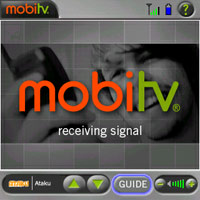
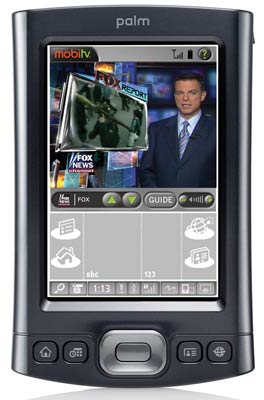
 The actual MobiTV application is attractively present and nicely laid out. Easy to read signal & battery strength indicators occupy the top bar of the screen alongside a help button. The bottom frame indicates which channel is being displayed, alongside channel and volume adjustment buttons that are a bit too small to be jabbed with a fingertip. A larger "Guide" button, located on the right corner, brings up the full channel guide. 38 total channels currently comprise the total lineup for Palm’s version of the client (note: various MobiTV platforms differ somewhat in their channel lineups). This master list is usually how I do my channel browsing. The guide presents the 38 channels in no particular order other than the fact that most of the "name" network channels (MSNBC, Fox News, NBC, ABC, Discovery, TLC, ESPN etc) are accounted for on the first page and the no-name and specialty channels are left for the 2nd and 3rd pages of the guide.
While nice and uncluttered in layout, I'd actually like to see MobiTV add some more features and customizations to the app. An option to segment or cluster channels by categories ("News", "Sports", "Movies" etc) would be nice as would a “Top 10” or “favorites” list.
Without a doubt my biggest complaint with MobiTV is that watching its programming is analogous to listening to a radio broadcast without a DJ. A nifty channel I've recently discovered is "Horror Classics". I stumbled across an old B&W horror flick on this channel and found it rather compelling viewing. Yet I had no status bar or info display in the MobiTV player to tell me what program I was actually watching! There's a nifty cartoon and Ataku, an anime channel. It'd be nice if I had some way of knowing what's playing at any given time so I could go back and check some of this stuff out on DVD for future viewing!
Finally, all of the channels are presented in a letterboxed format. An option to go fullscreen on all devices would be phenomenal. The Treo's 320 x 320 screen is already small enough as-is and the thick MobiTV client's bars at the top and bottom of the screen (giving very little helpful information in the process) doesn't help matters at all. On a mobile device with a tiny LCD, maximizing viewable screen space is much more important than worrying about proper aspect ratios!
 Technical Performance
?Several times during testing (on average about twice per week) I suddenly received a white screen displaying "Temporarily Unavailable. Servers are temporarily down for maintenance. We'll be back online shortly" Sometimes these outages were brief, lasting less than a minute, and other times it took nearly an hour to be resolved. I didn't notice that the outages occurred more frequently on a channel-by-channel basis or during any particular time of the day. In general, I found the service reliable and fast, even when buffering content in slower 1x service areas.
On a positive note I'll comment again on the apparent server-side compression improvements MobiTV has made over the summer. I noticed a distinct improvement in MobiTV picture quality from June (when I installed the app) to late August when I really began watching it seriously while riding in the backseat on a long car trip with friends. For the most part, MobiTV's current A/V quality is spectacular. Its video quality is leagues ahead of what I recall RealPlayer or streaming Quicktime to be in the late 1990s on a 56k dial-up connection. Even fast moving sport broadcasts didn't cause the signal to artifact too heavily. Unsurprisingly, the "name" channels seem to feature more consistent and clearer video quality over the no-names. Looking at the Weather and Discovery Channels just now I can even read most of the onscreen text. I only expect the quality to improve as the service picks up more subscribers and continues to optimize both their compression algorithms and the client's decoding techniques. Audio was tinny through the 700P's internal speaker but plugging in some headphones showed that the sound quality, while mono, was sufficient for its purposes.
Worth noting is that all of the above is assuming you're in a strong EVDO area like my home market is with Verizon. I only had the chance to take my Treo out into the "sticks" and test it on a 1x connection and quality loss was not as bad as I expect them to do. MobiTV also performs (this is actually a compliment to Verizon's network) well even when used in a moving vehicle. MobiTV's live stream does lag the standard cable broadcast of comparable channels such as the Weather Channel and Discovery by a few seconds but not enough to nitpick.
Overall thoughts
MobiTV is still tiptoeing the line between novelty and killer app. I think the technology is there *now*, at least in the major US markets served by EVDO and GPRS/EDGE telco coverage. MobiTV's client app isn't quite ready for prime time and it's not going to be a viable option for international users until unlimited wireless data plans become widespread and drop
drastically in price. But for the average domestic customer of Sprint, Cingular or Verizon unlimited high-speed data networks, it's a solid offering for $10/month. I don't even wax nostalgically for my old Casio 2.2" DSTN handheld TV with its wobbly pullout rod antenna anymore!
My overall rating:  3.5 / 5
 Permalink
 Print
PrintArticle Comments
(5 comments)
The following comments are owned by whoever posted them. PalmInfocenter is not responsible for them in any way.
Please Login or register here to add your comments.


RE: MobiTV lineup for Treos

Can it play in HVGA? Pretty cool, but the 240x320 is tiny on a Treo.
I could use the WiFi Card on my T3, with the addition of a 550CCA Sears Die Hard battery! :-)
Pat Horne
RE: MobiTV lineup for Treos
Pat, just go on www.mobitv.com and download the trial version for wi-fi Palms. It only mentions the LD & the TX so maybe the T3 and T5 are not supported...but I think it'll work. I do know that the LifeDrive requires the 2.0 update in order to use MobiTV.
Pilot 1000-->Pilot 5000-->PalmPilot Pro-->IIIe-->Vx-->m505-->T|T-->T|T2-->T|C-->T|T3-->T|T5-->TX-->Treo 700P
RE: MobiTV lineup for Treos
RE: MobiTV lineup for Treos
Let me put it this way--if I wanted anything TV-related past the few channels Sprint gives you for free with their basic Power Vision ($15), I'd just pay MobiTV directly instead of paying for the overpriced PowerVision plans.
One thing I find absolute mind-boggling about MobiTV is that you have one set of channel offerings for SprinTV customers, another set for Palm wi-fi devices (TX, LD) and then another for Treos that subscribe directly. And that's without going into what they offer for dumbphone customers and/or specific offerings for various carriers!
I'd like to see a two-tier pricing level where the more costly offerings gives a Treo user EVERYTHING MobiTV is currently broadcasting. Why can someone with a TX and a wi-fi hotspot watch Fox News and I am just stuck with Fox Sports on my 700p? That's assuming I care to watch Fox News in the first place...
Pilot 1000-->Pilot 5000-->PalmPilot Pro-->IIIe-->Vx-->m505-->T|T-->T|T2-->T|C-->T|T3-->T|T5-->TX-->Treo 700P



Latest Comments
- I got one -Tuckermaclain
- RE: Don't we have this already? -Tuckermaclain
- RE: Palm brand will return in 2018, with devices built by TCL -richf
- RE: Palm brand will return in 2018, with devices built by TCL -dmitrygr
- Palm phone on HDblog -palmato
- Palm PVG100 -hgoldner
- RE: Like Deja Vu -PacManFoo
- Like Deja Vu -T_W


MobiTV lineup for Treos
Well, this answers my question about what the unknown horror film was. They just loop 4 public domain B&W horror flicks on the channel. Good stuff, mind you, but these are just the titles you can buy for $3 on DVD at Wal-Mart.
Still a good app. Also, in case anyone was wondering, I could not have my MobiTV account active on both my TX (wi-fi edition of MobiTV) and on my Treo 700p. You have to register each device uniquely with MobiTV so you have to have a separate account for each device you own. Bummer but unsurprising.
Maybe a $15 or $20/month deluxe family subscription like XM & Sirius have for multiple device-owning families.
Pilot 1000-->Pilot 5000-->PalmPilot Pro-->IIIe-->Vx-->m505-->T|T-->T|T2-->T|C-->T|T3-->T|T5-->TX-->Treo 700P