


Organize Files with FilePoint
Bachmann Software has launched FilePoint, an application designed to help users manage their files. It allows users to organize applications and documents into a hierarchy of folders and subfolders and includes the ability to drag and drop documents among folders, plus the ability to browse or search for documents by title or file type. Users are able to open their documents directly from a folder, and retrieve documents that were recently opened. It sells for $20 and is available now.
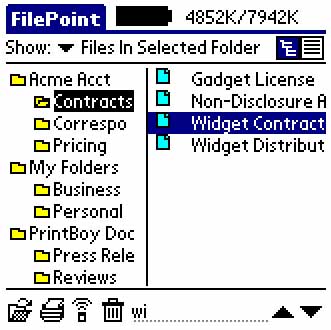 Users can open, beam, or print their data with a single tap of the stylus. Applications can be launched, too. FilePoint is able to interpret documents from the many third party developers and file formats, such as Quickoffice, WordSmith, thinkDB, MiniCalc, Documents To Go and others.
It does not support accessing files on external storage cards, like SD/MMC or Memory Sticks.
"With the addition of documents, spreadsheets, databases and other computer content, handhelds have become much more than digital rolodexes," said Dan Reuvers, Bachmann Software's vice president. "If you are having a difficult time tracking down the documents you need when you need them, it defeats the purpose of having a handheld computer. FilePoint provides users with many of the Windows Explorer-type organizational tools they are accustomed to at their desktops and is designed to help them access their information faster and more easily."
Related Information:
 Permalink
 Print
PrintArticle Comments
(5 comments)
The following comments are owned by whoever posted them. PalmInfocenter is not responsible for them in any way.
Please Login or register here to add your comments.
 Comments Closed
This article is no longer accepting new comments.

RE: Not 100% useful -- yet
I am SO frustrated at the utter uselessness of my SD card slot, unless I install three separate programs on my Palm to manage files, install apps, and access large databases. Sheesh... I saw this headline and thought "Finally, someone's had the brainpower to consolidate these into the program that Palm should have included on every m50x." Then I read the story and just became angry.
RE: Not 100% useful -- yet
Brian S. Faile
RE: Not 100% useful -- yet
RE: Not 100% useful -- yet
This is not true. McFile DOES allow you to create folders or new directory. Just tap on the directory name and tap "New".


Latest Comments
- I got one -Tuckermaclain
- RE: Don't we have this already? -Tuckermaclain
- RE: Palm brand will return in 2018, with devices built by TCL -richf
- RE: Palm brand will return in 2018, with devices built by TCL -dmitrygr
- Palm phone on HDblog -palmato
- Palm PVG100 -hgoldner
- RE: Like Deja Vu -PacManFoo
- Like Deja Vu -T_W


Not 100% useful -- yet