


By: Ryan Kairer
August 21, 2003
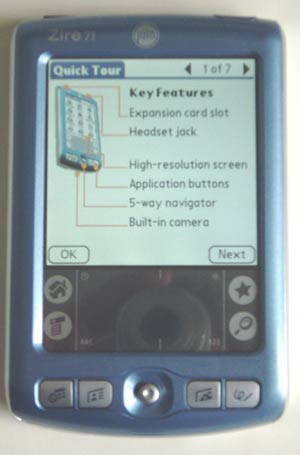 The Palm Zire 71 is Palm's latest consumer model with an emphasis on multimedia. The Zire 71 sets itself apart with its bright and crisp screen, built in digital camera, and blue casing all at a wallet friendly price tag.
Design
At first glance, the Zire 71 looks much like a traditional Palm OS handheld. The Zire 71 has plastic blue case, with a subtle sparkle and a plastic silver back. It includes a new small joystick like 5-way navigator and four good sized application buttons.
The sides of the device are smooth and clean, but can get a bit slippery especially if you have a case of sweaty palms. There is a small speaker in the rear and a SD slot, IR window, headphone jack, stylus silo and power button at the top. The Palm Universal connector is on the bottom.
The new 5-way navigator is a small joystick like nob, similar to the one found on the Sony-Ericsson t68. It's like a mini joystick of sorts. It works well for general navigation and scrolling through apps and the datebook, however it took a little bit of getting used to for some games. Because it's so small it is a little bit clumsy for some situations that require precision movement in games. (But thats not the main use for PDAs, right?) It's also sometimes hard to push in on the joystick without triggering up or another direction at the same time. I much prefer the d-pad of the Tungsten series.
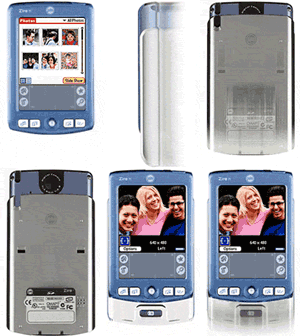
The Zire 71's main feature is cleverly concealed by a hidden sliding section. With a push up on the slider the blue portion of the handheld rises to expose the camera lens on the back and the dedicated shutter button in front. The slider both protects the camera lens and acts as an activator that launches the camera app for a quick picture.
Its dimensions closed are 4.5 in. x 2.9 in. x 0.67 in. (114 x 74 x 17 mm). The 71 weighs a pocket friendly 5.3 oz (150 g). The build quality is solid with no creaks or rattling loose parts. However, Palm loses a few points for using a silver paint that is a magnet for smudges and fingerprints.
The included stylus is a solid black and plastic. It is a decent thickness and weight. However, a major oversight is the lack of a reset pin of any kind. Looks like we're back to the days of relying on a trusty paperclip.
Hardware
The Zire 71 uses a 144MHz Texas Instruments OMAP310 (ARM) processor. It includes 16MB of internal memory of which, 13MB is user accessible. The processor is very snappy and applications run fast and smooth. In fact some processor intensive games, such as Sonic the Hedgehog, seem to run a bit smoother on the Zire 7, compared to the tungsten T..
 Screen
The display is a bright transflective TFT color display. It is a square 320x320 pixel screen with supports over 65,000 colors. The display is stunningly is gorgeous and quite vivid. It is very bright display, even at lower brightness levels. The colors are accurate with excellent contrast and viewing angles. It's very hard to judge or capture the quality of a handheld display through the pictures, it is something you must see in person to really appreciate.
The display is easily one of the best I've used on any handheld. The screen is viewable from nearly all angles and is consistently backlit without any shadows or bright spots. It has an on-screen slider to set the backlight brightness. The screen fades and loses a little bit of it's vividness in direct sunlight, but is still very useable. The default font that palm uses for Palm OS 5 is one of the nicest and more legible fonts on any handheld.
Audio
For audio, the Zire 71 has a true speaker mounted on the lower left back of the handheld with a 3x2 grid of speaker holes. Palm placed the speaker in a bad position, as it is very easy to cover the holes and muff the sound when holding the handheld. It provides decently loud volume for alarms and system sounds, though if you're a deep sleeper forget about it getting you out of bed. MP3's can be played back over the speaker as well, but most will opt for using the stereo headphone jack (it does not come with headphone). The Software essentials CD contains the free RealOne audio player and there are a number of third party programs for digital audio as well.
For the first time, Palm has replaced the standard Palm OS system beeps and chirps with a new set of much nicer and modern sounding system alerts. For instance, instead of a monotone beep when you insert a SD card, a richer sounding alert is played. This is a nice touch and something I think Palm should continue to implement on new models.
Even with the updated audio and speaker, Palm is still using the same datebook alarm sounds that debuted on the Pilot 1000. While there are many third party replacements, these are long, long overdue for an update.
Camera
 The Zire 71's main feature is cleverly concealed by a hidden sliding section. With a push up on the slider the blue portion of the handheld rises to expose the camera lens on the back and the dedicated shutter button in front. The slider both protects the camera lens and acts as an activator that launches the camera app for a quick picture. Palm calls this a slide and shoot design..
The camera can capture images images in three different resolutions: 640x480, 320x240 and 160x120. The CCD has a 300,000 pixel rating, about the same as most expensive camera phones. There are advanced options for setting the white balance (Auto, Fluorescent, indoors and sunlight) a contrast slider and auto brightness. With the screen as your viewfinder pictures are taken with the dedicated shutter button. Pictures take less than a few seconds to save to the handheld or expansion card. The app also shows you how many remaining pictures you can take as well as a battery meter.
I'm a little mixed about the quality of the camera. It does a fairly good job for being such a low pixel camera. Sometimes it suprises me with a really quality picture and other times, the focus and soft colors make for a very disappointing image. The software itself does a good job of adjusting to various light conditions. If you're just looking for simple images and photos for emailing and posting on the web they will be just fine. If you always carry your handheld with you, it's great to have the extra ability to capture pictures in what ever situation you find yourself. I've posted a series of unedited pictures in different lighting situations so you can make your own quality judgments.


The battery in the Zire 71 is a 900mAh lithum-ion rechargeable. With the backlight set to about 40% the battery life is quite good. Even taking a bunch of photos in succession does not put a big strain on the battery. Recharge time in the included USB HotSync cradle is approximately 2 hours for a fully discharged battery. On caveat is the lack of a LED to show that the handheld is being charged.
 The Zire 71 has dual expansion, in the form of the Secure Digital (SD) slot and the Palm universal connector on the bottom. It supports both SD and MMC cards and is SDIO compatible for non-memory expansion cards. Strangely, as of this writiing Palm still does not have a Palm OS 5 driver available for the bluetooth SD card. So your options are pretty limited if you would like to use any sort of wireless access with the Zire 71.
A few minor things that the Zire 71 lacks but would be a nice addition include a microphone for voice recording, a LED to indicate charging status and vibration alert. I find it a little curious that a multimedia handheld can not record sound clips. Another thing that surprised me was that you can not record short movie clips. This would be a nice touch, however it seems pointless if you don't have a mic to pick up audio.
|
SPECIFICATIONS
|
|
| Size & Weight: | 4.5 in. x 2.9 in. x 0.67 in. (114 x 74 x 17 mm); 5.3 oz. |
| Processor: | 144MHz TI OMAP310 (ARM) processor OS 5.2.1 |
| Memory: | RAM: 16MB (13MB avail.) |
| Expansion: | SD / MMC |
| Screen: | 320x320 pixel; 65k color; transflective |
| Audio: | speaker; stereo headset jack |
| Power: | LiIon Poly (3.7V, 900 mAh) |
| Connectivity: | UC (USB, serial), IrDA, SDIO |


Software
The Zire 71 runs Palm OS 5.2.1. OS 5.2's main new features include new color themes, enhanced security and the Graffiti 2 software. Palm includes software to allow Graffiti 2 to be written anywhere on the screen
I have picked up on Graffiti 2 pretty quickly, it is very similar to the original graffiti, with the exception of letters that now require two strokes instead of one (i,k,t, x and 4). Capital letters can now be written in the middle of the silkscreen without having to use the capitalization shift first. There are a variety of third party solutions that allow you to customize the characters or use the old Graffiti system.
One of the most useful software features on the 71 is the way the D-stick is integrated to support the one-handed functionality. For starters: with the device off, a short press of the Select button pops up the time and date for a couple of seconds then shuts down, or a double click and the device is on. Holding Select down for two seconds switches to the application launcher screen, and you can use the D-stick to navigate to your application of choice and launch it with another press of Select.
In addition to standard Palm OS applications Palm includes, the Kinoma player for movie playback. A simplified version of Kinoma producer for windows is included to create and transfer movie clips to the handheld. The Palm photo app, which is used to display pictures taken with the camera can also import jpeg files from a pc, but can't display images any higher than the native 320x320 resolution. Also included is the World Clock, Notepad, Expense and Phonelink and SMS (only for use with IR phones for now).
One the desktop side of things, Palm includes their new Quick Install program for Windows. Quick Install simplifies installing programs and converting documents and photos for handheld use. Users simply drag zip files, prc application files, photos, videos and even MS office files into the app and it will preform the necessary conversion and install the the files on the next hotsync.
The photos application is integrated with the Palm Desktop for windows. You can view pictures taken and do some very basic editing and sharing. On Apple systems the photos are saved as jpegs to a folder. The in box software includes: RealOne audio player, Adobe Acrobat, Audible player, powerOne calculator, Kinoma, Palm Reader, Solitare and VersaMail.
Summary
The Zire 71 is a fun photo centric handheld with a good price and a fantastic screen. It's great to always have a camera with you and even better to catch people off guard with a PDA camera. The Zire 71 combines a great feature set and a stylish design at a mid range price.

|
PROS
|
CONS
|
|
|
|
RATING:
8.8 / 10
|
||
| Design: |  |
Smooth lines, Camera Slider |
| Features: |  |
Fun built in Camera |
| Screen: |  |
Fantastic Screen |
| Battery: | |
decent battery life |
| Value: | |
Good Features, Good Price |
The Palm Zire 71 can be purchased for $299 from the Palm Store, or you can search for the lowest price on the web with our price comparison shopper.
 Permalink
 Print
PrintArticle Comments
(65 comments)
The following comments are owned by whoever posted them. PalmInfocenter is not responsible for them in any way.
Please Login or register here to add your comments.
 Comments Closed
This article is no longer accepting new comments.


Hidden Camera / Hints and tips
Pictures were not allowed for the birth (hospital policy) of my 3rd child, yet I have over 70 of them thanx to the 71. The Dr's didn't even have a clue it was a camera, they just thought i was strange. You have to measure brightness/darkness like old style F-stop settings (35mm manual) on the amount of seconds NOT to move the camera to get a perfect picture this takes about 20 pictures to master. Brightness and contrasts seem to adjust very well! I now have over 600+ Zire Pictures all printable quality via Shutterfly (smallest size of course but the same as a standard 35mm or 110 camera. 5x7? 8x10? No.
Palm for life, Miami FL
DellTech
"I'm not crazy, everyone else is and they are trying to steal my magic beans!"
RE: Hidden Camera / Hints and tips
RE: Hidden Camera / Hints and tips
http://kevdo.com/zire/
http://kevdo.com/lollapalooza/
-Kevin Crossman
RE: Hidden Camera / Hints and tips
Cheers,
RE: Hidden Camera / Hints and tips
-Kevin Crossman
RE: Hidden Camera / Hints and tips
and yes i put a bit of grip tape on the silver side of mine, total cost= $1.00 from the local skate shop to cut it, you sure dont wanna bust that screen....
review
Maybe I'm just ignorant, but hasn't the Z71 been out for quite some time now?
RE: review
Almost the end of the product cycle and we get ourselfs a review. Well better late than never.
Keep it up PIC.
RE: review
RE: review
coming next week... my visor deluxe review
RE: review
RE: review
Someone at http://www.cliesource.com posted their own summary of early impressions of the iQue and it is a much better "review" than the fluff iQue article on Brighthand. Sites like this need more in depth analysis by people who actually have experience using Palms. Adding a section for users to post their personal reviews of hardware would be a welcome addition to Palm Infocenter.
History and Review
* I was anxiously awaiting this review five months ago, but I eventually gave up, and bought the unit based on reports from other sources.
* After my enthusiasm for the Zire 71 held up to daily use, I sent email to PIC offering, if it was simply a lack of willing sacrificial lamb, to write a review of the product myself. I did not receive a reply -- they're swamped, no big deal.
* Then enough time passed that reviewing the model seemed pointless in the face of OS 6 and TT3 rumors.
* Now, PIC posts a review with nothing particularly new to say when compared to reviews that appeared back when the hardware was new, and, it’s full of typos. I cannot help thinking I should have just commandeered the comment section of some other thread to post my review months ago.
Review review and additional comments:
As far as the factual information presented in the review, I agree except, perhaps, with the meager RAM complaint. RAM use varies user to user. I purchased an SD card and am quite pleased with the combined storage capacity, as well as how the software handles accessing data on the expansion card.
Pros:
At the time I purchased the Zire 71, I didn't want the built-in camera, fearing the extra bulk and battery drain it represented. I still don't use the camera much, but it doesn't seem to adversely affect the machine. The Zire 71's overall dimensions are not vastly different than non-camera-having Palms and it fits comfortably in even small hands. The screen is crisp and bright the way I'd always hoped they'd eventually make color screens. OS 5.2 is zippy and sleek (upgrading from 3.5, it would have been hard to disappoint me in this regard, admittedly).
Cons:
I used the legal, inexpensive method of installing TealScript to get around the annoying two-stroke character recognition. The supplied case is flimsy and leaves the corners of the unit and the power button exposed –- it’s useless in a bag or purse. You get what you pay for; I bought a better case. The lack of indicator when charging the battery (the battery icon changes to show a lightning bolt when it’s charging but gives no indication how full or empty the battery may be. You have to disconnect the juice to check) is mildly annoying.
Summary:
I am very pleased with the Zire 71. If its feature set is what you’re looking for, I recommend the model as well worth the money.
Less than perfect
a.) The silver slider has a very poor grip and can cause accidental drops. I've dropped my Zire twice, thankfully on plush carpet..no damage. But the unit doesn't feel secure in your hands like a metal body (or rubber grips), such as the T2. I've added strips of Scotch tape to both sides of the slider, which helps a great deal, but detracts from the Zire's appearance. It reminds me of the iPaq; shiny, slippery, and delicate. I don't like it.
b.) NO FLIP COVER!!!!!!!!!!!!!!!! This is quickly becoming a pet peeve of mine. Using a PDA without some form of flip cover is rather unnatural to me. I've grown so accustomed to them since the beginning of PDAs that I can't live without one. PalmOne is betraying its own principals here in order to add gimmicky features. That rubs me the wrong way. I'm even beginning to miss the old Palm III form factor. Even the M515 had a great stylish leather flip. Come on PalmOne, dance with the one that bring you. Bring back FLIP COVERS!!!!!!
c.) Weak volume. Zire 71 compares very poorly to competing handhelds that support digital audio. Much like its siblings, the TT and T2, the Z71 has extremely anemic audio. Unless you've never actually used a PDA that supports audio, most experienced users will find the volume level to be intolerably low. At maximum volume, the Zire 71 is equivalent to just 25% of what I get from the Axim X5. PDA enthusiasts interested in serious digital music playback should look elsewhere. The Zire 71 is certainly no multimedia powerhouse, nor is any PalmOS device...for now.
That said, Zire 71 is still among the very best PDAs on the market right now, and I still believe it is the BEST device PalmOne (or whatever you wish to call them) has ever produced. Not perfect by any stretch, but very well conceived.
-------------------------------
My blog: www.pocketfactory.com
RE: Less than perfect
--
"Life is what you experience between racing games"
Galley
RE: Less than perfect
I think some Sony owners would disagree...
RE: Less than perfect
The scuba case is stiff, and, like the metal cases, there is so much extra space that the Palm rocks back and forth (leaves marks on the sides).
RE: Less than perfect
RE: Less than perfect
Uh...Sony's falling marketshare?
-------------------------------
My blog: www.pocketfactory.com
Godzilla Sony
Palm's engineers must wet their pants whenever other manufacturers announce new models. Palm simply hasn't been able to compete for several years, even though much smaller companies (like HandEra) have shown that innovation doesn't require massive amounts of funding.
The standalone PDA market needs to evolve immediately into a number of niche designs (like the AlphaSmart Dana, Garmin iQue 3600, CLIE UX50, etc.) because Joe Average won't be biting now that his free cellphone replicates a lot of the basic PDA functions.
RE: Less than perfect
RE: Less than perfect
I'm amazed by those who still doubt Sony. They will own the Palm market soon enough. The models they've released to this point have been little more than expensive beta tests to see what works. <<<
that's still not automatic. And they seems to have trouble with next lines. The Handheld engine is dead if Sony can't bring the price approaching Intel's Xscale. $700 is not the type of machines to take over the world with. Sub $199 are.
RE: Less than perfect
Sony is able to manufacture all components of their PDAs and have complete control over costs (unlike all other Palm OS competitors). They price their PDAs they way they do because that's what they think the market will bear - not because they need to. If their positioning turns out to be wrong (as I believe it is), Sony will simply slash prices and accept lower profits.
High end non-convergence PDAs will soon cease to exist in any significant numbers. Sony's bricks will be half their current size by 2004 and will embrace even more functions. On the other hand, Palm's Tungsten lineup will look like an anachronism by January, 2004. I don't see Palm being able to produce new designs quickly enough to compete with the Godzilla they foolishly licensed the Palm OS to.
RE: Less than perfect
Actually, I was refering to Sony's ability to compete against low cost PPC. I have no doubt that Sony will start munching on Palm market share once they set their sight on $300 price backet. All they have to do is tweak the TG50 spec a little, redesign the chasis, give some cute gimmick and put it next to Z71. It'll be an kill. It's not a difficult to imagine.
But for some reason I have doubt that Sony can pull a $180 device matching iPAQ h1930 for eg. or matching Dell's up coming X3. That is where the biggeer market share battle going to be. High end models might only sway about 2-3% here and there.
RE: Less than perfect
you mentioned the zlippy zides of the zire... you might want to check out "egrips" at this site
http://egrips.com/catalog/product_info.php?products_id=183{1}17{2}6
mine are on order; will post my comments when i get them.
I love my Zire71!
My old HANDERA just started to behave funny shortly before my trip to the South Pacific. Needless to say I needed something new. I decided for the ZIRE 71 and I really enjoy this machine! It's fast fun the pictures are not 1st class and sometiem looking strange but by and large OK. I agree also that the sound is a bit low and I have not used it with headset yet (too new!). Battery is OK except when forgotten at the bottom of rucksack and the baterry got drained (pushed down joystick). But having a complete backup on the SD card i could reload everything and recharge quickly.
RE: I love my Zire71!
Back up to SD card? Please advise a new user. How?
RE: I love my Zire71!
RE: I love my Zire71!
I've really been saved by the backups a few times.
CHirS
BackupMan
Read review here:
http://www.infosyncworld.com/reviews/n/3860.html
Nice, easy, inexpensive. Get it at handango.com or palmgear.com
_________
Paul C.
RE: I love my Zire71!
I'm using CardBackup from www.jkware.com
It copies the whole content of your Zire to the Card!
(I haven't found the ability to to a selective backup/restore yet). You have also the ability to perform automatic schedule backups.
With regard to the "Power"utility I promptly installed it in order to desactivate the Jog as a wy to switch on the ZIRE. Thanks for the tip
Louis
One More Issue with Zire 71
It is very easy to turn on unit in a bag or other case by accident, as the on-off button easily get's hit.
THE solution at this time is a wonderful little program called POWER or more deluxe BTToggle, both from http://petereaston.com.
They allow you to set up a sequence to hit or repeat that removes chance of accidental turning on unit.
Aside from this one "con" the unit is great AND a great bargain.
- Peter
Peter M. Fine
President, New York City Digital Assistant Users' Group (NYCDAUG)
The PDA-centric User Group for all of you.
pmf@nycdaug.org | http://www.nycdaug.org
RE: One More Issue with Zire 71
The "Joy Stick" (D-Pad) actually seems to stick out far enough to make this very easy to do. Not sure why they didn't contour the case inside to prevent that.
RE: One More Issue with Zire 71
--
"Life is what you experience between racing games"
Galley
RE: One More Issue with Zire 71
Sony T615 owner
I've got one for sale now...

 Only the first 50 comments are displayed within the article.
Click here for the full story discussion page...


Latest Comments
- I got one -Tuckermaclain
- RE: Don't we have this already? -Tuckermaclain
- RE: Palm brand will return in 2018, with devices built by TCL -richf
- RE: Palm brand will return in 2018, with devices built by TCL -dmitrygr
- Palm phone on HDblog -palmato
- Palm PVG100 -hgoldner
- RE: Like Deja Vu -PacManFoo
- Like Deja Vu -T_W


Zire...the new Paradigm