


Palm Tungsten T3 Review
By: Ryan Kairer, Editor in ChiefOctober 1st, 2003
 The Tungsten T3 packs a brilliant 320x480 screen, a 400mhz Intel XScale processor and 64MB of RAM in a compact and functional design. The T3 prominently features the largest screen found on a Palm branded handheld to date, and double the resolution of any Pocket PC. Palm Inc's new top of the line Tungsten handheld with a large screen and small form factor debuts with a $399 price tag.
Design
The Tungsten T3 design and form factor heavily echos its predecessors the Tungsten T and Tungsten T2. Palm originally chose to implement the slider design based on usage studies that indicated that users are looking up information the majority of the time. So Palm implemented a transformable design that facilitates one-handed lookup and at the same time keeps size to a minimum.
Slider
The key design feature of the unit is the sliding lower section which can be extended to expose the extra screen space or the virtual input area for text entry, and then be retracted again to maintain its compact form. The slider action is very smooth, and it locks positively into place in either configuration. The feel is pleasantly solid, thanks to six points of contact. These include twin channels in the back, side bars, plus a pair of slider pads on the front. Palm realizes that this design decision is a potential source of failure (and therefore costly warranty issues) and has taken pains to ensure that it will be very reliable. Part of their design criteria included passing a 100,000 open/close test cycle. (To put that in practical terms, even if you open and close the device 3 times an hour, 16 hours a day, the slider should provide at least 6 years of faithful service.)
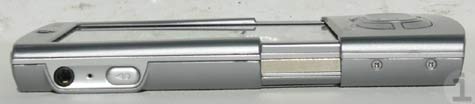
The rear of the sliding section extend two thirds of the way up the back and include the back attachment points for the Universal Connector, so these accessories will function in both the compact and extended configurations. The TT3's slider can also be configured to turn the handheld on and off.
 The large screen dominates the front of the handheld. Across the top is the charing LED (now flush with the casing and rattle free), the Tungsten T3 logo, a protruding translucent Palm logo bubble, and a 3x5 grid of holes for the internal speaker (the TT&T2 have a 2.5 grid). The very top edge of the slider portion is curved in to allow some extra visible screen space for the "status bar area". The top cover of the slider houses the revised 5-way navigator and curved application buttons.
The T3's physical dimensions are 4.3" (closed) - 5.0" (extended) x 3.0" x 0.66 inches and it weighs 5.5 ounces. When closed it is very compact and pocketable. The casing is made of brushed aluminum with a light silver finish.
Sliver metal accents line the sides of the device, and replace the drab black plastic of the TT. On the right you'll find the 1/8th inch (3.5mm) stereo out headphone jack, the microphone, and a larger voice recorder button (which can be changed to launch any application). The right side of the handheld lacks any buttons. The sides of the bottom of the slider have two small exposed screws that don't get in your way, but I'd like to see them removed or covered in any future revisions for aesthetics.
Along the top portion of the handheld from right to left is: a much stiffer power button, the SD card slot that now has a built in cover to protect against dust and pocket lint, the IR window and stylus silo. The bottom of the device is the same color and material as the side accents and holds the Palm Universal Connector.
The back of the handheld is fairly typical, with the standard assortment of logos and serial numbers. With the slider open the back reveals the reset button, which thankfully is large enough to use with the stylus tip, negating the need for a reset pin. The large reset hole is an excellent design trend all devices should adopt. New to the T3, the top of the back has two small square holes, which server as points of contact that keep the new flip cover in place.
While the T3 shares a number of similarities with the TT there are some minor outward differences. Compared to the original TT casing the T3 is only .3 of an inch taller, and practically the same width and thickness. The weight is practically the same, but it is worth noting that the T3 is actually .1 ounce (3 grams) lighter than its predecessors. While the TT's side lines were straight, the T3 has a bit of a waist curve, as the top and bottom sides of the handheld subtly curve outward.


Buttons
The new 5-way navigator is now a wider oblong shape, that facilitates easy use in either portrait or landscape mode. The navigator will automatically adjust to the current screen orientation. The four application buttons now curve around the sides and hug the wider navigator. Palm centered the app buttons around the navigator for easier one handed access. There is a new buttons keylock setting in the prefs that allows you to set the buttons to turn off automatically or after a preset delay to prevent accidental presses.
 Flip Cover
Palm listened to the complaints about the original translucent flip cover on the TT and T2. The original cover was prone to scuffs and scratches and required an extra step just to remove the cover in order to use the handheld in most situations. On the T3 Palm has a new attractive grey leather flip cover. The front is smooth with a matching grey sticking border. The back is a suede with built in impressions to snug the d-pad and buttons area and top palm logo. The cover attaches to the two divots on the top back of the unit and clips into place. It provides a cover and protection for the screen when closed and flips in place around back.
Stylus
The stylus is the same pop-out release, telescoping stylus that debuted with the TT. It has an excellent weight and size and is very comfortable. It is made of a polished steel with a inset black plastic writing tip. The stylus tip can also be used on the reset button in the back, eliminating the need for a small pin or paperclip. The stylus docks securely back into the silo, and with a second push-and-release it compacts back out of the way.
Hardware
The Tungsten T3 is powered by a 400mhz, 32-bit Intel XScale (PXA255) processor, one of the fastest mobile processors currently available. It has 64MB of internal RAM, of which 52MB is user accessible, 12MB is used for the dynamic heap. The extra memory is a more than welcome addition and a few of the essential apps such as Docs2Go, VersaMail and RealOne have been moved to the device ROM to further free up precious RAM. These days, 64MB is the minimum you would expect to find in a high end handheld. The T3 has a SD expansion slot that supports both SD and MMC cards and is SDIO compatible for non-memory expansion cards.
The Tungsten T3 has excellent performance power for a handheld. Applications and games run very fast. In my standard torture test I was able to listen to MP3 files (with RealOne) and surf the web over Bluetooth with no noticeable slowdown. Trying the same test on a TT, you would notice the system lag because of the demand of the audio in the background. The T3 handles this with no problems.
Screen
The crown jewel of the Tungsten T3 is no doubt its large screen. It is a 320x480 pixel transflective TFT display that supports over 65,000 colors. The full extended display area measures 3.25" x 2.2" inches (82.5 x 61mm). The extra screen space provides 50% more viewing area over than the standard 320x320 square screens. It can easily be rotated either portrait (320x480) or landscape mode (480x320) with the touch of an icon. Applications will automatically expand and contract when you open and close the slider. The screen is double the resolution found on any Pocket PC handheld, and Pocket PC devices require a third party app and a manual reboot in order to switch screen orientations.
The display is the same type as the highly praised screens found on the Zire 71 and Tungsten C. The display is stunningly gorgeous and quite vivid. Colors are accurate with excellent contrast and viewing angles. It's very hard to judge or capture the quality of a handheld display through the pictures, it is something you must see in person to really appreciate. As I've said before, the display is one of the best I've used on any handheld. It is viewable from nearly all angles and is consistently backlit. It has an on-screen slider to set the backlight brightness. In direct sunlight, the screen does fade and lose brilliance and colors get very washy, but it is still usable. The default font that Palm SG uses for Palm OS 5 is one of the nicest and more legible fonts on any handheld.
 The advantage of going with a larger screen is there is much more display to work with. Developers must update their applications
to make use of the extra space, older apps work as normal but can not raise or lower the input area. For apps that do work with
the extra space, a white arrow will light up on the bottom right of the status bar that lets you expand and hide the input area.
All of the core PIM apps (Notepad being the only exception) and a few third party applications have been updated to make use of
the extra space. In time many applications will be updated to take advantage of the extra space.
I've put together a image gallery of 20 screen shots from the T3 that demonstrate the larger screen space and wide screen abilities.
The advantage of going with a larger screen is there is much more display to work with. Developers must update their applications
to make use of the extra space, older apps work as normal but can not raise or lower the input area. For apps that do work with
the extra space, a white arrow will light up on the bottom right of the status bar that lets you expand and hide the input area.
All of the core PIM apps (Notepad being the only exception) and a few third party applications have been updated to make use of
the extra space. In time many applications will be updated to take advantage of the extra space.
I've put together a image gallery of 20 screen shots from the T3 that demonstrate the larger screen space and wide screen abilities.
Audio
The T3 has a front-mounted true speaker, which provides decently loud volume for alarms and system sounds. The speaker is in an ideal position behind the 3x5 grid of speaker holes on the top right of the handheld. Fortunately, Palm is using the updated system sounds that debuted on the Zire 71. Palm replaced the standard dull Palm OS system beeps and chirps with a new set of much nicer and modern sounding alerts. For instance, instead of a monotone beep when you insert a SD card, a richer sounding alert is played.
MP3s can be played back over the speaker as well, but most owners will opt for using the 1/8th inch stereo headphone jack (headphones are sold separately). Many users complained that the audio volume of the TT and T2 was too low and sub-par for a top of the line handheld. Palm heard the complaints and re-architected the audio system on the TT3. The new system provides independent control of headphone vs. speaker volume and other settings, allowing them to optimize both. That said, audio is noticeably much louder and clearer on the T3 through the headphone jack.
Even with the updated audio and speaker, Palm is still using the same DateBook alarm sounds that debuted on the Pilot 1000. While there are many third party replacements, these are long, long, long overdue for an update! In addition to the audible alarms the T3 has alarm vibrate and can flash the LED for alerts as well.
Battery
The battery inside the T3 is a 900mAh lithum-ion rechargeable, the same found in the TT, T2 and Zire 71. According to Palm,
with software improvements minus the extra battery required for the larger screen and additional memory,
battery life should be about the same as the original TT. While that may be optimistic, it certainly was not the
case with my review unit. Granted I don't think my T3s battery was conditioned properly either, as it
had been used before it got to me. Generally I've found that charging up for at least four hours,
prior to turing a device on, and then completely draining and fully recharging the battery will provide optimum battery life.
With my fairly hefty usage (lots of Bluetooth, audio, web browsing and games) I would see about 3-4.5 hours of use between charges. How much life you get out of the battery will depend on what you use, how long you use it and how frequently. It's a complex thing to pin a absolute number on, so your millage may vary. Most users in the PIC forums have been reporting roughly the same 4-5 hour life. If you need extra juice, Palm sells a clip on battery pack accessory, the Power to Go [link]. I feel that the battery life is pretty disappointing, while it is not absolutely terrible, it is my biggest complaint with the unit.
|
SPECIFICATIONS
|
|
| Size & Weight: | 4.3" (closed) - 5.0" (extended) x 3.0" x 0.66 inches ; 5.5 oz. |
| Processor: | 400mhz, 32-bit Intel XScale (PXA255) processor |
| Memory: | RAM: 64MB (52MB avail.); flash ROM: 12MB US |
| Expansion: | SD / MMC |
| Screen: | 320x480 pixel; 65k color; transflective TFT |
| Audio: | speaker; stereo headset jack, mono mic |
| Power: | LiIon Poly (3.7V, 900 mAh) |
| Connectivity: | UC (USB, serial), IrDA, SDIO, BT 1.1 |
Software
 The Tungsten T3 runs the latest version of the Palm OS, v5.2.1. Palm SG has gone a long way to improve the internal PIM applications and add third party applications to make the T3 a productive and entertaining machine out the box. It is the first Palm OS handheld to include the ability to view, edit and create native Microsoft Office documents.
Palm OS 5.2's main new features include new color themes, enhanced security and the Graffiti 2 software. The T3 does work with the original Graffiti replacement trick.
Updated PIM apps
Palm has made a number of improvements and changes to the standard Palm OS PIM applications. First of all you may be confused at first because all of the names have changed. DateBook is now Calendar, Address is now Contacts, To Do List is Tasks, and Memo Pad is now Memos. The changes were made based on user feedback and research and also to more closely resemble Microsoft Outlook. The new enhanced PIM apps are only included on the Tungsten T3 and E.
Calendar
Calendar sports a redesigned Agenda View that lists your most recent upcoming appointments, tasks due and email. You can now assign colors to different categories, appointment location details and a new year view. Palm also made it possible to have events spanning midnight, separate calendar support and the ability to beam multiple appointments and categories.
Contacts
Contacts has a number of visual and structural improvements. You can now have multiple contact addresses, such as work, home, other. The are new contact fields for more phone numbers, email addresses, website and instant messaging accounts. There are now nine custom fields and a new birthday field, that will keep track and remind you before an approaching birthday (Palm calls this the marriage saving feature).
Memos and Tasks
Many will rejoice that you can now have memos larger than 4k, Palm SG has increased the memo size to 32k for larger memos. They have also added repeating tasks and new views for To Do items.
 Documents to Go
Palm bundles the latest version of Documents to Go (v6.03). Docs to Go 6 supports native Microsoft Word and Excel files, no conversion is necessary. You can use files recieved from Email, Bluetooth or and SD card. The application is built into the device ROM and supports the large screen area. Being able to view and edit documents and spreadsheets with the widescreen is a much better experience. The new version also includes new spell check and word count features.
 Bluetooth
Palm also made a few enhancements to the Bluetooth wireless features. It's now possible to pick a Bluetooth device from a prebuilt list, or just your trusted devices. Previously on the TT, you had to wait through a discovery each time you wanted to send something via BT. The new software also recognized what kind of deice your trying to connect to, be it a handheld, access point or mobile phone. With the Bluetooth icon in the status bar, it is easy to quickly turn on and off the Bluetooth radio or make a network connection.
Palms Phone Link wizard makes it easy to quickly setup a connection with a Bluetooth enabled mobile phone for sharing a GPRS connection, Dialing numbers from your address book or sending an SMS. With a few taps you can select the model and carrier information and PhoneLink sets up the rest. The TT3 makes a excellent companion to a Bluetooth enabled mobile phone. I routinely compose my SMS messages on the T3 and send them to the phone over Bluetooth all without ever touching the phone in my pocket.
One Handed Operation
One of the most useful software features on the TT3 is the way the navigator is integrated to support the one-handed functionality. For starters: with the device off, a short press of the Select button pops up the time and date for a couple of seconds then shuts down, or a double click and the device is on. Holding Select down for two seconds switches to the application launcher screen, and you can use the navigator to navigate to your application of choice and launch it with another press of Select.
In Contacts a right press activates Look Up: and it's easy to quickly navigate to an entry, and then open it with another press of Select. If you then right press again, it opens the Quick Connect feature which brings up the list of contact options for that entry. If your T3 is paired with a Bluetooth phone, you can then dial the number, or send an SMS from the SMS app, or send email from VersaMail with a click.
Multimedia
As far as multimedia goes the T3 offers more featues built in than any previous Palm branded handheld. Both RealOne, for MP3 audio and Kinoma, for videos are built into the device ROM. Kinoma supports the large screen display and Palm includes a version of Kinoma Producer, that allows users to convert their own videos. The Palm Photo application is also present and supports full screen photos and can handle jpeg's from a SD card.
One the desktop side of things, Palm includes their new Quick Install program for Windows. Quick Install simplifies installing programs and converting documents and photos for handheld use. Users simply drag zip files, prc application files, photos, videos and even MS office files into the app and it will preform the necessary conversion and install the the files on the next hotsync. Palm has also reworked the MS Outlook synchronization conduit. It supports the new address fields, calendar locations, larger memos, notes and the birthday feature.
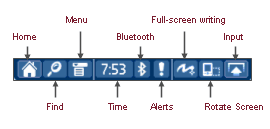
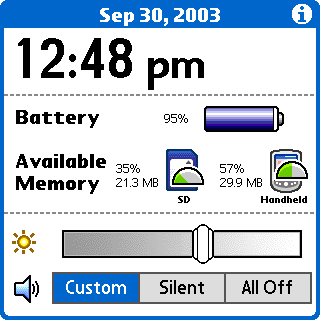 There are a number of additional little enhancements to the status bar that improve the handhelds functionality. If you click on the time button, it brings up a nice little info screen that tells you the time and date, battery life as a battery meter and a percentage, available memory (internal and expansion), and has the contrast control and a quick volume setting tab. If you hold down on the small home icon, it will bring up a list of your recently used applications (a la McFling). It is also possible to bring up the find dialogue, alerts, toggle Bluetooth settings, turn on screen graffit on/off, rotate the display and change the virtual input mode. There are three virtual input settings: Classic, which resembles the familiar silkscreen; Wide, which does away with the icons and has three large areas for lowercase, uppercase and number input; and an on screen keyboard. You can also easily switch between the three by clicking on the small letters or numbers in the corners. You also can customize the icons in the classic mode by holding the stylus down on the icon you wish to change (sometimes this comes up a little too quick).
Web Browsing
For surfing the web Palm includes v3 of the WebPro Browser. The browser supports both proxy and proxy-less connections. The proxy is enabled by default and cuts out most of the formatting in html pages to make them load faster. The proxy-less mode makes a direct connection to the website and used the regular code. For general use with the proxy enabled, WebPro is a speedy browser that formats pages nicely to the screen, The normal view is much slower and pages are rendered as they would on a desktop and you frequently need to use the side scroll bar. While it's good that Palm provides both methods, I found the normal, proxy-less, mode to be much slower. Overall WebPro is a good browser but could use some optimizations to make it faster, it just seems to run slow, which it shouldn't on such a fast handheld. The browser also allows you to save pages to expansion cards and does a good job with bookmarks and offers a great full screen mode.
Applications built into the T3 ROM include: Calendar, Contacts, Memos, Tasks, Note Pad, Expense, Calculator, VersaMail 2.6, Docs to Go Professional Edition v6.03, Palm Photos, RealOne, Kinoma, Voice Memo, World Clock, SMS, PhoneLink and Palm Dialer. Additional applications included on the CDROM include: Adobe Acrobat, powerOne Personal calculator, RealOne Desktop, Kinoma Producer, Palm Blueboard and Bluechat, PalmReader (supports the larger screen), Palm Web Pro and Solitaire by Handmark. Palm SG also makes a IBM a Java Virtual Machine optimized for the Tungsten T3 available for download.
Summary
The Tungsten T3 is an elegant, stylish and powerful handheld with integrated Bluetooth and a fantastic large screen. Palms largest screen to date is stunning and adds a new level of use and productivity for a compact handheld. With twice the resolution of the PPC devices, the ease and simplicity of the Palm OS, a fast processor and a generous amount of memory the latest Tungsten is a winner in many ways. The Tungsten T3 debuts at a very tempting $399.

|
PROS
|
CONS
|
|
|
|
RATING:
8.5 / 10
|
||
| Design: |  |
compact, large screen |
| Features: |  |
Just about everything but Wi-Fi |
| Screen: | |
Large, vibrant display |
| Battery: |  |
battery life could be better |
| Value: |  |
Great features at a low debut price |
The Tungsten T3 can now be purchased online from the Palm.com store for $399. Palm is offering free shipping on all handheld orders. You can also search for the best price online with our price comparison shop.
Want more info? Check out the Palm Inc forums.
 Permalink
 Print
PrintArticle Comments
(382 comments)
The following comments are owned by whoever posted them. PalmInfocenter is not responsible for them in any way.
Please Login or register here to add your comments.
 Comments Closed
This article is no longer accepting new comments.


RE: First Post!
Great Reivew!!
Visit http://goodthatway.com/
-better living through better technology.
Nice review
One Palm to rule them all!
-Sniffer
New Palm Handhelds
Thanx
RE: First Post!
--
http://www.arpx.net/article.php/top_10_palmos_applications - my top 10 palm apps
RE: Oh yea!!!
Hey, what I'd really like to see is an external sled that gives me a compact flash card slot! Then I could plug in the wi-fi card of my choice.
Wi-Fi is *not* missing.
A self-powered sled would be a great option.
RE: Oh yea!!!
It called the Guyver sled:
http://www.hotsync.com.hk/guyver.htm
Visit http://goodthatway.com/
-better living through better technology.
RE: Oh yea!!!
RE: Oh yea!!!
Palm says:
"Stay productive in the office, at your favorite HotSpot, or at home with built-in Wi-Fi:"
Are they using Wi-Fi in some new sense?
RE: Oh yea!!!
--
Ben Combee, CodeWarrior for Palm OS technical lead
Programming help at www.palmoswerks.com
RE: Oh yea!!!
As for the additional power consumption, my personal app for WiFi is around the house, lounging on the couch on in bed--I keep Palm chargers at both spots. I'd like to be able to do light Web surfing and to control my Audiotron through its Web server.
RE: Oh yea!!!
RE: Oh yea!!!
I take it that's too high?!
RE: Oh yea!!!
Promotion Price: US$160 (Till 30/June/2003
TOO MUCH.
----
I am simply happy with my T|T1. Best PDA ever made. With Jot Complete, SlideFree and McPhling, I never open my slider except to do a reset. Add a good launcher and mp3 software and it is the best organizer package around for the size, price and features.
Just need a good BT phone (may just opt for Treo 600 instead) and either the WiFi SD card w/ memory or that PDA Case with the WiFi built in
RE: Oh yea!!!
If the battery is 900mAh and the card uses 15mA (just standing by) that would give 3600 seconds (900*3600/15)????
Is that right?
RE: Oh yea!!!
I take it that's too high?!"
According to a table in that davespda.com review that I cited, it's exactly 100 times the power draw of a normal SD memory card.
"How would you estimate the batterylife with the Sandisk-Card?"
I'm not sure whether your estimate is correct or not. Personally, I would try not to leave the card plugged into the PDA when not using it. I'd only need it for 5 or 10 minutes at a time.
RE: Oh yea!!!
RE: Oh yea!!!
Thanks, robrecht
RE: Oh yea!!!
I don't see you saying, "who needs a backlight that idles at 75-100 mA". It's just the cost of doing business, so to speak.
But nevermind the idling consumption. When actively transmitting, both Bluetooth and WiFi SD cards are going to use 75-300mA, depending on the card, with the majority between 100 and 200.
RE: Oh yea!!!
RE: Oh yea!!!
As for preferring using Bluetooth with a phone for data, I'd actually like both options. The WiFi is for use on my wireless LAN, not random hotspots outside.
RE: Oh yea!!!
> Well, I don't know about the middle of nowhere but I still need a POTS modem on my frequent 3-day weekends in the Adirondacks!
Infrared travel modem. You can find them on eBay. Advantage is that one modem will work with any Palm or Sony model (OS3 or newer). You still need to be near a phone jack to use one.
RE: Oh yea!!!
and finally our wait is over!
On the other hand don't you think it is kind of strange that Sony never sold the 320x480 screen in a tablet shape and only after Palm has done so they are going to sell it? (wait a couple of weeks to see what I'm talking about)
On the other hand I apreciate the core PIM improvements, but I wonder if those changes will be backward compatible?
____________________________________________
Former Tapwave's Helix fan, now a T|T3 fan.
RE: and finally our wait is over!
I seriously doubt we will ever see an OS upgrade for T|T's, and perhaps not even the T2. pa1mOne is a hardware company now who wants to sell more PDAs, not give people a reason to keep what they have. Just like the PPC makers who didn't release Windows Mobile 2003 for their older models, pa1mOne is using planned obsolescence to get us to buy new (even when the current hardware can support an OS upgrade).
Can someone tell me why upgradeable flash-ROM is still even a selling point? I can't afford $400 every year just to stay current, but I'd be willing to pay $50 for a worthy OS improvement.
RE: and finally our wait is over!
Psion 5 -> Palm Vx -> Palm m505 -> Sony N770C -> Sony T625C -> Sony NR70V -> Toshiba e310 -> Palm Tungsten T -> HP h2210 -> Palm Tungsten T/3
RE: and finally our wait is over!
It also makes users feel more confident in a manufacturer to know that they are not going to be abandoned when the next device starts shipping. That has to count for something in buyer's eyes! I know Sony has developed a reputation for not supporting any real upgrades and in theory that would preclude people from buying their devices, don't you think?
RE: and finally our wait is over!
The margin on OS upgrades has actually got to be pretty good. I would bet the PalmSource would help it's licensees to put together an upgrade. I also thought PIC had a comment from Pa1mOne saying they would support upgrades to OS6.
RE: and finally our wait is over!
RE: and finally our wait is over!
RE: and finally our wait is over!
If you feel the need to have the latest PDA all the time thats your problem. Until a month or two ago, I was still using a IIIxe.
Hmmm. So SONY is finaly comming out with a VG tablet huh? Are you a beta tester, A3? Somehow, I don't think it will compete with the T3. SONY's work is to proprietary and over priced.
RE: and finally our wait is over!
Unfortunately I only have 10MB of RAM available. I loaded all of my Mapopolis maps on the handheld and it sucked all my memory. I wish that Palm would come out with a T3 with 128MB or 256MB of RAM...sigh
Ugh, the slider
The Slider!
It makes no sense. The point of the slider on the older TT models is to hide the grafiti area when you didn't need it. NOW, however, if I'm not using grafiti, I want to be able to fit more on the screen!
Leaving it open all the time is a pain and a complete waste of space.
RE: Ugh, the slider

 Only the first 50 comments are displayed within the article.
Click here for the full story discussion page...


Latest Comments
- I got one -Tuckermaclain
- RE: Don't we have this already? -Tuckermaclain
- RE: Palm brand will return in 2018, with devices built by TCL -richf
- RE: Palm brand will return in 2018, with devices built by TCL -dmitrygr
- Palm phone on HDblog -palmato
- Palm PVG100 -hgoldner
- RE: Like Deja Vu -PacManFoo
- Like Deja Vu -T_W


First Post!