


New Bluetooth Power Management Utility
Blue Fang is a new freeware utility that has been created to simplify the control of your handheld's Bluetooth radio. It provide simple and easy control over the Bluetooth radio.
Blue Fang shows you the current status of the Bluetooth radio in the command bar, and allows you to switch it on or off by tapping on the status button. This is most useful on handhelds like the Tungsten T and T2, where there is no reminder that Bluetooth is on, and no convenient way to turn it off.
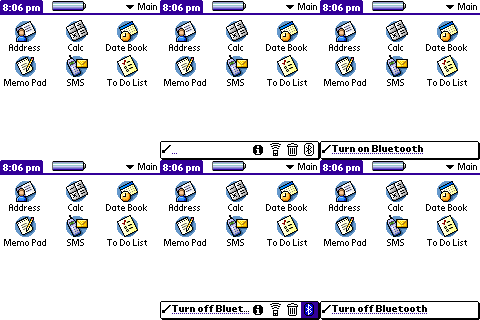 Blue Fang has been tested on the Tungsten T and T2, and should work on other Palm OS 5 handhelds that use Palm's Bluetooth stack. It can be downloaded from PalmGear or the author's home page.
 Permalink
 Print
PrintArticle Comments
(7 comments)
The following comments are owned by whoever posted them. PalmInfocenter is not responsible for them in any way.
Please Login or register here to add your comments.
 Comments Closed
This article is no longer accepting new comments.

Look also at BtToggle
Dave
a Brit in Clogland
RE: Reminds me of Hacks
In the battle between Good and Evil, Evil has the most fun.
RE: Reminds me of Hacks
For Bluetooth-Enabled PDAs only strictly
* Zire 72
* Tungsten T Series
* Sony's Early OS 5 Clies (i.e. NZ90)
* Sony UX50
* Tapwave Zodiac
Not sure about whether you can use this with a Bluetooth SDIO, though, but IMO this was meant to be for Palm-Powered PDAs with Built-In Bluetooth.
Intel PXA27X, Motorola's ARM Processor, or Texas Instruments OMAP? Pick one Palm Enthusiasts, the choice should be yours. When handheld makers make you choose the ARM Processor, you win.
Preferences.c
Dave
Update to v1.1
Apologies for any inconvenience!


Latest Comments
- I got one -Tuckermaclain
- RE: Don't we have this already? -Tuckermaclain
- RE: Palm brand will return in 2018, with devices built by TCL -richf
- RE: Palm brand will return in 2018, with devices built by TCL -dmitrygr
- Palm phone on HDblog -palmato
- Palm PVG100 -hgoldner
- RE: Like Deja Vu -PacManFoo
- Like Deja Vu -T_W


Reminds me of Hacks
Palm m505 User