


Palm Desktop 4.2 Rereleased as 4.1.4E
Palm has rereleased the Palm Desktop for Windows that was initially billed as version 4.2. It is now called version 4.1.4E. The E denotes that it is meant for devices with the extended PIM applications.
This update is identical to Palm Desktop 4.2, with simply a new version number. Palm Support says if you installed the version labeled 4.2, there is no need to install 4.1.4E.
Palm Desktop 4.1.4E for Windows is available here. It is only compatible with the Treo 650, LifeDrive, Tungsten T3, T5, E, E2, and the Zire 31, 71, 72.
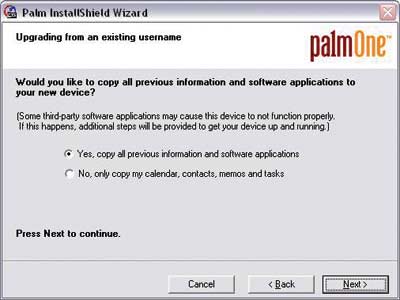
The installation process has been improved for users that upgrade from a previous Palm device. It has a new wizard that can copy all previous information and software applications to a new device. It also can detect incompatible apps in the users backup folder in order to avoid conflicts.
This installer is not meant for Treo 600 users or anyone who has the PocketMirror Standard conduits because this desktop installs the Outlook conduits meant for handhelds and smartphones which use the extended PIM applications.

 Permalink
 Print
PrintArticle Comments
(5 comments)
The following comments are owned by whoever posted them. PalmInfocenter is not responsible for them in any way.
Please Login or register here to add your comments.


RE: Could not install this software

It deletes the File Transfer program that's installed automatically with the original Palm Desktop from the CD.
I tried every way to install the updated Palm Desktop - on top of the old, after deleting the old... but the File Transfer program is deleted.
Even tried saving the executable in a different folder, and the pasting it back into the PalmOne folder - error message.
Wouldn't be surprised if this "update" deletes other stuff too.
Finally went back to the Palm Desktop version from my CD, because I need the File Transfer program.
RE: Could not install this software
I had to undo the install by overwriting with the original CD, as posted above.
And, the files it takes away as "incompatible" had been working fine for me...where would these have been moved from? (Looks like archive, not backup.) What is the difference between archive and backup, anyway? After a hard reset, where would the files be copied from?
Incidentally, anyone having trouble with the multi-connector? I find that it is very sensitive, and often when I plug it in or move it slightly the connection is lost, and my PC declares it is an unrecognized device...a slight nudge, and then it is OK...even the motion of pressing the button on the chord seems to create too much motion and often will disrupt the connection.

Did anyone notice the log is html now??


Latest Comments
- I got one -Tuckermaclain
- RE: Don't we have this already? -Tuckermaclain
- RE: Palm brand will return in 2018, with devices built by TCL -richf
- RE: Palm brand will return in 2018, with devices built by TCL -dmitrygr
- Palm phone on HDblog -palmato
- Palm PVG100 -hgoldner
- RE: Like Deja Vu -PacManFoo
- Like Deja Vu -T_W


Could not install this software
After trying to install three times, I discovered that my existing Palm software had become balled up, to the extent that I could no longer hotsync or launch the desktop software.
Is this a known problem? Does it prove that Palm Inc. is broken?