


Pennovate Notes 3.0 Released
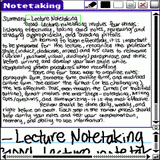 Pennovate has just released an update to Pennovate Notes for Palm OS. Pennovate Notes is a onscreen note taking paper replacement app. It allows you to take down notes in your own handwriting in a large paper sized format. The latest update features a few new improvements including new anywhere alarms allowing you to create handwritten alarms from your notes.
Pennovate Notes is available with a 15-day fully functional free trial and costs $19.95 to register.
CalenNotes uses the same digital ink technology in a calendar/time management format and has also been updated. It allows you to create, manage and schedule events on your device in your own handwriting. It costs $24.95 USD to register.
 Permalink
 Print
PrintArticle Comments
(3 comments)
The following comments are owned by whoever posted them. PalmInfocenter is not responsible for them in any way.
Please Login or register here to add your comments.


RE: Tried It. Impressions.

I imagine all experienced graffiti users would not see the point in writing text via this program. But it seems to be marketed at the novice who is still clinging to his paper copies. Even still, I'm not sure how satisfied such a user would be. But as I state above, it has many other uses besides just text.
One thing is for sure - more useful on a 320x480 screen. You trying to use this on your Treo Pat?



Latest Comments
- I got one -Tuckermaclain
- RE: Don't we have this already? -Tuckermaclain
- RE: Palm brand will return in 2018, with devices built by TCL -richf
- RE: Palm brand will return in 2018, with devices built by TCL -dmitrygr
- Palm phone on HDblog -palmato
- Palm PVG100 -hgoldner
- RE: Like Deja Vu -PacManFoo
- Like Deja Vu -T_W


Tried It. Impressions.
Seems very well written from a programming and design standpoint. Lots of tutorial pop ups to begin with. Then again, when you have to have tutorials that may be a bad omen if you expect simplicity and efficiency.
Has exporting and saving options covered too. Not bad at all. Actually quiet impressive.
But, with all the bases covered, I'm finding it hard to believe that this would really help make one more productive. Is the idea of being able to write full size notes and an app that shrinks them into a miniature paper space really worthwhile?
Reading the notes off the shrink-paper is troublesome at best. Writing them is far more cumbersome than on paper or in a scribble pad program. Furthermore the background processing necessary to identify strokes makes the writing itself quiet digitized and unnatural looking. Frankly it's low quality in recording what's written.
Diddlebug's super easy tap once for a new page, accurate pen recording, lightening quick speed, and ability to search notes wins the day for me. Plus it's free and simply rock solid stable.
I'll keep trying, but it looks like less is more for me so far.
Pat Horne