


Full Featured HTML Editing on the Palm
Pine Tree Software has released Torpedo, the first Web page editing application that allows users to create HTML files, preview them on the handheld, then FTP them directly to a Web server. Torpedo’s drop-down menus and wizards guide users through coding of HTML tags including font formatting, applets, image linking, hyperlinks, Javascript, and more. It comes bundled with iLinx’s Palmscape Web browser for previewing the pages, LFTP for uploading the files, and CSpotRun, to read the on-Palm documentation. Torpedo is available for $12.50.
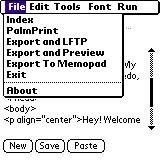 It comes with Palmscape for HTML preview. This can show text formatting (with color), frames, tables, and more. Plus, Palmscape is directly launchable from Torpedo.
It also comes with Laurent Thaler’s LFTP software for FTP access from any phone line or wireless connection. Most FTP commands are usable, including make directory, delete directory, put a file, get a file, and even upload DOC to HTML. Files can be exported then uploaded with a single Torpedo command.
Torpedo has integrated support for Stevens Creek Software’s PalmPrint and SCS Print Server to print the HTML.
Torpedo keeps its HTML files in its own database that is automatically backed up on every HotSync. Torpedo even can synchronize its files with the Memo Pad.
A desktop conduit and wireless server (Palm VII) application are coming soon, probably being released by summer.
On the Web:
 Permalink
 Print
PrintArticle Comments
(10 comments)
The following comments are owned by whoever posted them. PalmInfocenter is not responsible for them in any way.
Please Login or register here to add your comments.
 Comments Closed
This article is no longer accepting new comments.

RE: text editing?
What makes Torpedo "better" than the other methods you mentioned is that it's well integrated. I haven't tried it out, as I haven't the need to edit and upload HTML on my Palm. I'd like to read some reviews of this program, though.
-Greg
RE: text editing?
Please tell me what is the benefit of the integration?
Also if you have NS Basic don't use the latest runtime, use the runtime included with Torpedo otherwise you'll get an error when you use the image or link 'wizard'.
What is really needed is a good Browser for the palm, one in which the user can see the page source. Also I would love to have more FTP programs or at least see LFTP augment from 'tool' to 'application'
PS editing html for the Palm is not dumb.
All I really want is the ability to edit code and upload to the server. Now that will be cool.
RE: text editing?
RE: text editing?
You are correct in that Torpedo is a standalone and most folks should just download the one program.
Please Torpedo maker, bring out the wireless Palm VIIx version!
I'll buy!
RE: text editing?
>upload to the server. Now that will be cool.
that's what I do with OnBoardC (http://www.individeo.net) and LFtp
Laurent THALER
http://lthaler.free.fr
lthaler@free.fr
I saw no real benefit from it.
IMO the only real benefit to using Torpedo was that you can upload html documents to a server using LFTP. I can't do that (at least I think I can't) with Quickword.
It appears to be designed for people who are pretty proficient with html to start with. And in that case (in my case) the interface just got in the way. To insert an image or a script or whatever, I could use the menus (which was a PITA) or just type it in manually (much easier - but why do I need another program to do this?).
It would be cool if you could apply html tags to existing text on the screen, rather than having to go through the menus. In other words, just highlight the text, and click an icon on a tool bar to make it bold, italic, h1, whatever. I want it to function like a word processor or FrontPage or Dreamweaver on a desktop.
Sorry, It just wasn't useful for me. I'd love to hear how someone is using it though. Perhaps my thinking is too linear. I'd like to be able to edit my pages or write articles on the road with my palm.
RE: I saw no real benefit from it.
Introducing Tagger 1.0, the HTML tagging poplet!
Search for it in Palmgear. Tagger adds HTML tags to text anywhere there is a text field. You can write a whole website with this. It uses the Poplet Kit and is for free! (just because I like you all and because a chimp could have coded this)
Think of it as a poor man's HTML editor for only 3K! It's no Torpedo, but it gets the job done for me.
Again, I think Torpedo is a great idea and I hope to see the PalmVIIx version which I'll buy if it works.
The more the merrier.
Best regards,
Tony
>It would be cool if you could apply html tags to >existing text on the screen, rather than having to go >through the menus. In other words, just highlight the >text, and click an icon on a tool bar to make it >bold, italic, h1, whatever.
Great Solution!


Latest Comments
- I got one -Tuckermaclain
- RE: Don't we have this already? -Tuckermaclain
- RE: Palm brand will return in 2018, with devices built by TCL -richf
- RE: Palm brand will return in 2018, with devices built by TCL -dmitrygr
- Palm phone on HDblog -palmato
- Palm PVG100 -hgoldner
- RE: Like Deja Vu -PacManFoo
- Like Deja Vu -T_W


text editing?
or another word processor and previewing or uploading the html via
the included apps: LFTP and PalmScape?
You can use Pop! from Rick Bram to make menus of Html tags to insert into your html, then upload via LFTP.
There is a 4K limit however, but maybe Torpedo breaks that?
I think the idea of Torpedo is great, but other programs can do the job.