


Manage Files with myWorkbench 1.0
myWorkbench 1.0 is a new utility for managing files on handhelds with expansion cards. It acts like the Windows file manager. Users can copy, move, and delete files from RAM and removable media like Compact Flash, SD/MMC, and Memory Stick. It offers a split screen view, by default showing the contents of RAM in one side and the expansion card on the other. Frames can show different views of the same card, which simplifies moving files.
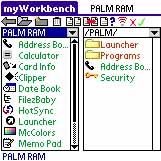 In additional myWorkbench also lets users beam files, create new folders, format removable cards, rename removable cards, set file information, and more.
It supports the Palm m500 and m505, HandEra 330, or Sony with PalmOS version 3.5 or higher. And requires 50K of free memory. It costs $14.
Thanks to Reggie for the tip. -Ed
 Permalink
 Print
PrintArticle Comments
(17 comments)
The following comments are owned by whoever posted them. PalmInfocenter is not responsible for them in any way.
Please Login or register here to add your comments.
 Comments Closed
This article is no longer accepting new comments.

RE: Powerrun
Mcfile is a good file manager but lacks changing of file attributes. It can beam from the card but somehow can't beam from the Palm RAM.
Filez is another popular file manager that has the facility to change file attributes but somehow, it's not as easy as McFile.
myWB lets you beam from ram & card, and change file attributes! I like the PcTools/Ztree (remember these old DOS programs?) format which lets you easily multi- select files, and immediately make the active window the source and the other the destination.
RE: Powerrun
RE: Powerrun
RE: Powerrun
Here's the download link
PalmGear:
http://www.palmgear.com/software/showsoftware.cfm?prodID=26094
Handango:
Can't seem to find it.
RE: Here's the download link
Almost the same...
They support very well the expansion card ('cept the Clie), They also have very nice features for developers.
I don't know if their marketing is defficient, but we don't hear a lot from them, even though they have good products and nice support. Handmark didn't charge me anything for their last two major updates, and I respect that a lot.
Solo
Best SD card utility?
I read the description of this and its related app, Workbench, and am not sure that I should use this to replace McFile.
Also, I have used Filez to change attributes with disasterous results (read "hard reset").
Any comments?
Need combination of launcher and file utility
RE: Need combination of launcher and file utility
RE: Need combination of launcher and file utility
Eric Garrido
RE: Need combination of launcher and file utility
RE: Need combination of launcher and file utility
Although in Launcher III one can organize with subfolders, as far as I can tell, one cannot actually launch a file. I would like to create subdirectories and organize my files, particularly the hundred or so iSilo files, and be able to start that file from the theoretical organizer/launcher program. I don't think that you can do this with Launcher III. I would still need to start iSilo and would be limited to its single level of organization.
Launching DOC files


Latest Comments
- I got one -Tuckermaclain
- RE: Don't we have this already? -Tuckermaclain
- RE: Palm brand will return in 2018, with devices built by TCL -richf
- RE: Palm brand will return in 2018, with devices built by TCL -dmitrygr
- Palm phone on HDblog -palmato
- Palm PVG100 -hgoldner
- RE: Like Deja Vu -PacManFoo
- Like Deja Vu -T_W


Powerrun
bit more expensive, $20 (if I remember correctly).