


Hi-Res Documents To Go Comes with T650C (Updated)
A ZDnet Japan review of the new Sony T650C mentions that it comes with a hi-res version of DataViz's SheetToGo, its spreadsheet app. The hi-res version allows the user to view spreadsheets at regular size, or zoom out to get a wider view of the sheet.
Update: A DataViz spokesperson said, "At this time we do not have the high res version of Sheet To Go as part of the retail sold Documents To Go Standard Edition. It was provided to Sony for the bundle and it is something we are working on for the future."
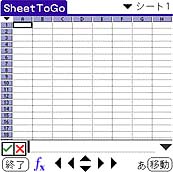 The T650C will be out in Japan on June 8. It's possible DataViz will release a new version of their app in other countries on or near that date.
It seems likely Sony put some pressure on DataViz to add hi-res support to their product. While Sony's hi-res screens are a nice feature for U.S. and European users, they are almost a necessity to make the Japanese written language readable on a handheld screen. But a 320 by 320 screen goes to waste if a document reader or spreadsheet app displays everything at 160 by 160.
Documents to Go won't be the first Palm office suite to support Sony's hi-res screens. For example, Quickoffice already does so.
Thanks to Christian Stocker for the tip. -Ed
Related Information:
- PMN: The Palm Office
- PIC: Software Forum
 Permalink
 Print
PrintArticle Comments
(10 comments)
The following comments are owned by whoever posted them. PalmInfocenter is not responsible for them in any way.
Please Login or register here to add your comments.
 Comments Closed
This article is no longer accepting new comments.

RE: Asian Fonts: 320x320 vs. 160x160
Sony seems to think a high res screen is the only answer. Ever notice that they don't sell the S360 in Japan?
High res
RE: High res- can't get update!
RE: High res
Ahh - the point is that this means that Sony N760C, T615C,T650C users get the benefit of displaying spreadsheets maxed for their device. Yes, NR70 users don't get to use virtual graffiti space :( but they still get 320x320 - a better experience then if it was just 160x160. So why to you ask "...so what is the point."
run and edit files from expansion cards
RE: run and edit files from expansion cards
RE: run and edit files from expansion cards


Latest Comments
- I got one -Tuckermaclain
- RE: Don't we have this already? -Tuckermaclain
- RE: Palm brand will return in 2018, with devices built by TCL -richf
- RE: Palm brand will return in 2018, with devices built by TCL -dmitrygr
- Palm phone on HDblog -palmato
- Palm PVG100 -hgoldner
- RE: Like Deja Vu -PacManFoo
- Like Deja Vu -T_W


Asian Fonts: 320x320 vs. 160x160