


New Voice Command Software for Palm OS
VoiceIt Technologies has released VoiceNavIt, a new voice command and control application for the Palm Treo 650 & 600 and the Palm LifeDrive. VoiceNavIt enables you to automate your most common tasks and launch applications with your own voice commands.
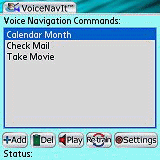 VoiceNavIt is a voice command and control application with system-wide macro recording and playback inside of VoiceNavIt gives you the capabilities of voice navigation execution for common tasks such as speeding up text entry to automating the execution of a series of actions.
"Just a simple voice command can retrieve your emails, create new tasks, open your calendar and switch between views, take - save – send a picture, launch your favorite PalmOS application and much, much more. The possibilities are as endless as your imagination." says developer Noel Grover of VoiceIt.
VoiceNavIt v1.0 currently only works with the Treo 650, Treo 600 and the LifeDrive. it comes with a free trial and costs $29.95 to register.
 Permalink
 Print
PrintArticle Comments
(13 comments)
The following comments are owned by whoever posted them. PalmInfocenter is not responsible for them in any way.
Please Login or register here to add your comments.



Voice Command Impressions

This is how it works... first you select and app to create a command for, then you record the command, that will set it up to launch an app by your voice. You have to assign a button that will invoke the listener and put it into action mode. After you record a command you can also record macros in the app, such as fetching email or creating a new datebook entry with your own predetermined message.
RE: Voice Command Impressions
-------------------------------
Editor, http://Pocketfactory.com
RE: Voice Command Impressions
Seems strange someone would be developing something today for PalmOS that still relied on having to record commands.
RE: Voice Command Impressions
RE: Voice Command Impressions
RE: Voice Command Impressions
Using voice commands
1. Assign a Voice Command button. See “Reassigning buttons” on
page 171 for details.
2. Hold your device about 9" away, and then press and release the Voice Command button. A tone plays and a microphone icon
appears at the top of your screen.
3. In a clear voice say, the command. For example, to access Help, say “Help.”
4. After Voice Command finishes speaking a microphone icon
appears at the top of your screen; say your answer. For example, say “General” to access general Help topics.
Page 180 (172) of the Palm Treo 700w user manual.
http://www.palm.com/us/support/handbooks/treo/treo700wvzw_ug.pdf
Surur
They said I only argued for the sake of arguing, but after an hour I convinced them they were wrong...
RE: Voice Command Impressions
I am stunned that Palm hasn't tried to introduce some "voice comamnder" type of feature on a Palm with a mic & voice recorder. It seems like it'd be an easy extension of FrankenGarnet and give users at least something gimmicks to play around with. On the LifeDrive especially it might be useful to play around with. Imagine having a couple of commands available out of the box and then additional ones learnable. Listening to a song with headphone on while shouting "next track" into your hand is certain to elicit stares ;-)
Pilot 1000-->Pilot 5000-->PalmPilot Pro-->IIIe-->Vx-->m505-->T|T-->T|T2-->T|C-->T|T3-->T|T5-->TX
RE: Voice Command Impressions
Surur got you started on invoking it. The coolest thing is, once you get it assigned to a button, press the button (don't press-hold) then just say "Help." It will then answer with a list of topics, you reply with the topic of choice, and on and on and on.
You can ping back and forth with it and it will audibly tell you 95% of what you would ever want to know about it.
Paraphrasing Agent Smith in the Matrix:
Yes, Palm, perhaps putting a microphone into your PDAs is a good idea after all!
Sure as hell glad they decided to put a mic into their Treos! Sounds extreme but there's no telling what Palm will do during these strange times, after all, they did leave out the microphone from the Tungsten W!
"It is commonly said, and more particularly by Lord Shaftesbury, that ridicule is the best test of truth".
Lord Chesterfield
Where is the mic?
RE: Where is the mic?
http://tinyurl.com/puacj
FWIW, I don't think using the Palm hotsync cable is the best method, but just read the whole thread.
It might not be the "mythical color HandEra", but I'm liking my TX anyway.


Latest Comments
- I got one -Tuckermaclain
- RE: Don't we have this already? -Tuckermaclain
- RE: Palm brand will return in 2018, with devices built by TCL -richf
- RE: Palm brand will return in 2018, with devices built by TCL -dmitrygr
- Palm phone on HDblog -palmato
- Palm PVG100 -hgoldner
- RE: Like Deja Vu -PacManFoo
- Like Deja Vu -T_W


Awesome!
<><