


Palm Treo 700p Review
 by: Ryan Kairer
June 12, 2006
© PalmInfocenter.com
Palm's Treo 700p is the latest in a now long linage of Treo smartphones. The Treo 700p combines the benefits of a full featured mobile phone with the Palm OS mobile computing platform. From a visual perspective the design changes are small, evolutionary refinements of a proven smartphone form factor. Most of the improvements to Palm's flagship smartphone come in the form of new software innovations, a big boost in memory and fast, broadband like data speeds.
Beginning with the large aerial bulge, the top of the device contains the memory expansion slot, IR window, the famous silent mode switch and the stylus silo. The silent mode switch now vibrates when activated, giving you a physical confirmation when engaged. Compared to its successful predecessor, the Treo 650, the 700p has a much darker grey plastic casing with with a more subtle silver finish. On top front of the device above the screen are the LED and phone earpiece. The LED on the Sprint version now only blinks when you have a waiting notification alert such as a missed phone call or voicemail and remains on when charging. Curiously, the Verizon version still retains the old behavior of inanely blinking to indicate network status.
At first glance, the Treo 700p is almost identical to its Windows Mobile counterpart, the Treo 700w. The main differences between the two units include the operating system (obviously), a higher density 320 x 320 pixel display and a few distinctive icons on the buttons. On the back of the device is a possible sign of things to come. The usual Palm powered circular logo, has been replaced with a new ACCESS Powered stamp, reflecting the new owners of PalmSource.
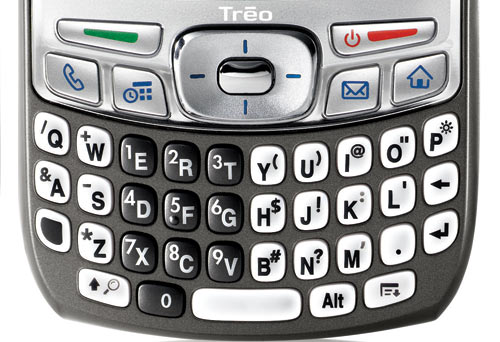
The keyboard now has a more square thumb keyboard arrangement instead of the rounded oval keys on past treos. They keys are now angled towards the sides of the device in the usual smile pattern. After using it for a few weeks I can't say I either dislike or prefer the new keys. My personal thumb typing speed and accuracy feels about the same with both styles. The backlighting on the keyboard and buttons has been improved with blue outlines on the app keys and a brighter, more consistent white illumination on the qwerty keypad.
The 700p has two new dedicated send and end call buttons just below the display. The rectangular green and red buttons are devoted to initiating and ending phone calls. The red end key also turns the screen off and activates the keyguard. Activating and using the keyguard is nicely implemented and is pretty mostly a transparent process. You simply tap the red button to turn off and it locks the keys. The on-screen keyguard display now has a larger notification bar that now shows the current time and date whenever you activate the device.
The center 5-way navigator is also a bit larger and is a lot easier to grip and thumb around with. The row of application buttons below the screen are user changeable and by default take you to the Phone app, Agenda view (calendar) and email. Hitting the blue option key before tapping a button gives you a few more shortcuts which you can also customize.
The menu key has been moved to the bottom right of the keyboard and gone is the former convenient home and menu key arrangement from the 650. The home key is part of the application buttons on the far right and can't be changed by design. The menu key has been awkwardly relocated to the bottom of the keyboard next to the infrequently used alt key. This reshuffling of the key navigational array is a disappointment. it is a little more clumsy to access common functions and menus. I also ran into trouble with a lot of games and a few apps. Often the home key is over-ridden by the games and there is no way to quit out of the current app and you can get stuck. Fortunately, there is a third party utility that lets you remap the buttons to your own preferences and you can revert to the more efficient 650 style.


Size wise, the Treo 700p has dimensions of 5.08" x 2.28" x 0.89" inches (129 x 58 x 22.5 mm) and weighs in at 6.4 ounces (180 g). It pretty much shares the same dimensions and weight as the Treo 650 and 700w.
Hardware
The Treo 700p is powered by a 312 MHz PXA270 Intel XScale processor. The device has been given a much needed boost in the memory department. The 700p includes 128 MB of non-volitile (NVFS) chip for internal program memory, of which 60 MB is user-available. Both the dbcache and dbheap (internal application memory space) have been increased for improved program memory space allocation. The dbheap is now up to 10 MB and the dbcache has a 18 MB capacity.This is a positive step up for both application development and overall device stability, though is still a bit conservative. The 700p improved on two of the major drawbacks of the Treo 650: limited internal memory and device stability. While there are still a few quirks and bugs with some third party apps, generally I found the 700p to be much more stable. The 650's main limitation was its cramped internal memory. Even with external memory expansion, things can get crowded quickly if you had more than a few applications and games installed. In addition, many apps store their databases in internal ram such as email and the browser cache and rely on having a few megs free in order to operate correctly. Fortunately the 60MB of space on the 700p makes things more comfortable if you are upgrading from the 650/600.
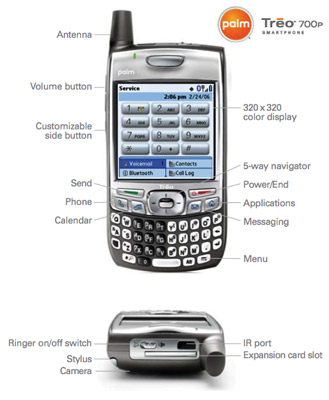 The Treo 700p has a SD/MMC memory expansion slot. Palm has added built in FAT32 support for SD cards up to 2 GB in size. Palm engineers are currently testing 4 GB size cards for compatibility, some 4 GB cards may work others may be incompatible at this time. While the SD slot does support SDIO accessories with Palm OS device drivers, Wi-Fi via an SD card is still not supported. This appears to be a limitation of Palm OS Garnet and Palm has no plans to ever support WiFi on this model.
Display
The Treo 700p has a 2" x 2" inch square display. It is a 320 x 320 pixel TFT touch-screen display that supports 65,000 colors. The display on the 700p is an improvement from previous models. The new display has much "whiter" whites and a noticeably better color saturation rate and chromaticity. It does a decent job of remaining viewable in direct sunlight, as well as lighting up a dark room at full brightness. It also appears a bit brighter than the 650 screen at the same brightness level and had a slightly better viewing angle.
Having more pixels than most other smartphones is a definite selling point. People are often impressed at the quality and viewabilty of digital video the small screen. TCPMP supports pretty much all the formats including avi, mpeg, divx and mp4 (video iPod) files. You can convert your own videos using VEMoDe and there are a number of DVD mobile conversion programs. There is also a program available that can automatically convert content from your Tivo.
Camera
The 700p includes a 1.3 megapixel digital camera on the top back side of the device. It can take photos at a max resolution of 1280 x 1024 and has 2x digital zoom. It also records video clips with audio at a 352 x 288 resolution. The software takes care of automatic light balance and the camcorder function has an improved FPS capture rate. A non-camera version will also be made available. The camera quality is pretty standard for a phone-cam. Outdoor scenes and good natural lighting conditions will give you the best results. Since the resolution is higher you get better detailed and clearer pictures than the Treo 650. However the 650 does a better job indoors and in lower light situations. The 700p camera has a tendency to be very dim and washed out in darker conditions and in low light indoor scenes. In some indoor, low light conditions the 700p would be totally dark, when the 650 would have a clear picture. Here are four raw, unedited Treo 700p photo examples in various lighting conditions (partial shade, sunny, indoors, outdoors lowlight):


Bluetooth
The 700p also has built in Bluetooth wireless capabilities. This allows for accessories such as wireless Bluetooth headsets, GPS navigation kits and using the 700p as a wireless modem for your laptop (which will likely require a carrier DUN plan). The v1.2 spec allows for faster device connections and adds the ability to use Bluetooth devices concurrently. For instance, you could keep a headset connected at the same time you have your Bluetooth GPS running. I noticed that the device can transfer files over Bluetooth a little quicker than previous Palm devices and there is also less interference and static when using Bluetooth headsets. There is also a new option to leave the device in discoverable mode for a short time period. By setting the device visibility to temporary it will remain discoverable for 2 minutes.
Phone
The Treo 700p phone uses CDMA wireless technology (850/1900MHz). It is the first Palm OS smartphone to support EV-DO high-speed wireless data. EV-DO allows for data speeds around 10x faster than previous 1xRTT rates and is backwards compatible. EV-DO also allows you to receive calls while the Internet connection is active, as on all previous CDMA devices the phone would not accept calls when using the data connection. Previously, incoming calls would go straight to voicemail when browsing the web or checking email. It also features E911 compliance with a built in A-GPS chip that is solely used for the enhanced E911 emergency location service.
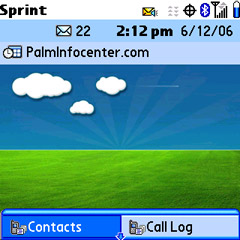 Both Sprint and Verizon have made a lot of progress deploying EV-DO lately. However, its coverage is still not as spread out and is still being deployed by carriers in many rural areas and communities far from a major metro area. In my tests, I usually saw around an average of ~260 kbit/sec using the mobile speed test at dslreports. My Treo 650s EDGE connection usually gets around 80-120k, while the results of the 700p ranged from 120 - 319k. Generally, I would see higher rates outdoors and in downtown areas and a good deal less indoors from my ad-hoc speed tests. The speed is a definite improvement and greatly accelerates downloading/sending files, attachments and browsing the web.
Audio
Like previous Treos, 700p has a dual speaker design, with the front earpiece speaker used for phone calls only while the rear handles the speakerphone, sysytem sounds, games and music. If you want to listen to digital audio via a headset with standard headphones you'll need to use a 3.5mm stereo adapter accessory. The rear mono speaker is well placed just under the camera and can get loud. There is an varied selection of ringtones that can also be used as alarms. You can record your own sounds to be used as a custom ringtone and alarm. You can also transfer wav and midi files via Bluetooth, beaming or hotsync for use as ringtone sounds. The 700p has no new ringtones from the 600/650 set.
Seeing that the best selling treo software has been a call volume boosting app, VolumeCare, I was wondering if the Treo 650's notoriously low ear speaker phone call volume had been addressed. While I found that the highest setting standard call volume through the speaker is a little better, I still don't think it is adequate at full strength. Even in some moderately noisy situations and outdoors the max volume did not seem loud enough, but in most situations its not that bad of an issue. Call quality seemed very good as I never had any issues and all calls were very clear on my Sprint review unit. The speakerphone is loud and clear, and I found I get better volume with a bluetooth or wired headset.
One Hand Operation
Like all Treos, the 700p really excels at one-handed operation. The 5-way navigator and on screen cursor combine to make most tasks work without having to tap on the screen. In fact, it's pretty rare that I even use the stylus, except for games. There is a light blue glow that highlights dialogs and form elements, that acts much like an on screen cursor. It really makes using the handheld with one hand easy and more intuitive. It works well within many of the included apps and is also compatible with many existing and newer third party programs. It is worth noting that having a touchscreen on a mobile phone is a new concept for many first time smartphone buyers. It really adds a lot to the device functionality, that many experienced PDA users now take for granted. The touchscreen makes many apps and games much more usable, like crossword puzzles and and soduko, and there is always handwritten notes, drawing programs and of course action games.
Phone Functionality
 The Phone application is the centerpiece of the phone functionality that controls calls, contacts, dialing and accessing your shortcut favorites buttons. From here you can simply start punching in numbers, or letters that and it will display your matching contacts or you can click to goto your phonebook. The favorites function allows you to setup quick shortcuts to frequently dialed numbers, groups of contacts, device applications, emails and web links. It has a nice scrolling animation when you expand the list, which can store up to 70 custom buttons. The phone application also shows your signal and battery strength, bluetooth status, data status and the number of new email or text messages. There is also an option to display your next upcoming calendar appointment in the main screen. The phone display options support choosing a background photo or wallpaper or can show the standard dialing pad.
With the addition of the new dedicated green and red send/end buttons, initializing and ending calls is more straightforward. You can tap the green phone button from within the phone app to bring up a shortcut list of your recently dialed calls and can find shortcuts to your call history or the dial pad. When a call is in progress, call related options and functions are available as large on screen buttons. With one click you can start a conference call, mute, switch lines on call waiting or exit out to the device to lookup something in your datebook or other application and remain on the call.
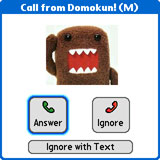
When you have an incoming call, the phone displays the name and caller picture (if you have one assigned). If the number is not found in your contacts, the screen will show which US state the call is coming from. There is also a new option for handling incoming calls and that is "Ignore by Text." This is a popular feature taken from the 700w that enables you to decline a call and quickly type in an sms message letting the caller know you are busy. Another unique feature I found useful was that the phone will ask you to save unknown numbers as new contacts or add to an existing contact when you dial or receive a call from a number not already stored on your device.
The sms/mms messaging application has been given an attractive new interface. SMS chats are saved by person in an IM chat style view, which is an excellent way to keep track of all your sms conversations. When composing a new text or mms message the software will now automatically bring up your lists of contacts so you can just type the first few letters or numbers of a recipient and it will show matching numbers and email addresses from your list of contacts. Attaching photos and voice memos to multimedia messages is pretty painless and quick.
You can use the Treo 700p as a wireless modem for your laptop or desktop computer. Palm now includes an easy to setup DUN (dial up networking) connection that can be used over Bluetooth or with the included USB cable. The USB cable is finally able to trickle charge the device, so you don't have to worry about draining the battery when using it in DUN mode. Not all carriers may support this feature, and some might even require you to purchase a additional DUN data plan. Windows PCs support DUN over USB and Bluetooth, while at this time the Mac OS only supports Bluetooth connections.
Battery
The Treo 700p comes with a 1800 mAh Li-ion rechargeable battery that can be removed via the cover on the back. The cover also hides the reset hole, which can be activated with the stylus tip. Additional spare treo batteries are available for $24.95 USD. A 2400 mAh extended life battery is available for $39.95 for approximately 33% more life. Official battery lifetime is rated at 4.5 hours talk and 300 hours standby. With my own personal usage pattern, which included heavy internet usage and a few phone calls a day and Bluetooth on all the time, I am able to go roughly 2-3 days on a single charge, which is impressive for a high end phone. I felt that battery life was comparable to the 650, but the EV-DO use is seems much more power hungry and with a lot of net usage I saw my time between charges drop. I also felt I got better battery life out of 700p than with the 700w, but battery life varies greatly with how you personally use the device and features. As an example, when on flights (wireless off for most of the time) I can watch about 3 hours of video and play a few games and still have around 40% battery life left when I land.
Software
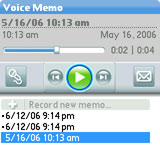
The Treo 700p runs the Palm OS Garnet operating system v5.4.9. While this is still the same Palm OS 5 Garnet core, there have been a number of improvements to the Palm Treo platform that extend the functionality and multimedia capabilities of this device.First off, there is a new UI style for some of the built in applications, but only a few programs make use of the new interface, namely: pTunes, Pics&Videos, Voice Memo and the streaming program. Its full blue titlebar and silver, grey color scheme and buttons give these apps a more modern and attractive feel. It's too bad this new UI style is only used in a few of the newly commissioned apps.
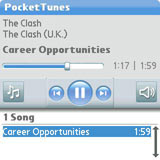
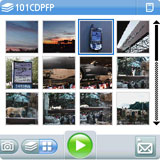
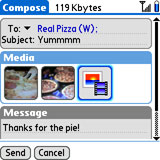
Among the updates are small, but nice visual queues such as more high-res phone status icons and a new shortcut menu icon. Instead of the classic command stroke, the shortcut icon has been updated with the more appropriate menu key icon for accessing common shortcuts in drop down menus. The phone signal strength now shows 5 bars instead of four, the bluetooth icon now changes to indicate activity and there are blue small triangle icons that indicate when EVDO is in range and shows activity (though curiously this icon is only shown on the phone app - which does not use the data connection). The small blue/grey triangle above the signal strength indicated whether you are in range or are connected to a 1xRTT connection. There is a new alerts notification, that shows an animated bell in the top left corner that takes you to the notification screen when you have new alerts such as missed calls, alarms or todo's. The battery meter icon is also a little more high res, and you can click on it to check the percentage remaining.
The 700p has an impressive set of new multimedia capabilities for a Palm device. Both video and audio streaming over the Internet is now built in. Thanks to the high-speed EVDO connection and streaming software, you can access Windows Media player format streaming video and audio to the device. For instance, you can navigate to npr.com in the web browser and click on the 'live audio link' the media player will launch and start streaming NPR's live radio feed to the Treo. You can also visit a some movie preview websites such as Netflix.com and watch the streaming movie trailers. I was also able to watch clips at ComedyCentral.com, CNN.com and Fox New's desktop websites. Unfortunately, flash video based websites such as YouTube and Google video do not yet work on the 700p. If your local radio station offers a live feed in .wma compatible format you could likely access it on your treo and there are a number of local and worldwide internet radio stations that should work as well.
Spint's 700p includes a new SprintTV application. This app includes a number of subscription based channels that you can stream to your device, similar to MobiTV. I was rather disappointed with this service as there is a limited number of channels to choose from and most are sold individually, on the expensive side with monthly subscriptions going for $3-6 a month. While there is a selection of major media channels, most are "mobile stripped down editions" with clips and highlight shows that loop throughout the day, as opposed to actual live TV feeds. There is an option to purchase a collection of some live TV channels at $10 a month. You can also subscribe to some music channels as well as SIRUS satellite channels. SprintTV does not support background play, so if you leave the app it will stop streaming.
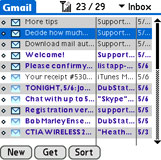
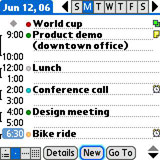
The built-in pictures and video app received some needed improvements and also uses the new interface. While the 650 could get painfully slow when you had more than a few pictures, the 700p app is now much faster at displaying your photo thumbnails. Even thumbnails from SD cards from dedicated digicams will load quickly. New camera images are now placed at the top of the list, eliminating the need to scroll all the way to the end to see new snaps. It also now sorts groups of photos by album from the main screen for both albums stored on a card and internally. There is an enhanced slideshow mode, with some new slide transitions and you can set the slideshow to music. You can also upload to select online albums from the viewer, draw on photos and even add audio annotations.
The latest v8.001 release of Dataviz's Documents to Go is now built into the device ROM. Docs to Go supports creating and editing native Microsoft Word, Excel and Powerpoint files. v8 also includes PDF to Go, which is a native Adobe PDF viewer. You can view and edit office files received from email attachments, stored on SD or beamed and transfered to the device. Docs to Go also comes with a hotsync client that can keep your documents in sync with your desktop.
Pocket Tunes is included on the device for MP3 digital audio and music playback. Owners will have an option to upgrade to Pocket Tunes Deluxe for WMA/PlaysForSure support to subscribe to online digital music stores. Pocket Tunes works well and with a free registration you can change and install skins, it also has robust support for playlists, background play and sorting through artists and tracks on SD cards.
Email
Versamail v3.51 is included as the default email client, and has been renamed to simply "Email." It supports POP, IMAP and Microsoft Exchange accounts. The program also has preset support for Gmail, Yahoo Mail, .Mac, AOL email and others. For Enterprise users whose organizations run Microsoft Exchange Server 2003, the Treo 700p has built in Exchange Server ActiveSync that will directly import and enable corporate email, calendar and contact synchronization. Versamail is a fairly good email program, and if you are looking for push email options or other clients there is a wide selection of alternatives available.
 Web
Web
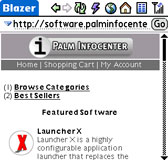
Blazer v4.5 is included for browsing the web. Blazer has been enhanced with new caching rules that make browsing both mobile device optimized and full size websites a more pleasant experience. Instead of having to refresh and reload the entire page each time you exit the browser or use the back and forward buttons, the page is reloaded from the device cache. This enables much faster navigation and rendering when browsing the web or jumping from the browser to another application and back. Palm has also improved JavaScript support, which increases the number of sites accessible and usable on the device. Previously on the 650, sites that used Javascript would render many sites inoperable and would sometimes even cause the treo to reboot. The browser is also better at loading and displaying larger, designed for desktop sites. The faster EVDO data connection definitely improves the web surfing experience as sites are downloaded fast and Blazer is pretty speedy for a mobile device to begin with. Combined with the caching improvements above, Palm has done a good job to improve the mobile web experience.
When you get a Treo, you also get the full range of built in Palm OS apps which includes the PIM apps. The PIM suite includes the usual contacts, calendar, ToDo and memos. Palm also got around to adding a built in Voice recorder this time. You can set the left side button to activate the recorder and take down voice memo's walkie talkie style. A first I've seen on a mobile device, is that in addition to the usual Quick Tour feature guide, Palm has included an electronic version of the entire user manual on the device. Don't forget, there are thousands of commercial, free-ware and open source applications and games available for the Palm OS platform that you can download and install to your device in addition to what is built-in. There are also a lot of treo specific programs and utilities from the active developer community.
One the desktop side of things, Palm includes their Quick Install program for Windows. Quick Install simplifies installing Palm OS programs and converting documents and photos. Users can drag zip files, prc application files, photos, videos and even MS office files into the app and it will preform the necessary conversion and install the the files on the next hotsync. The software CD includes the Palm Desktop v4.2 for Windows XP/2000 and Mac OS X (10.2 and above) as well as an Outlook synchronization conduit for Windows.
Summary
The Treo is a device that can have a direct impact on your productivity both inside and away from the office. But unlike the BlackBerry the Treo can be much more than just a business tool. It can handle a number of different roles, from a high powered PDA phone, to a portable music and video entertainment device to a pocketable email machine and it does so with ease and style. Palm has ironed out the rough spots on the Palm OS Treo platform, making for one of the top smartphones on the market today. The changes and improvements to the 700p may not be drastic or earth shattering, it is definitely a much more refined device than the Treo 650.
The Palm Treo 700p can be purchased online from the Palm store and at local Spint and Verizon stores. Prices and service rates vary based on your carrier, available rebates and plans. At this time, the 700p is only offered in the US from Verizon and Sprint, both are offering it for $399, based on a 2 year contract and rebates. Sprint sells it for $549 with a 1yr agreement and it has a suggested retail price of $649 without a new contract.
 Permalink
 Print
PrintArticle Comments
(110 comments)
The following comments are owned by whoever posted them. PalmInfocenter is not responsible for them in any way.
Please Login or register here to add your comments.




RE: GSM?
Where do We Go Nowwwwwww?!
- Sir Axl de Rose, 1986
RE: GSM?
David Beers
Pikesoft Mobile Computing
Software Everywhere blog
www.pikesoft.com/blog
RE: GSM?
There should be no difficulty at all implementing an EVDO device in the australian market which has had EVDO (GSM) for several years already.
I respect your opinion but am unconvinced.
Where do We Go Nowwwwwww?!
- Sir Axl de Rose, 1986
RE: GSM?
(Deep breath) So, I guess my point is that we won't see a CDMA Treo in Oz because Telstra wouldn't really want to introduce any killer new products onto a network it wants to wash its hands of.
Apologies for the rant. I really hate Telstra. In case you couldn't tell.
This sig is a placeholder till I come up with something good
RE: GSM?
Where do We Go Nowwwwwww?!
- Sir Axl de Rose, 1986

Really? You can accept a call while browsing?
If so, it sounds like Garnet may be UMTS compliant, now, which would in my opinion be bigger news than the release of the 700p itself. It means we will probably see a 3G Treo for GSM networks much sooner than expected (i.e. Palm won't have to wait for the completion of a successor to Palm OS Garnet).
David Beers
Pikesoft Mobile Computing
Software Everywhere blog
www.pikesoft.com/blog
RE: Really? You can accept a call while browsing?
RE: Really? You can accept a call while browsing?
EVDO allows you to send or receive a call while you're on the data connection, but data is suspended while you talk. That's just the way the standard works. In essence, voice is now prioritized, but you still can't talk and surf at the same time. That's the case with any EVDO device.
That was my impression, too, which is why I asked Ryan to confirm if he really meant you could "receive calls while the Internet connection is active." That would be something we haven't seen before.
David Beers
Pikesoft Mobile Computing
Software Everywhere blog
www.pikesoft.com/blog
RE: Really? You can accept a call while browsing?
I have to admit that the 700P has performed admirably for me when doing PDA basic while having a call on speakerphone.
It's also "multitasked" quite well when playing MP3 in the background.
But I would not get my hopes up for a UMTS FrankenGarnet Treo anytime soon.
I predict that Palm will release a semi-comprehensive Treo 650 (FAT32, Blazer update, BB connect etc) ROM update for GSM models *ONLY* within the next few months. They will then follow
with a slightly thinner & sleeker WinMob UMTS Treo this fall. That'll have to do for GSM markets until Palm can come up with the "next" version of POS, whatever its origins.
Pilot 1000-->Pilot 5000-->PalmPilot Pro-->IIIe-->Vx-->m505-->T|T-->T|T2-->T|C-->T|T3-->T|T5-->TX
RE: Really? You can accept a call while browsing?
Yes, if you were using a headset or the speakerphone. For obvious reasons, you couldn't use the earpiece and see the screen at the same time. :)
RE: Really? You can accept a call while browsing?
Bluetooth Multi-tasking.
Surur
They said I only argued for the sake of arguing, but after an hour I convinced them they were wrong...
RE: Really? You can accept a call while browsing?
------
"People who like M$ products tend to be insecure crowd-following newbies lacking in experience and imagination."
RE: Really? You can accept a call while browsing?
Surur
They said I only argued for the sake of arguing, but after an hour I convinced them they were wrong...
RE: Really? You can accept a call while browsing?
Just a few quick "off-topic" questions. 1) Now, I heard that the TX uses a BT 1.1 stack but a BT 1.2 capable chipset. Would it be possible to use the BT Stack (and appropriate, non-Treo/phone specific profiles) from the Treo 700p on the TX? 2) Do any programmers know where I can find info about creating my own BT profiles? I have looked, only briefly, and found nothing.
I hope to see (and expect) many more "innovations" (well, for lack of a better word since many more innovative technologies exist) like this from Palm.
You CANNOT accept a call while browsing.
Surur
If Palm was going to release a multimedia device that used Bluetooth for wireless streaming of music, wouldn't it make sense to allow more than one Bluetooth connection at a time? (Of course, that's just TVoR SPECULATING...)
TVoR
P.S. Bluetooth is not exactly "rocket surgery". Or should I say "brain science"? Remember, Kiddies: The Walrus was Jeff. Goo goo g' joob*...
*Marty's theme.
RE: Really? You can accept a call while browsing?
Definitely something that is very important. (Ok, now that I have talked to much, I will continue reading...)
RE: Really? You can accept a call while browsing?
TVoR
TVoR, you are 100%. The problem is, as Palm has proven in the past, they don't always think completely. Remember how many of their device have been half-***ed. For instance, the TX's lack of microphone (they don't take up much room and there is no excuse to leave them out). I definitely agree with you and Surur on this (hence the reason o make it a big deal. Finally, Palm did something better).
-Donald
You can accept a call... ever.
I am the Eggman
RE: Really? You can accept a call while browsing?
This sig is a placeholder till I come up with something good
RE: Really? You can accept a call while browsing?
TVoR's suggestion would provide the final piece of the puzzle. And, folks, all of this is possible under FrankenGarnet!
By "uber device" I mean one tablet-style PDA that combines the best of the T3/T5/LD/TX in one device:
Basically, something a tad larger than a TX but smaller than a TX. It could theoretically have a bright HVGA screen (18-bit), a removable high-capacity Treo battery, a voice recorder, vibrating alarm, charging LED, FAT32 SDIO slot, 128mb of program memory with generous heap & DBCache sizes. BT & wi-fi w/ BT 1.2 & A2DP support natively. Finally, 2 or 4gb of flash storage onboard would seal the deal.
Palm'll bundle a pair of mediocre BT headphones with it as a promo and/or sell a Palm-rebranded pair of Logitechs for $100.
Palm would probably use such a device to replace the LD and possible the TX in one fell swoop.
If a device with the above specs (and likely $400-$500 pricetag) flops like the LD then Palm will throw in the towel in the PDA & "mobile manager" media devices and focus only on Treos.
Everything above could be pulled off under FrankenGarnet. It could all be put into a sleek & stylish, well-built device with an MSRP of $400 and still sold quite profitably.
In the event of a helacious turn of events (Palm's own Linux solution is delayed, ALP is a no-show) and/or the need to pinch pennies, Palm could take the new BT stack out of the Treo 700P (or the above device) and stick it in the TX. Alongside a micropone and a higher capacity battery such a TX2 could be sold it as a light-duty multiledia/VOiP solution to renegade mobile users who don't want to be shackled to the cellular providers (and to people who didn't stock up on TH55s while they were cheap!) ;-)
Pilot 1000-->Pilot 5000-->PalmPilot Pro-->IIIe-->Vx-->m505-->T|T-->T|T2-->T|C-->T|T3-->T|T5-->TX
A few additional thoughts & initial observations...
-My screen is on the yellowish side. While it is indeed brighter than my TX's (which itself has a blue tint) it's nowhere near as bright as the last few Treo 650's I've examined. With two 700P's already here in our office and two more being owned by colleagues (all of them are VZW Treos by the way) mine is the dimmest and most yellow of them all. My keyboard's backlight is also somewhat inconsistently ulluminated unless it's set past 3/4 brightness.
-Battery life has been surprisingly mediocre. This is the 2nd Verizon EVDO device I've owned (V3c was the first) and both device switch constantly between EVDEO & 1x modes, thereby drastically impacting battery life. I am barely able to get through a full 12hr day (work + whatever I do in the evening) with my standard pattern of phone usage + some light web browsing and auto-checking e-mail every 2 hours.
I've ordered a Seidio extended battery but they've been procvessing my order for a week now and still haven't shipped it...Palm should sell the 2400mAh battery at retail with their own name on it. I'd gladly have paid $50 for it just to get 30% more time out of the battery!
-I also got the Treo cradle kit (rev B) and while it's spectacularly ugly in comparison to my backlit TX/T5/LD/E2 cradle, it's heavier and stable on the desktop. No issues with syncing from my end. I'm going to do a review of it soon.
-I installed the latest version of SplashPhoto on the 700P and was able to extract slightly better quality photos out of the 700's camera by using the Splash camera app instead of the default Palm one! Splash is also an infinitely better photo viewer as well but the Palm one is their best ever stock photo viewer.
-PTunes is really jumpy on my 700P. Changing SD cards (blue Sandisk to an Ultra II) doesn't help any. I am sure this can be remedied by a patch. It actually reminds me of the LifeDrive when it stutters.
-There IS some lag/delay when switching between apps. It's most pronounced when entering phone mode and/or trying to use the keypad while on a call. It reminds me of a "fresh" LifeDrive or a T5 pre-1.1 update--it's aggravatingly laggy but not a dealbreaker. I was trying to delete voicemails the other day and ended up pushing "7" 3x in a row because the Palm wasn't accepting the button press! I hope this is addressed in a forthcoming ROM update!
-I vastly prefer the 700P/W key design over the 650 & 600's. Everything about the formfactor is better...it looks slightly sleeker and the d-pad is better too. I still cannot stand the antenna jutting out of the top of the Treo and I wish the light silver bands on each side of the Treo had some kind of rubberized texture or coating on them.
-Initial stability is better than my TX's. I haven't installed any games other than Bejeweled 2 and Solitaire on it. Only an ancient app (Handmark's Checklist) crashed the 700P. That's been the only casualty of the migration. TomTom Navigator 5 is having some serious install issues with Palm Desktop 4.2 but I've managed to work around them and have gotten TT & its maps on the Treo. I am expecting at least a handful of games to be broken by the Treo's button remapping. However, I am going to keep it in the stock configuration and not mess with LudusP (a tleast for the time being).
-MobiTV. I cannot fathom why anyone would pay for SprinTV when you can get a ton of channels direct from Handmark for $10/month AND with better encoding quality too! I have been very pleasantly surprised by MobiTV.
-VersaMail is FINALLY stable. 6 POP accounts, downloading attachments & HTML emails and not a single crash yet. Only two Blazer crashes as well!
What I'd like to see Palm or someone else relase for the 700 series:
1. An even higher capacity battery (2800mAh?) fitting in the same original battery door.
2. A replacement battery door with a grippy & durable rubberized coating on it. Due to its width & thickness (I have short, thick fingers) I feel like I am sometimes close to droppping the Treo when I am trying to answer it in the midst of something else.
3. A ROM update to address the few OS quirks as well as the app switching lag and some of the phone hiccups. ROM updater utilities for updating DTG 8 & PTunes to the latest Premium/Deluxe versions without sacrificing valuable RAM would be great!
Pilot 1000-->Pilot 5000-->PalmPilot Pro-->IIIe-->Vx-->m505-->T|T-->T|T2-->T|C-->T|T3-->T|T5-->TX
RE: A few additional thoughts & initial observations...
In the Spirit of Umoja,
Ronin
RE: A few additional thoughts & initial observations...
What I'd like to see is a version of this with the stupid keyboard replaced by a plain old hard GIA. (Yes, I know that will never happen.)
Now is the time for all good men to come to the aid of their profits.
RE: A few additional thoughts & initial observations...
hkk - Congrats on finally getting a Treo. It's about f***ing time. Enjoy.
RE: A few additional thoughts & initial observations...
Docs to Go 8.001 was the version included on my ROM. I did the free update to 8.003. I now show "documents" is version 8.003 but occupies 530k of memory.
Any 700p Surprises?
i'm upgrading soon to the 700p from a 650. am i in for any good or bad surprises?
thanks
RE: A few additional thoughts & initial observations...
PAIN, PAIN, AND MORE PAIN!
Verizon or Sprint?
If Sprint then try to get a 755p if at ALL possible.
If Verizon, then try to hold out until the 700p ROM update is released.
You WILL love the EVDO, extra memory and the improved keyboard over the 650.
Pilot 1000-->Pilot 5000-->PalmPilot Pro-->IIIe-->Vx-->m505-->T|T-->T|T2-->T|C-->T|T3-->T|T5-->TX-->Treo 700P
RE: A few additional thoughts & initial observations...
> for any good or bad surprises?...
Not sure if it qualifies as "good or bad" but you WILL be surprised at how many people actually believe you!
Giggle.
RE: A few additional thoughts & initial observations...
Sprint. No choice, it's company-issue.
maybe Sprint has a new updated stable ROM? Ryan's review said the 700p was more stable than the 650.
RE: A few additional thoughts & initial observations...
#1 Try to hold out until the 700p ROM update arrives (hopefully this week but at this stage of the game I'll be pleasantly surprised if it even comes out at all).
I think that flashing a brand new phone with the ROM updat would be the best possible scenario.
Since the 700p has been EOL'd, I doubt anyone will ever be selling them pre-patched. The best you can possibly hope for is the "newer" old ROM version (like the Alltel 700p has) that slightly addresses the BT issues.
#2 Make sure you install whatever version of Palm Desktop is in the 700p's bundled software CD. Also seek out the latest versions of all apps you use and redodnwload/reinstall them freshly. Don't just do a straight up Hotsync from your 650 to the 700p! Check web pages & Treo forums for any potential program incompatibilities.
#3 Copy over your PIM data manually and/or beam it over. You don't want to corrupt the 700p with any old leftover junk from the 650.
#4 Purchase a Seidio 2400mAh battery for the 700p. The stock one will go down in a hurry. Also get yourself a decent case. With the conversion of 3/4 of Palm's Treo lineup to the new antennaless 680/750/755 formfactor, 700-series stuff may become harder to find. I'd also recommend buying a 4gb SD 1.1 card (I recommend Patriot or Transcend or OCZ) to maximize the device's storage capacity. make sure it's a regular SD 4gb card and NOT the newer SDHC (SD 2.0) variant. if you don't need 4gb then the 2gb Sandisk Ultra II Plus cards are nice due to their built in USB ports.
Gekko;
Do you Hostync at home on a personal machine or at work on a company machine? Are either of them running Vista? If so then see this week's PIC news item on Vista compatibility update.
The 700p probably crashes less frequently than the 650 did BUT it's laggy as he11 and has an even worse Bluetooth implementation. The voice performance is also pitiful (compared to a good dumbphone) on the 700p. Compared to a 650, the 700p's voice quality is slightly better but its reception is nothing to write home about.
Pilot 1000-->Pilot 5000-->PalmPilot Pro-->IIIe-->Vx-->m505-->T|T-->T|T2-->T|C-->T|T3-->T|T5-->TX-->Treo 700P
RE: 700P - A few additional thoughts & initial observations...
got the 700p
1. love the faster Sprint EV-DO (or whatever the call it). Blazer and Email are much more bearable.
2. hate the new key layout - but i'll get used to it. used th 650 for 2+ years so change is painful.
3. love all the RAM! feels so nice not to be squeezed into a 23MB box.
4. form factor is solid and pretty much same as 650.
5. BT - dont use it except for occasional file transfer.
6. IR - my Thinkpad recognizes the 700p's via IR as a "Palm III". strange.
7. device hasnt crashed yet - seems more stable than the 650.
nice upgrade for me because of EV-DO and RAM.
RE: A few additional thoughts & initial observations...
What hardware revision is yours? What is the ROM version on it?
How is the lag?
Which OS is on your Thinkpad? I'd assume it treats it as a Palm III either due to the age of the OS (Win 2k or XP SP1?) or due to the fact that the Palm IR stack hasn't been changed since the Palm III days of 1998.
Have you started installing the latest versions of all of your apps yet?
Isn't the new Palm Messaging SMS app fantastic? I love the threaded view!
Pilot 1000-->Pilot 5000-->PalmPilot Pro-->IIIe-->Vx-->m505-->T|T-->T|T2-->T|C-->T|T3-->T|T5-->TX-->Treo 700P
RE: HKK - A few additional thoughts & initial observations...
Hardware A
ROM 1.08
>How is the lag?
not so bad - a little more than the 650.
>Which OS is on your Thinkpad? I'd assume it treats it as a Palm III either due to the age of the OS (Win 2k or XP SP1?) or due to the fact that the Palm IR stack hasn't been changed since the Palm III days of 1998.
Windows XP SP2
>Have you started installing the latest versions of all of your apps yet?
only have about 5 - they all seem to work. i'm a minimalist. i don't want to ever fall in love with any one app.
>Isn't the new Palm Messaging SMS app fantastic? I love the threaded view!
yes - seems pretty much same as the 650.
PERSONAL REVIEW
OVERALL LOOK:
1. first i agree with the holding the device, it is a bit slippery. but as compared to the 600 or 650 it feels more solid and the slipperiness has improved.
2. the keypad buttons are much bigger, which is a blessing and a curse. a) being use to my old treo, i have found myself typing words with wrong letters b)faster typing once you get the hang of it
3. there is a 'dial' and 'end/power' button. i am not sure about other users, but i always found the space bar or screen dial works fine. to me this has become a problem with my device powering on in my pocket, and in case.
4. the screen resolution is the selling and buying point of this unit.
OVERALL SOUND:
1. from a former 600 user, the sound on the rings and even hearing someone on the other end is a 100% better.
2. people have said they have heard me better.
3. audio from the ptunes and mobitv sound great on the speaker.
PROGRAMS:
1. there is a lag between programs, but once you are in the device sails.
2. i've noticed in blazer that if you do not refresh you will not have an updated page.
3. evdo is awesome, dl and uploads are so much faster
MISC NOTES:
-the device is great, i've been happy with the upgrade. i didn't change from the 600 to the 650 in hopes there would be a major improvement. but i would tell any 650 owner to make the change.
-since this is a new device, great cases are hard to find. i am very picky on my cases and it took me a good 6 months to find the perfect case for my 600. i am anticipating that with this one as well. right now the metal rhinoskin is way too bulky (no suprise), the palm metal case, opens when you aren't wanting it to, and it is hard to get to when you are sitting down. and the sena leather case i use to own is too tight.
... i am thinking i want a nice vertical case that had a metal clip (not the plastic two piecer). it also should have a top cover to protect from lite rain.
-i use my device on the average of 12hrs (phone, internet, email, text), so be prepared to buy a car charger.
-earlier i said this thing is solid, well i dropped it while running over asphalt and there is not a scratch on the sucker!
-bluetooth works great! printer and wireless headset
-NO ONE HAS SAID THIS YET BUT no more flashing led light. it only flashes when you have a message
anyway, i hope this helps those thinking of buying one. good luck and enjoy!

 Only the first 50 comments are displayed within the article.
Click here for the full story discussion page...


Latest Comments
- I got one -Tuckermaclain
- RE: Don't we have this already? -Tuckermaclain
- RE: Palm brand will return in 2018, with devices built by TCL -richf
- RE: Palm brand will return in 2018, with devices built by TCL -dmitrygr
- Palm phone on HDblog -palmato
- Palm PVG100 -hgoldner
- RE: Like Deja Vu -PacManFoo
- Like Deja Vu -T_W


GSM?