


How To Add MP3 Ringtones on Your Treo or Centro
 The recent Treo 680 firmware updates include a new option to use mp3 ringtones without any additional software. However, Palm provided no support or instructions on how to transfer or use mp3 ringtones on the device. Thanks to the Palmdoc, we have a new simple set of instructions to import mp3 ringtones to your Palm OS smartphone that supports the new ringtone options.
Read on for the instructions as well as a number of other options for using enhanced ringtones on your Treo or Centro.
Via the Palmdoc, here is a simple option for importing mp3 ringtones from an SD card:
- Place the MP3s file you want to import in the Audio folder of your SD card.
- In the Blazer web browser, type: file:///audio/xxx.mp3 where xxx is the name of your mp3 file. (Note the 3 forward slashes after the first file declaration.)
- Hit GO.
- Then you will be prompted and select Copy To Ringtone.
- Then Hit Save and Open.
- The MP3 Ringtone will now be added to your Ringtones which you can Manage from your Prefs/Sounds.
In addition to mp3's the latest Palm smartphones support a number of ringtone formats including: AAC, AAC+, MIDI, WAV, and AMR.
MiniTones
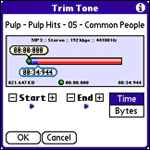 An alternate option is the nice bit of freeware called MiniTones. With Minitones you can take a full mp3 file stored on your device and select the exact time clip from a song you want to use and MiniTones will take care of the rest.
Another prehaps even simpler option is to create your rintone on your PC and transfer it to your Palm device via a Bluetooth file transfer. This option should accept the ringtone file and place it in the ringtone list as well.
Ringtone Managers
If you're looking for something more robust, the PalmInfocenter software store has a number of enhanced ringtone managers such as Ringo Pro, RingCare, Phone Technician and Call Block MP3 Ringtone Edition.
 Permalink
 Print
PrintArticle Comments
(20 comments)
The following comments are owned by whoever posted them. PalmInfocenter is not responsible for them in any way.
Please Login or register here to add your comments.


RE: Good stuff!


Simple option? You are kidding, right?
Place the MP3s file you want to import in the Audio folder of your SD card.
In the Blazer web browser, type: file:///audio/xxx.mp3 where xxx is the name of your mp3 file, note 3 forward slashes after the file.
Hit GO.
Then you will be prompted and select Copy To Ringtone.
Then Hit Save and Open.
Simple would be to stop the steps after "Place the MP3s on your device in folder X"
I know, I know, Palm is simple. I just need to learn the new definition of "simple" I guess.
RE: Simple option? You are kidding, right?
RE: Simple option? You are kidding, right?
Or drop it in \Windows or \Windows\Rings.
Someone can email you an MP3/WMA/WAV file and you can save it out to the My Documents folders from within email, or you can download from a website in Pocket IE by tapping on it. Or, you could record a ringtone with Voice Recorder and use the WAV file as the ringtone. I have a friend that recorded his 3 year old daughter saying "Daddy... DADDY!!! Get the phone!!!".
THen once you have the file somewhere on your device, just open the ringtone settings or custom ringtones for a particular contact and select the sound of your choice.
No third party tools necessary, and you sure didn't have to do any wholly unintuitive 5 step process to get there.
You know, just like it works in Windows. Or Mac. Or Linux.
RE: Simple option? You are kidding, right?
No third-party tools necessary here either. And is it really "intuitive" to be placing ringtones in the My Documents folder? Or the Windows folder? "Intuitive" would be ONE directory on the root that was clearly labelled "Ring Tones". What if you have 74 podcasts and a bunch of other sound files on your device and don't want to pick through each one every time you go to choose a ringtone?
Don't get me wrong, Palm's method is not the best. But neither is Microsoft's.
RE: Simple option? You are kidding, right?
It's actually pretty easy if you use bluetooth to transfer your ringtones over on Palm OS, as that automatically triggers the import into exchange manager, which is what the steps above force.
RE: Simple option? You are kidding, right?
I think it was for the original Smartphones, and *may* have been for Pocket PC Phone 2002, but from 2003 onward, My Documents has always worked.
RE: Simple option? You are kidding, right?
Music/podcasts are generally put on a storage card in \Music. The Ringtone selector ignores that folder. If you want to use a song as a rington, you need to copy the MP3/WMA file to My Documents (storage or device memory)
Not sure about other sounds. I've never carried around WAV files that I didn't use as device sounds (new email notifications, ringtones, etc.) I guess if you store dozens of WAV files on your device for some reason, you'd have to play with it and see if there are other locations RingTones doesn't use.
I suspect the percentage of the population that does that is so small that I am not even interested in testing this just to know it in case someone asks in the public newsgroups.
Somewhat easier way to install ringtones
adding songs to minitones
RE: adding songs to minitones
you need to move the mp3 file(s) onto an SD card. you can use this -
Item 758062
Model SDDR-121-A11M
SanDisk MobileMate Micro Reader
$9.99
Each
and
Item 694640
Model SDSDO-2048-A11M
SanDisk 2GB microSD™
Price:
$24.99
Each
palm centro ringtone program
Help with Ringtones...
With that aside, I saw on a site that I can download MP3's to my Micro SD card, currently plugged into computer.
I want to open Micro SD,
Search for Audio folder (now in my audio folder there are seperate folders for Tones, Notifications, and Music)
So what I did is dragged and dropped the MP3's I want into each of these folders.
So I assume, and we all know what that could mean, that when I put my Micro SD chip into my phone, all is well phone will recognize music, tones, notifications, no problem?
Is that correct?
Or will I have 3 versions of the same song on my phone? Do I need to delete all the subfolders and just have the songs under Audio?
Do I need to do anything special for phone to recognize that I have a ton of music on my card?
I could easily sync from Windows Media Player for Music aspect, but I want my MP3's as Ringtones.
Also, What do you reccommend as far as an email client on phone. I have the option of Windows Live (which I love the interface on the computer desktop) or Windows Mobile Outlook.
The difference for me will be the ability to sync my calendar, and from what I understand, if I use Windows Live on the mobile phone, that will not be synced, but if I use Mobile Outlook it will. Is this correct?
Thanks for the replies in advance,
please email me at jaclynjones@live.com
RE: Help with Ringtones...


Latest Comments
- I got one -Tuckermaclain
- RE: Don't we have this already? -Tuckermaclain
- RE: Palm brand will return in 2018, with devices built by TCL -richf
- RE: Palm brand will return in 2018, with devices built by TCL -dmitrygr
- Palm phone on HDblog -palmato
- Palm PVG100 -hgoldner
- RE: Like Deja Vu -PacManFoo
- Like Deja Vu -T_W


Good stuff!
By the way, has anyone else experienced occasional problems with corrupt SMSs since upgrading? I upgraded my Cingular-branded Treo680 to 2.11 and every so often I receive a txt message that reboots the phone if I try to open or delete it! The only solution I've found is to delete the Messages database, but I lose ALL my messages that way. I haven't found a way to just delete the corrupt one :(
It also seems to have trouble re-finding the network if I go out of range. I sometimes have to switch the phone off and back on again to get signal. Never happened before the upgrade.
Thanks
Roy