


CorePlayer Mobile for Palm OS Updated
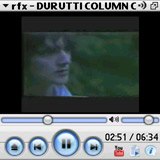 CoreCodec has released a new update to its massively popular CorePlayer Mobile multimedia software for Palm OS. CorePlayer v1.2.3 brings a large number of new features and all around improvements. The main new features include YouTube video support and a native YouTube browser, the addition of a number of new streaming audio and video formats, Google GData support, multi-language support, optimized AVC playback and AVCHD support.
CorePlayer Mobile for Palm OS v1.2.3 is available now for $29.95. It is currently reduced to $24.95 for a limited time. You can read our review of an earlier version here. It is also available for Windows Mobile Professional and Smartphone.
In addition to the usual bugfixes and tweaks, there has been a series of improvements to the Bluetooth stereo functionality, rss and podcast features and other UI and skin updates. You can find a full list of updates and changes here.
Customers who previously purchased from PalmInfocenter can log into their store account here and download the update from the My Purchases list.
 Permalink
 Print
PrintArticle Comments
(21 comments)
The following comments are owned by whoever posted them. PalmInfocenter is not responsible for them in any way.
Please Login or register here to add your comments.


RE: Youtube Support

The new version has a YouTube button, that opens up a YouTube browser within CorePlayer, which lets you browse and launch videos.
I've updated the screenshot above to show a video being streamed via youtube taken on a Centro.
RE: Youtube Support
PDA's Past and Present:
Palm TX (Number 2)
Palm - IIIxe, Vx, M500, M505, Tungsten T, TX
Handspring - Edge, Platinum, Deluxe
Sony - SJ22, UX50
Casio-EM500
Apple - MP110, MP2000, MP2100
RE: Youtube Support
PDA's Past and Present:
Palm TX (Number 2)
Palm - IIIxe, Vx, M500, M505, Tungsten T, TX
Handspring - Edge, Platinum, Deluxe
Sony - SJ22, UX50
Casio-EM500
Apple - MP110, MP2000, MP2100
RE: Youtube Support
RE: Youtube Support
RE: Youtube Support
PDA's Past and Present:
Palm TX (Number 2)
Palm - IIIxe, Vx, M500, M505, Tungsten T, TX
Handspring - Edge, Platinum, Deluxe
Sony - SJ22, UX50
Casio-EM500
Apple - MP110, MP2000, MP2100
RE: Youtube Support
RE: Youtube Support
PDA's Past and Present:
Palm TX (Number 2)
Palm - IIIxe, Vx, M500, M505, Tungsten T, TX
Handspring - Edge, Platinum, Deluxe
Sony - SJ22, UX50
Casio-EM500
Apple - MP110, MP2000, MP2100

RE: FLV files
It did NOT when I tried it on a 755P moments ago.
It refused to show an FLV file in the list of files to pick from.
Forcing an association did not seem to work either.
Very disappointing.
How can they justify providing streaming YouTube's FLV files, but NOT allow viewing local FLV files?
RE: FLV files
http://mikecane2008.wordpress.com/2008/04/13/reference-grab-youtube-video-as-mp4/
RE: FLV files
CorePlayer is the first media player to feature Configurable YouTube quality control.... You control the bandwidth and quality that your platform can handle. From Low, Medium, to High quality (H.264) streams.
Some things you can do with YouTube in CorePlayer:
- Disable YouTube 'Tools > Preferences > Select Page > Network' and uncheck 'Enable YouTube Support' Restart and its gone
- Set stream/quality 'Tools > Preferences > Select Page > Network > YouTube Format'
* Low (RTSP) default video resolution / audio
** Medium (RTSP) 448x336 44100hz
*** High (H.264) 480x360 44100hz
- Change the default YouTube Profile to be shown 'Tools > Preferences > Select Page > Network > YouTube User' change to the user you wish
- Use http://m.youtube.com on Pocket IE (mobile) or IE (desktop) and click "play' to play a video in CorePlayer.
- See previously played YT videos in the CoreTheque Media Library under 'Top 50', '100 Last Played' or 'Not Rated'
- Open YouTube Videos the 'EASY' way. 'File > Open URL' youtube://123456 (replace 123456 with the video ID, for example http://www.youtube.com/watch?v=123456 )
Now, do we support FLV? In our public version no, but we do internally fo testing purposes and our OEM customers but we have no plans to release it to the public because the Adobe's license prohibts this.
RE: FLV files
I would like to thank you very much for posting.
It is almost always nice to hear from vendors. It shows their active interest in their customers and their customers concerns.
And, yes, I am a customer. My initial interest in CorePlayer was based on their roots in the highly functional freeware player, and in their strong public image during the active development of that player.
As for Adobe:
I have to say, it boggles the mind that Adobe wants to BLOCK use/development of players for their codecs.
With competing technologies being promoted heavily, it seems utterly ridiculous that Adobe would want to throw roadblocks in the way of continuing to spreading Flash video players as far and wide as possible.
They have done a pretty good job so far in leading this market area, but there are corporate players with Very Deep pockets that are actively hunting this very landscape.
Sitting on one's laurels is never wise for long in a tech business.
I would love to hear Adobe's rationalization of this policy. Unfortunately, I would be astonished to hear a response from them.
On The Other Hand:
A competitor of yours (the one the begins with a "K") claims support of FLV. Their website has a FAQ page devoted to describing their support for the most common of FLV encoding formats.
To sum it up:
Your products support Flash video streams.
You have the code working within your development group to support FLV file playback.
But you claim you can't release it because Adobe supposedly doesn't want you to.
Adobe is seeing more pressure from very large organizations releasing updates to their completing technologies.
And one of your major competitors does support FLV playback, be it streamed or from a file.
This collection of points seems somehow very ... wrong.
The only thing I can think of that I did not mention is the inability/reluctance of Palm Inc to secure support for Adobe Flash across the board in their products. But that is likely to lead us to one or more well worn paths...
RE: FLV files
Just saw this today:
"Adobe lifts Flash and AIR development restrictions"
http://www.regdeveloper.co.uk/2008/05/01/adobe_open_access_protocols/
Wonder how long it will take to translate into a NEW update to CorePlayer Mobile for Palm, one having local FLV/F4V file playback???
streaming
I'm not having much luck! Is there a failsafe:
a) streaming method (rtp/http/udp or whatever)
b) packaging thingy (e.g mp4 / ogg etc)
c) codec combination ( video/audio)
I've tried all sorts of combinations, but no luck yet.
The list of new features is very impressive, and in general, it seems like a really useful bit of software however the complete lack of any decent manual or guide is less impressive!
Can anyone help out?
Cheers
Chris
ANOTHER CorePlayer Mobile for Palm OS Update!
A major update is...
The ability to play local FLV files.
It may even play F4V files, but I have none at the moment to experiment with.
CoreCodec also announced planned future support for SWF flash files, but not using Adobe's player.
CoreCodec's announcement of a planned update was issued just hours after my previous post here.
After a few days to iron out some last minute QC issues, they have released it.
And it is working fairly well so far on several FLV files I had already on my 755p's 4GB card.
One that I did not get to work correctly at first was the audio portion for Tay Zonday's "Internet Dream" (I know, I know - some folks think that might be a really good thing.) The sound was a buzzing.
But I did get it to play fine after I hit the rewind button after a few seconds of play.
This same file plays fine in Kinoma's current player.
RE: ANOTHER CorePlayer Mobile for Palm OS Update!
http://www.palminfocenter.com/news/7675/coreplayer-mobile-now-supports-flv-files/


Latest Comments
- I got one -Tuckermaclain
- RE: Don't we have this already? -Tuckermaclain
- RE: Palm brand will return in 2018, with devices built by TCL -richf
- RE: Palm brand will return in 2018, with devices built by TCL -dmitrygr
- Palm phone on HDblog -palmato
- Palm PVG100 -hgoldner
- RE: Like Deja Vu -PacManFoo
- Like Deja Vu -T_W


Youtube Support
----
- Does not support WMV (we plan to add support at a later date)
- Does not support midi playback (threading limitation of the OS)
- Does not support UPNP (threading limitation of the OS)
- Does not support backround playback
- Does not support YouTube Module (threading limitation of the OS ... related to RTP/RTSP)
- Does not support RTP/RTSP (threading limitation of the OS)
« Last Edit: March 20, 2008, 05:26:21 PM by BetaBoy »